
Google introduced the nofollow attribute in 2005 to fight comment spam. Over the years it became the standard way to mark adverts and sponsored links too. One attribute was doing many different jobs.
On 10 September 2019, Google changed that. In a post on its Search Central blog titled “Evolving nofollow”, it announced two new values, sponsored and ugc, and changed how all three are treated. For anyone who buys advertising, runs affiliate links, publishes guest posts or allows comments, this is the rulebook.
The three values and when to use each
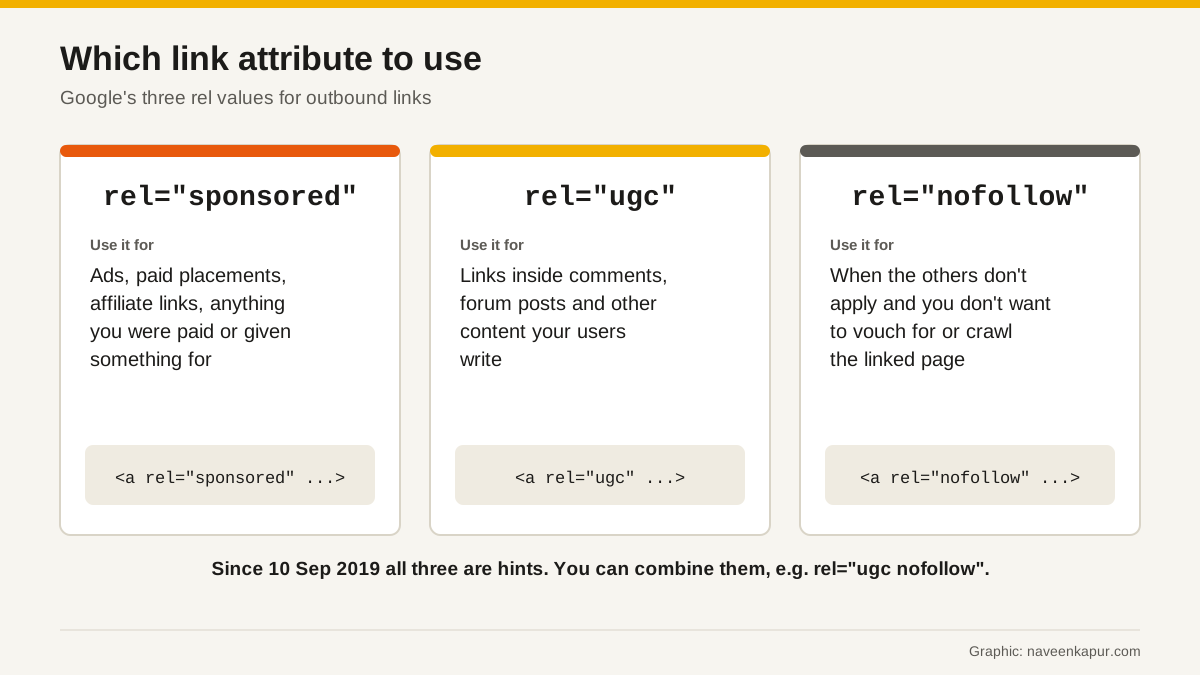
| Value | Use it for | Example |
|---|---|---|
| sponsored | Links created as part of adverts, sponsorships or other payment arrangements, including affiliate links | A paid review on your blog that links to the brand |
| ugc | Links inside user-generated content, such as comments and forum posts | A link a reader leaves in your comments |
| nofollow | When the other values don't apply and you don't want to imply endorsement or have Google crawl the page from your site | A link to a site you mention but do not vouch for |
Normal editorial links, where you link to a page because it is useful, need no rel attribute at all. Google's documentation says so directly.
The big change: from rule to hint
Before September 2019, Google did not count a nofollow link as a signal in its ranking algorithms. After the change, all three values are treated as hints about which links to consider or exclude. Google explained why: links contain useful information, such as how the words in a link describe the page it points to, and looking at all links helps it spot unnatural link patterns.
There were two dates:
- 10 September 2019: sponsored, ugc and nofollow work as hints for ranking purposes.
- 1 March 2020: nofollow also becomes a hint for crawling and indexing.
Answers to the common questions
Do I need to change my existing nofollow links?
No. Google said there is no need to change any nofollow links you already have. For new ad or sponsored links, it recommends switching to sponsored when convenient.
Can a link have more than one value?
Yes. You can write rel="ugc sponsored" or rel="nofollow ugc". Google lists both space-separated and comma-separated forms as valid. Adding nofollow alongside a new value helps with other services that do not support the new values.
What if I use the wrong value?
Google said there is no wrong attribute except for sponsored links. If you mark a normal or UGC link as sponsored, the worst outcome is that Google may not count it as credit for the other page. The problem is the other direction: a paid or advertising link must be marked sponsored or nofollow. Google prefers sponsored but treats both the same for this purpose.

Affiliate links, guest posts and paid reviews
In July 2021, alongside its link spam update, Google repeated the rules for money-related links:
- Affiliate links: using them to earn money is fine, but Google asks sites to mark them rel="sponsored", whether they are added by hand or by a plugin.
- Sponsored and guest posts: Google recommends the right rel values on links in these posts. Where it finds excessive sponsored or guest posting without proper link tags, it may apply algorithmic or manual actions.
This is the practical point for Indian bloggers and businesses. Many “guest post” offers are paid link deals in disguise. If money, free products or services change hands for a link, the link should carry sponsored. Google's spam policies list buying or selling links that pass ranking credit as link spam. You can read the history of these tactics in our older article on black hat SEO techniques.
A simple policy for your website
- 1Editorial links to useful pages: no rel attribute.
- 2Any link you are paid for, given something for, or earn commission from: rel="sponsored".
- 3Links in comments, reviews by users, forums or community pages: rel="ugc". Most CMS platforms can add this automatically.
- 4Links you need to include but do not want to vouch for: rel="nofollow".
- 5Pages you want out of Google: noindex, not nofollow.
How to check the links on your own site
- 1List every page with sponsored content, paid reviews, affiliate links or partner listings. These are the pages that need rel="sponsored".
- 2Open a few of those pages and view the link code, or use a crawler that reports rel values, to confirm the attribute is really there.
- 3Check your affiliate plugin or link manager settings. Many can add rel="sponsored" to every affiliate link automatically.
- 4Check comments and forum areas. Links there should carry rel="ugc" (and often nofollow too).
- 5Look for pages you meant to hide from Google but only protected with nofollow links. Add noindex to those pages instead.
Do this once, write the rules down for anyone who publishes on your site, and check again whenever you start a new partnership or affiliate programme. If an agency or freelancer publishes posts for you, include these rules in their brief, so paid links are marked correctly from the day they go live rather than fixed months later.
Google also suggests that sites may remove the ugc value from links by trusted members who have consistently made good contributions over time. That rewards real community members without opening the door to spam.