
Your page title is often the first thing a searcher reads, and the main reason they click. In mid-August 2021, site owners across the world noticed that Google was showing titles they had never written. Some were better. Some were odd. Many SEOs called it the “title rewrite update”.
On 24 August 2021, Google's Search Liaison Danny Sullivan explained it in a post called “An update to how we generate web page titles”. Google had introduced a new system the week before. Today Google's documentation calls these titles title links.
What changed in August 2021
- 1Titles stopped changing with the query. Before, the title shown might change depending on what was searched. Google said this generally would no longer happen. One title per page, chosen to describe the page overall.
- 2More use of visible text. Google said it now made more use of text people can see when they arrive on the page: the main visual headline, text in H1 or other header tags, and text that is large and prominent through styling.
- 3Other text could count. Other page text and the text in links pointing at the page might also be considered.
Google had gone beyond the HTML title tag for more than a decade, and significantly since 2012. The 2021 system simply did more of it.
How often Google uses your title tag
Google's numbers are reassuring. In August 2021 it said content from HTML title tags was still by far the most likely to be used, more than 80% of the time. On 17 September 2021, after feedback, it said it had refined the system and title elements were now used around 87% of the time.
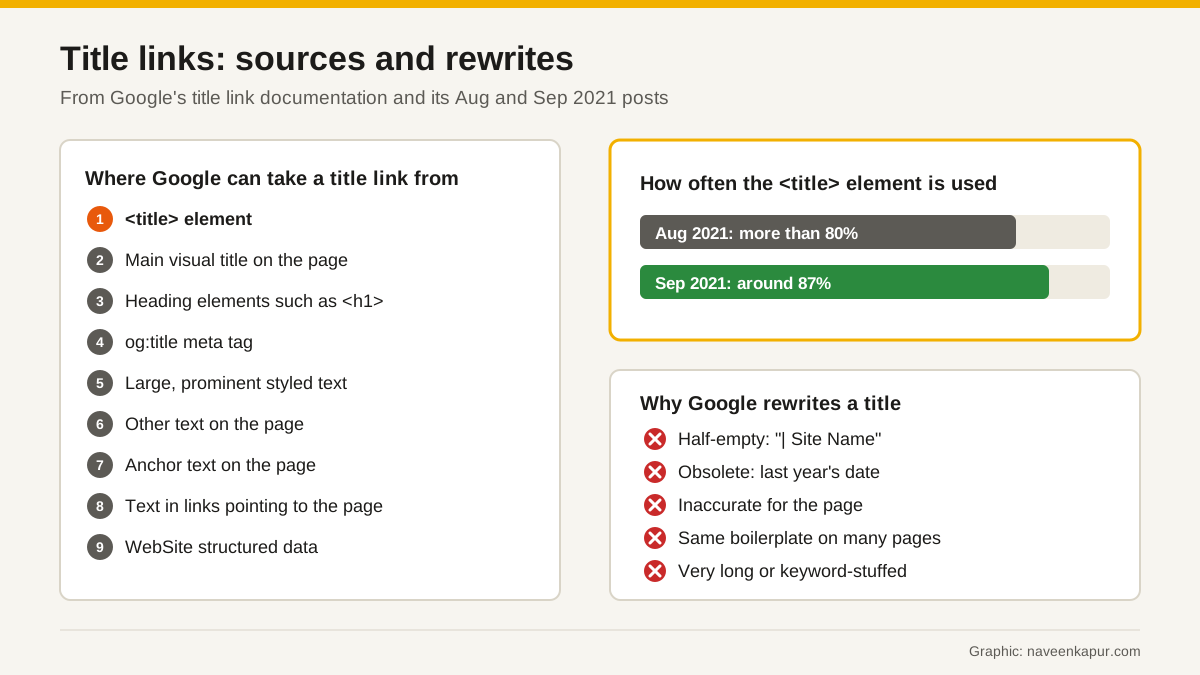
Why Google rewrites a title
Google's two posts and its documentation list the problems its system looks for. Real examples, in Google's own words where possible:
| Problem | Example | What Google may show |
|---|---|---|
| Half-empty title | “| Site Name” | Text from the page headline, e.g. “Product Name | Site Name” |
| Obsolete title | “2020 admissions criteria” on a page showing 2021 | The year from the visible headline |
| Inaccurate title | A fixed title naming products a dynamic page may not show | A broader, accurate title such as “Stuffed animals” |
| Boilerplate | The same title on many pages of a site | Distinct text from each page |
| Very long or stuffed | “Foobar, foo bar, foobars, foo bars” | The most relevant part of the title |
| Missing title | No title element, or “Untitled”, or just “Home” | Text from headings or other prominent text |
Note the university example. For an Indian college or coaching institute that reuses an admissions page every year, an out-of-date year in the title tag is exactly the kind of error Google corrects, and exactly the kind you should fix yourself.
Where Google can take a title link from
Google's documentation lists the sources it may use to create title links: the <title> element, the main visual title on the page, heading elements such as H1, the og:title meta tag, other large and prominent text, other text on the page, anchor text on the page, text within links that point to the page, and WebSite structured data.

How to write titles Google keeps
- 1Give every page its own title element. Google's first best practice.
- 2Be descriptive and concise. Avoid vague titles like “Home” or “Profile”. Google says there is no limit on title length, but long titles are truncated to fit the screen.
- 3Do not keyword-stuff. Repeating the same words makes results look spammy to Google and to users.
- 4Avoid boilerplate. Each page's title should describe that page's content.
- 5Brand concisely. Put the site name at the start or end, separated by a hyphen, colon or pipe, rather than a long brand line on every page.
- 6Make the main headline obvious, and match it. Google looks at the main visual title, so make it the most prominent text, for example in the first visible H1, and keep it consistent with the title tag.
- 7Use the page's language and script. Google says a Hindi page should have its title in Hindi, not in English or transliterated into Latin letters.
- 8Keep dates current on pages reused every year.
Title patterns that work
| Page type | Pattern | Example |
|---|---|---|
| Service page | Service + city or audience | Brand | CRM Setup for Real Estate Teams | Brand |
| Product page | Product name + key detail | Brand | Steel Water Bottle 1 Litre, Insulated | Brand |
| Blog guide | The question or topic, plainly | How to Read a GA4 Traffic Report |
| Yearly page | Year + topic | Brand (update every year) | 2027 Admissions Criteria | College Name |
| Home page | Brand: what you do, for whom | Brand: Accounting Software for Small Shops |
How to check your own titles
- Search for your important pages and compare the title link Google shows with your title tag.
- Look for duplicate or missing titles across the site. A proper SEO audit should list them.
- Check templates on large sites for half-empty titles, a common cause Google mentions.
- Compare clicks in Search Console before and after you fix titles, page by page.
Clear titles and headings help people choose the right page in every kind of result, from classic blue links to the source links in AI Overviews. For the bigger picture on Google changes, see our guide to Google core updates.