
Google Ads is one of the fastest ways to get enquiries. Switch on a campaign in the morning and the phone can ring by lunch. It is also one of the fastest ways to waste money: on the wrong searches, the wrong locations, or clicks that never become leads.
Whether you call them a Google Ads expert, consultant or specialist, the person you hire controls how your budget is spent. This guide covers eight checks to make before and during the first month, using Google's own help pages as the reference point.
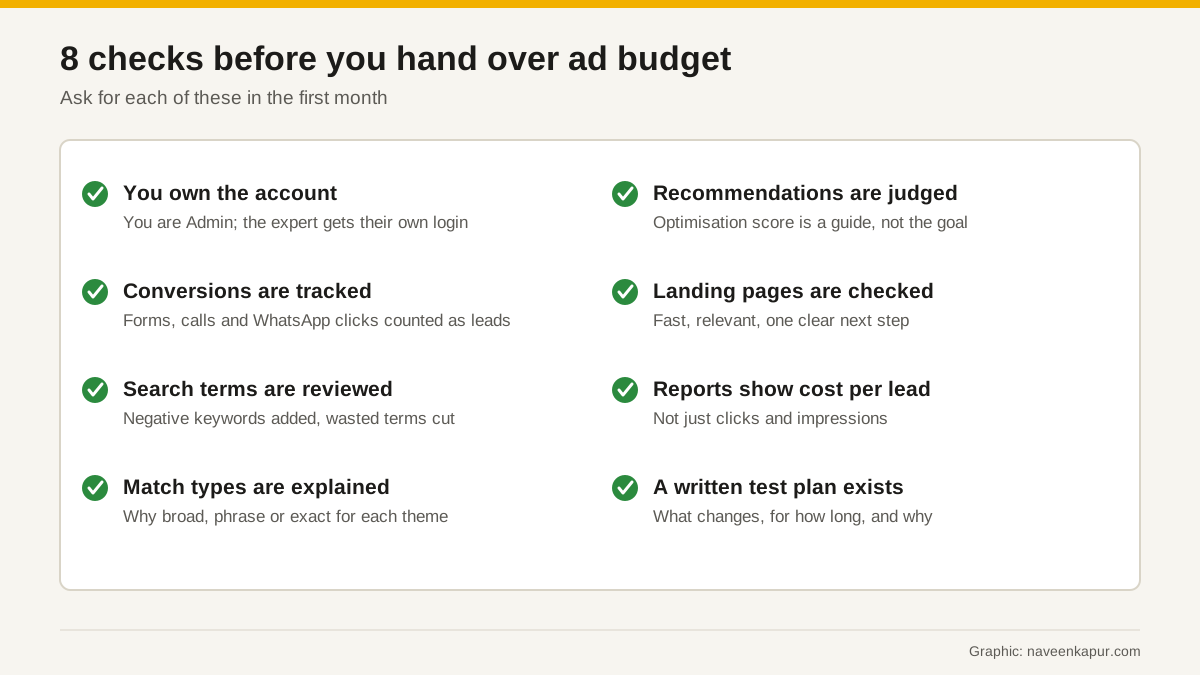
1. You own the account
The Google Ads account should be created with your business's Google Account, and billing should be in your business's name. The expert then gets their own login. Google Ads has several access levels (Email-only, Billing, Read-only, Standard and Admin), so you can give exactly the access the work needs.
Google itself suggests having more than one administrator, because if an account has only one admin and that person becomes unavailable, you may lose access to things like your tags. Keep yourself as an Admin. If you part ways later, you remove their access and keep all the history.
2. Conversions are tracked and tested
Google Ads can only optimise for what it can measure. Google's help page on conversion measurement says you choose what you identify as valuable, like a purchase, sign-up or phone call, and Google Ads then helps you get the most out of your campaigns. For most Indian service businesses, the conversions that matter are form submissions, phone calls and WhatsApp clicks.
- Ask which actions will count as conversions, and agree that only real leads count (not page views or button hovers).
- Ask how calls and WhatsApp clicks will be tracked.
- Ask whether they will use enhanced conversions or import conversions from GA4. Both are documented by Google.
- Test it: submit a form yourself and check that a conversion appears.
If your site gets visitors from Europe, consent signals also matter for measurement. See our guide to consent mode v2.
3. Search terms are reviewed
Keywords are what you bid on. Search terms are what people actually typed. Google's search terms report shows how your ads performed when triggered by real searches. It is where wasted money shows up: “free”, “jobs”, “course”, a competitor's name, or a city you do not serve.
Ask your expert to show you this report and the negative keywords they added because of it. Negative keywords stop ads showing for searches you do not want.
4. Match types are explained
Google offers broad, phrase and exact match. Google's help page notes that broad match is the default, can show ads on searches related to your keyword that may not contain its direct meaning, and can use signals such as the landing page and other keywords to understand intent. Broad match can work well with good conversion data and Smart Bidding, and can waste money without them. A good expert explains which match type they use for which theme, and why.
5. Recommendations are judged, not blindly applied
Google Ads shows an optimisation score from 0 to 100% with recommendations. Google calls it an estimate of how well an account is set to perform, and says you can apply or dismiss recommendations based on your own assessment and goals. A careful expert applies the ones that fit your business and dismisses the rest, and can tell you why.
Quality Score (1 to 10, at keyword level) is similar. Google says it is a diagnostic tool, not a key performance indicator, and not an input in the ad auction. It is built from expected click-through rate, ad relevance and landing page experience. Use it to find problems, not as the goal.

6. Landing pages are checked
The ad is half the job. If the page is slow on a phone, does not match the ad, or makes it hard to call or enquire, money is wasted after the click. Landing page experience is one of the three parts of Quality Score. A good expert reviews the landing pages before spending, or tells you clearly what needs fixing. Page speed basics are in our Core Web Vitals guide.
7. Reports show cost per lead
Impressions and clicks are easy to grow and say little about business results. A useful monthly report shows conversions, cost per conversion, which campaigns and searches produced them, what was changed, and what is planned next. Better still, match ad leads with your CRM or sales sheet to see which ones became customers.
8. A written test plan exists
Good Google Ads work is a series of tests: a new ad message, a new landing page, a new bid strategy, a new audience. Each needs a clear change, a time period and a way to judge it. Ask for this in writing, even if it is one page. It turns “we are optimising” into something you can check.
What the Google Partner badge means
Many experts and agencies show a Google Partner badge. Google's help page explains the requirements for a company to become a Partner: an optimisation score of at least 70% in the registered manager account, a 90-day ad spend of $10,000 USD across managed accounts, and at least 50% of account strategists certified in Google Ads, with at least one certification in each product area that has $500 USD or more of campaign spend in 90 days. Premier Partners must also be in the top 3% of participating companies in their country, assessed annually.
Questions to ask in the first meeting
- 1Will the account be in my name, with me as Admin?
- 2Which actions will count as conversions, and how will you test the tracking?
- 3How often will you review search terms and add negative keywords?
- 4Which campaign types do you recommend for my business, and which would you avoid?
- 5How will you decide which Google recommendations to apply?
- 6What will the monthly report show? Can I see a sample with client names removed?
- 7What is your fee model, and is it separate from the ad budget paid to Google?
- 8If we stop working together, what will I keep?
If your account runs automated campaigns, also read our guide to Performance Max. And if you need broader help across SEO, ads and tracking, see what a digital marketing consultant does.