
Many Indian businesses think European privacy rules do not concern them. Then they notice that remarketing lists stopped growing, or that conversions from European visitors vanished from Google Ads. Very often the reason is consent mode v2.
This guide explains in plain words what consent mode is, what changed with version 2, the difference between basic and advanced mode, and a checklist to set it up. It is not legal advice; check your own legal obligations with a qualified adviser.
First, what consent mode is
Consent mode is a way for your website to tell Google's tags what a visitor agreed to on your cookie banner. The tags then change their behaviour. If a visitor accepts, tags work normally. If a visitor refuses, tags stop reading or writing cookies for that purpose.
Google's help pages are clear on one point: consent mode does not provide a consent banner. It works with the banner you already have. You need both: a banner that asks the visitor, and consent mode that passes the answer to Google.
What changed in version 2
The original consent mode had two main signals: ad_storage (advertising cookies) and analytics_storage (analytics cookies). As part of stronger enforcement of its EU user consent policy, Google added two more:
| Signal | What it controls |
|---|---|
| ad_storage | Storage such as cookies related to advertising |
| analytics_storage | Storage such as cookies related to analytics, for example visit duration |
| ad_user_data (new) | Consent for sending user data related to advertising to Google. Required for measurement such as enhanced conversions and tag-based conversion tracking |
| ad_personalization (new) | Consent for personalised advertising, such as remarketing |
Google's help page puts the rule simply: to keep using tags for measurement, ad personalisation and remarketing, you must collect consent from end users in the EEA and share consent signals with Google. The rules also apply if you use Google Analytics data in Google Ads.
On 5 March 2024, in its post on complying with the EU's Digital Markets Act, Google said it was making multiple upgrades to its advertising products and tools to help advertisers communicate consent, in line with its long-standing EU user consent policy. That is why March 2024 is the date most advertisers remember.
What happens when a visitor says no
- ad_personalization denied: remarketing in Google Ads and personalised advertising are switched off for that visitor.
- ad_user_data denied: using personal data for online advertising is disabled, including user-provided data such as hashed emails for enhanced conversions.
- ad_storage denied: no new advertising cookies are written and existing first-party advertising cookies are not read.
- analytics_storage denied: no analytics cookies are read or written; Google tags send cookieless pings that GA4 can use for modelling.
Basic vs advanced consent mode
You can set up consent mode in two ways. This choice makes a real difference to how much data you keep.
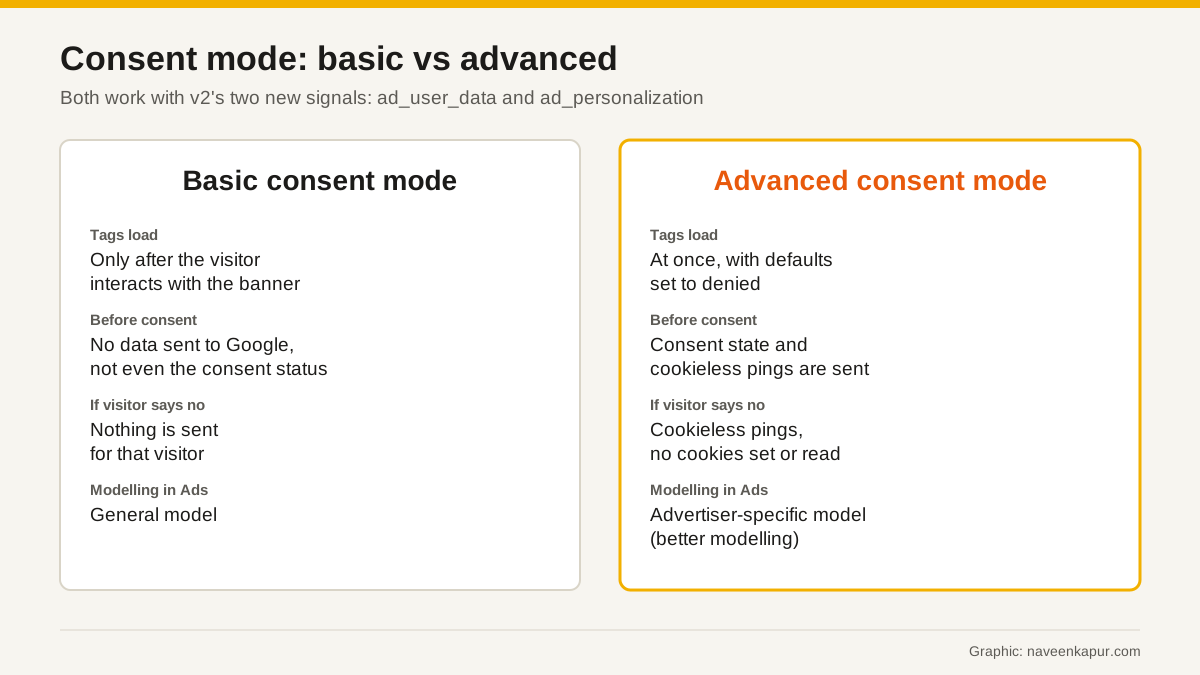
In basic mode, Google tags are blocked until the visitor interacts with the banner. If they refuse, nothing at all is sent to Google, not even the consent status. Conversion modelling in Google Ads then uses a general model.
In advanced mode, tags load when the page opens, with consent set to denied by default. While consent is denied, tags send cookieless pings without cookies. Google says this allows improved modelling, using an advertiser-specific model instead of a general one.
Who in India needs this
Consent mode v2 is about visitors from the EEA, so ask one question first: do people from Europe visit your site and do you advertise to them? Common Indian cases include study-abroad consultants, travel and hospitality businesses, exporters, software and IT services firms, and online stores that ship abroad. If your audience is only in India, the EEA rules may not touch your traffic, but setting up consent properly is still good practice as privacy rules tighten everywhere.

Setup checklist
- 1Use a modern tag. Google says legacy tag types should be upgraded to gtag.js or Google Tag Manager.
- 2Add a consent banner. Google recommends a banner from a Google-certified consent management platform (CMP). If you use one, switch on consent mode in its settings. Certified CMPs update to the newest version of consent mode.
- 3Set default consent before any tag fires. With your own banner, set all four signals to denied by default for regions where consent is needed, before any config or event command runs.
- 4Update consent when the visitor chooses. Send a consent update with the visitor's choices for each of the four signals.
- 5Pick basic or advanced and set it up the way you chose. Do not block tags by hand and also run advanced mode.
- 6Check the status in Google Ads. Google says your consent mode status appears in the conversion diagnostics tab once it is set up.
- 7Test with Tag Assistant. Load the site as a new visitor, refuse, then accept, and confirm the signals change.
Common mistakes
- Installing a banner but never connecting it to consent mode, so Google sees no consent signals.
- Only sending ad_storage and analytics_storage, and missing the two v2 signals.
- Firing the GA4 or Google Ads tag before the default consent command.
- Blocking all tags until consent and then wondering why there is no modelled data. Google notes that blocking tags means you will not get modelled data in GA4.
Consent mode sits inside a wider measurement setup. If you are moving to or fixing GA4, read our guide to Google Analytics 4. If you run Google Ads, remember that automated bidding in campaigns like Performance Max learns from conversion data, and Google's reference notes that some conversion data used for bidding is limited when ad_user_data is denied.