Before Performance Max, a business that wanted to advertise everywhere on Google ran separate campaigns: one for Search, one for Display, one for YouTube, one for Shopping. Each needed its own budget, targeting and reports.
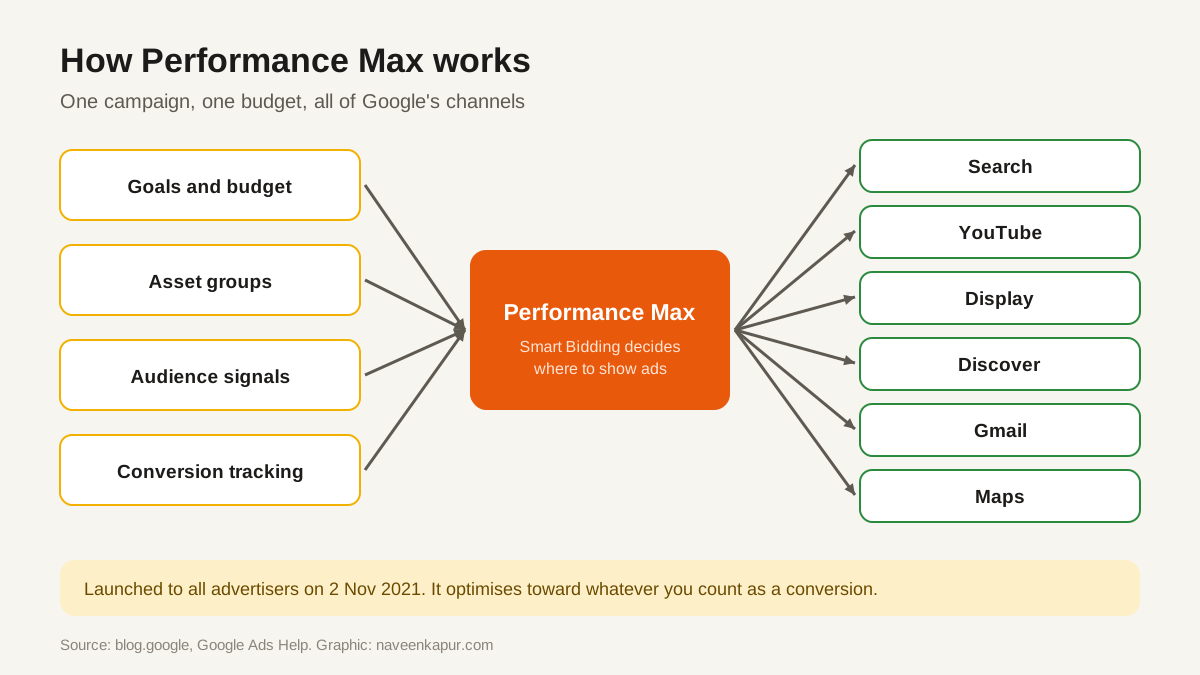
On 2 November 2021 Google announced that Performance Max campaigns would roll out to all advertisers around the world. The idea was simple: one campaign, one budget, all of Google's channels, with machine learning deciding where each rupee goes.
What Performance Max does
You tell Google what you want (sales, leads, store visits), how much you will spend, and give it creative material. Performance Max then uses Smart Bidding to show ads across Google's inventory wherever it predicts the best result for your goal.
- Asset groups
- Collections of creative assets: headlines, descriptions, images, logos and videos. Google mixes them to build ads for each channel.
- Audience signals
- Hints about who your customers are, such as your customer lists or people who searched certain terms. They guide the system at the start; they are not strict targeting.
- Final URL expansion
- Lets Google send people to other pages on your site if it predicts they fit better. You can turn it off or exclude pages.
- Brand exclusions
- Stop your ads appearing on searches for brand names you choose, such as your own brand if you already rank for it.
Timeline
| Date | What happened |
|---|---|
| 2 Nov 2021 | Performance Max launches to all advertisers worldwide |
| 27 Jan 2022 | Google publishes the upgrade plan for Smart Shopping and Local campaigns |
| Apr 2022 | Self-serve upgrade tool for Smart Shopping campaigns |
| Jun 2022 | Self-serve upgrade tool for Local campaigns |
| Jul to Sep 2022 | Automatic upgrades; complete by end of September 2022 |
| 23 Jan 2025 | Campaign-level negative keywords rolling out to all advertisers |
| 30 Apr 2025 | Channel performance reporting and a full search terms report announced |
Where it works well, and where it struggles
| Works well when | Struggles when |
|---|---|
| Conversion tracking is accurate and counts real leads or sales | Tracking counts page views or low-value clicks as conversions |
| There is enough conversion data each month for learning | Very few conversions, so the system has little to learn from |
| You have good images and videos for every channel | You only have text, so Google builds weak visual ads |
| You want reach across channels with one budget | You need tight control over exact keywords and placements |

Keeping control: reports and exclusions
The early complaint about Performance Max was that it was a black box. Google has added controls over time:
- Negative keywords at campaign level: in beta from late 2024, then rolling out to all advertisers from 23 January 2025.
- Search terms insights and search terms report: see what people searched before clicking. A fuller search terms report was announced on 30 April 2025.
- Channel performance report: see results by Search, YouTube, Display and other channels, announced in April 2025.
- Brand exclusions and URL exclusions: keep ads away from brand searches or pages you do not want used.
- Placement exclusions and content suitability settings: keep ads away from websites, apps or content you do not want them next to.
A setup checklist
- 1Set up conversion tracking for real business actions, linked with Google Analytics 4 key events where useful.
- 2Choose one clear goal per campaign: leads, sales or store visits.
- 3Build separate asset groups for separate products or services, each with its own landing page.
- 4Upload real images and at least one video. If you do not, Google may auto-create them.
- 5Add audience signals from your own customer lists and website visitors.
- 6Add brand exclusions, negative keywords and URL exclusions on day one.
- 7Give it a few weeks before judging, then review search terms and channel results.
Performance Max sends many people to your landing page, so the page itself matters. A slow page wastes paid clicks; see Core Web Vitals and mobile-first indexing.