When someone searches “dentist near me” or “bakery in Lajpat Nagar”, the first thing they usually see is a map with three businesses. Those listings come from Google Business Profile, the free tool that lets a business control how it appears on Google Search and Maps.
Until late 2021 it was called Google My Business. On 4 November 2021 Google announced the new name, and with it a new way of working: manage your profile directly on Google Search or Maps, not in a separate dashboard or app. This guide explains the change and, more usefully, how local ranking actually works.
What changed in November 2021
In its announcement, Google said Google My Business would be renamed Google Business Profile, that the standalone Google My Business app would be retired in 2022, and that it recommended small businesses manage their profiles directly on Search or Maps.
| Before (Google My Business) | After (Google Business Profile) |
|---|---|
| Separate dashboard and mobile app | Edit the profile from Google Search or Google Maps |
| Name: Google My Business | Name: Google Business Profile |
| Business Profile Manager for many locations | Still available for businesses with many locations |
Later changes kept the profile simpler. Google ended the chat and call history features on 31 July 2024, so customers now contact a business through its phone number, website or other listed options.
How Google ranks local businesses
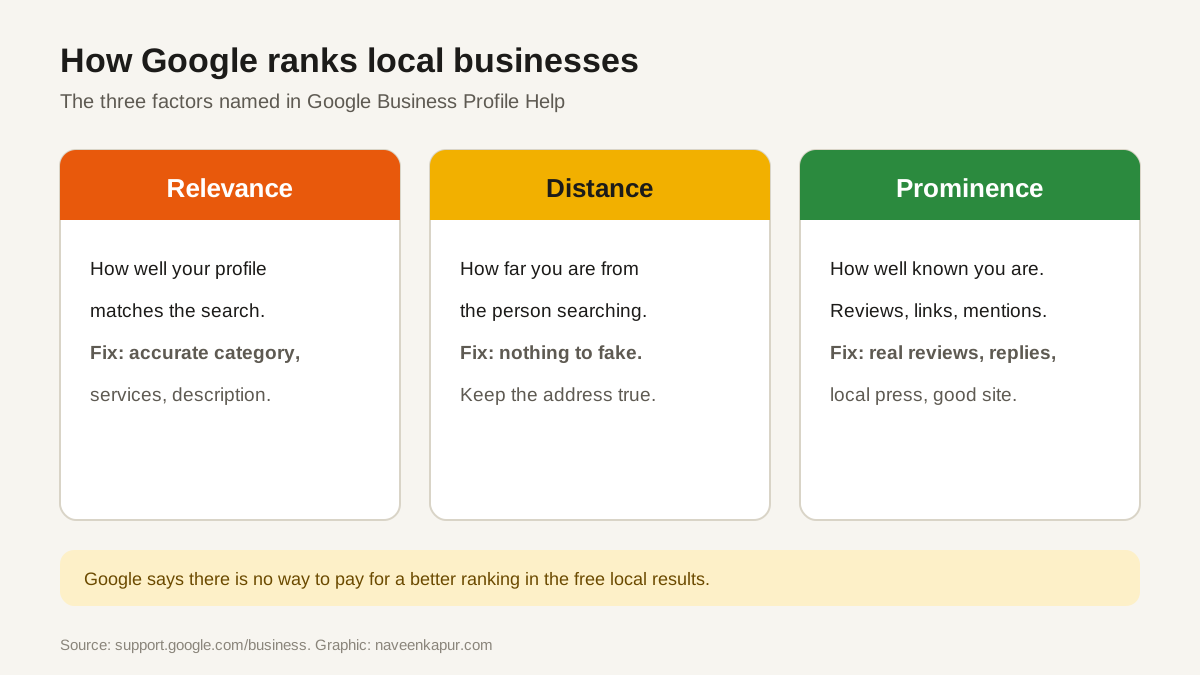
Google's help page “Tips to improve your local ranking on Google” names three factors:
- Relevance
- How well a Business Profile matches what someone is searching for. Complete, accurate categories and services help Google understand your business.
- Distance
- How far the business is from the person searching, or from the location named in the search. You cannot change this, so do not fake an address.
- Prominence
- How well known the business is. Google looks at reviews, links, articles and other information it finds about the business online.
Google also says there is no way to pay for a better local ranking in the free listings. Ads can appear in Maps, but they are labelled as ads and are separate from the organic map results.
Who is allowed a profile
Google's guidelines for representing your business are strict, and breaking them is the most common reason profiles get suspended:
- The business must make in-person contact with customers during its stated hours, either at a physical location they can visit or by travelling to them.
- A location must be staffed and able to receive customers during its stated hours.
- Service-area businesses (plumbers, home tutors, cleaners) should hide their address and list the areas they serve.
- The business name must be the real name used on signboards and documents, without added keywords or city names.
- P.O. boxes, remote mailboxes and virtual offices (a rented address you do not actually work from) are not eligible. A co-working office counts only with clear signage, staff and customers received there during stated hours.
Verification
Before a profile goes live, Google asks the owner to verify it. The methods include video (a live call or a recorded video), phone or text, email and postcard. Google decides which methods are offered for each business, so you may not see all of them. A video usually needs to show the signboard, the location and proof that you manage the business.
A setup checklist that follows Google's rules
- 1Name, address, phone: exactly as on your signboard and documents, and the same on your website.
- 2Primary category: the single most accurate one. Add a few secondary categories only if they are true.
- 3Hours: regular hours plus special hours for festivals and holidays.
- 4Services or products: list them with short, plain descriptions.
- 5Photos: real photos of the front, inside, team and work. Not stock images.
- 6Website link: to the most relevant page, which should load fast on a phone (Core Web Vitals).
- 7Reviews: ask every happy customer, reply to every review, never buy or filter them.
- 8Updates: post offers, events and news from the profile so it stays fresh.
Mistakes that cost businesses calls
- Different phone numbers or addresses on the profile, website and directories.
- Wrong or too many categories.
- Ignoring negative reviews instead of replying calmly and fixing the cause.
- Paying for fake reviews. Google's policies prohibit fake engagement, and it removes such reviews.
- Creating a second profile for the same location to “rank twice”.
Local search is part of the same system as the rest of Google. Your website still needs to be crawlable and useful on phones, and the content still needs to answer what customers ask. See mobile-first indexing and our guide to Google core updates.