
Many growing businesses in India reach the same point. Enquiries come from the website, Google Ads, Meta lead forms, phone calls, walk-ins and exhibitions. Each sits somewhere different: an inbox, a spreadsheet, a salesperson's phone. Someone buys a CRM to fix it. Six months later, half the team still uses the spreadsheet.
A CRM consultant exists to close that gap. This guide explains when a business needs one, what the work should include, and what to ask before you hire.
What a CRM is, in one paragraph
CRM stands for customer relationship management. Salesforce describes it as a technology for managing all your company's relationships and interactions with customers and potential customers. In practice it is one shared place where every lead and customer has a record: who they are, where they came from, what they asked, who in your team owns them, and what happens next.
Signs your business needs a CRM consultant
| What you see | What it usually means |
|---|---|
| Nobody can say how many enquiries came in last week | Leads are not captured in one place |
| Two salespeople call the same lead, or nobody does | No assignment rule and no duplicate check |
| Leads wait a day or more for a first call | No alert or reminder when a lead arrives |
| You cannot tell which ad or keyword brought paying customers | Lead source is not recorded at entry |
| The CRM is bought but the team still uses sheets | Setup does not match how the team works, or no training |
| Reports take a person two days each month | Fields and stages are not set up for reporting |
If two or more of these sound familiar, the issue is the system around the software, and that is where a consultant helps.
What the work should include
1. Map the sales process first
Before touching the software, a good consultant sits with your sales and support team and writes down how a lead moves today: where it comes from, who calls first, what happens after a site visit or demo, when it counts as won or lost. This becomes the stages of your pipeline. Skipping this step is the most common reason CRM projects fail.
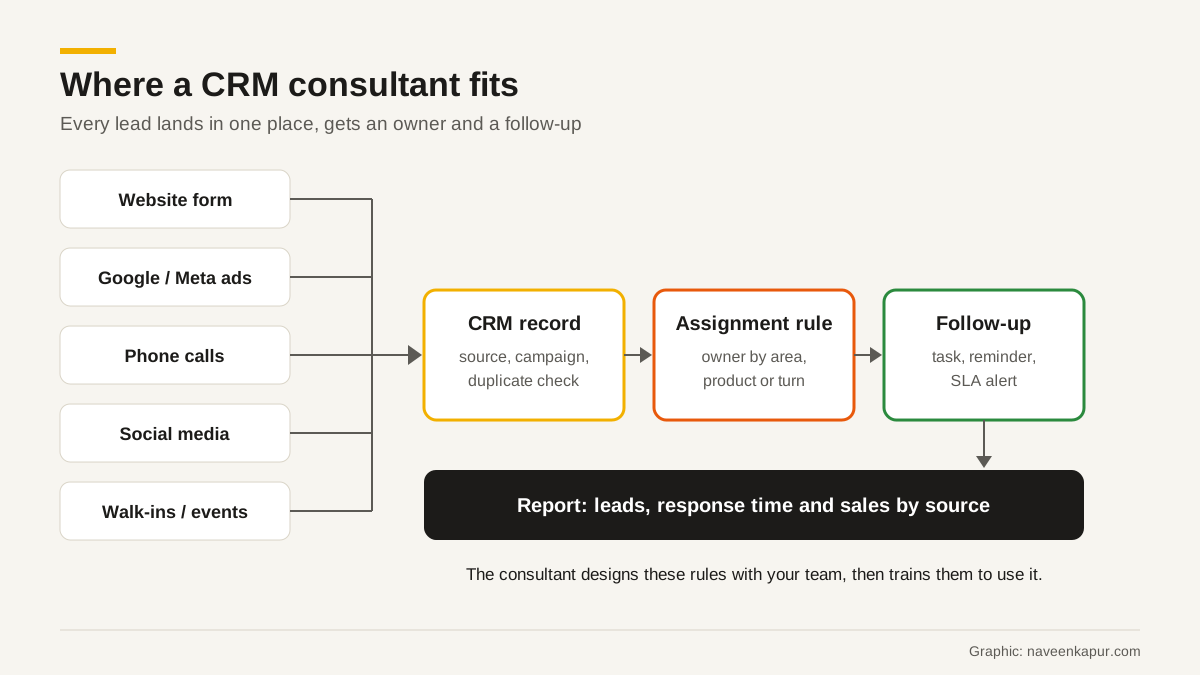
2. Capture every lead with its source
Each lead source needs a route into the CRM:
- Website forms connected directly to the CRM. Zoho CRM's webforms, for example, can create records in Leads, Contacts, Cases and custom modules, and can use a captcha to block spam submissions.
- Ad lead forms from Google and Meta connected through their integrations, with the campaign recorded.
- Phone calls, through a telephony integration or a simple, fast way for staff to log them.
- Walk-ins and events entered by the team the same day.
Each record should store the source, and for ads the campaign, so you can later see which spend brought sales. Hidden fields on web forms can carry details such as the page the form was on.
3. Assign every lead automatically
Assignment rules give each new lead an owner by area, product, language or simply in turn. Zoho CRM's help pages, for example, describe webform leads being assigned to a chosen user or through assignment rules, including round robin distribution. An automatic acknowledgement email to the person who enquired can also be set up.
4. Make follow-up hard to forget
Create a task or reminder when a lead arrives, set a time limit for first contact, and alert a manager when it is missed. Define what must happen at each stage before a lead can move on.
5. Reports that answer business questions
Useful reports answer simple questions. How many leads came in by source? How fast did we respond? What percentage became customers? Which salesperson has leads waiting? If your ad leads are tracked properly, sales data from the CRM can also be sent back to Google Ads as offline conversions, so bidding learns from real sales rather than form fills.

6. Data migration and clean-up
Old leads and customers in sheets need to be cleaned before import: duplicates merged, phone numbers in one format, sources filled where known. Importing a messy sheet only moves the mess.
7. Training and the first three months
Most adoption problems show up after go-live. Plan short training sessions by role, a one-page guide for the sales team, and weekly check-ins for the first month. Expect to change fields and rules once real use shows what does not fit.
Zoho CRM or Salesforce?
Both are widely used in India and both can do everything in this guide. The right choice depends on your team size, budget, the other tools you use, how much customisation you need and who will look after it. A good consultant explains the trade-offs for your case rather than pushing the platform they happen to sell. We will cover the comparison in detail in a separate guide.
Questions to ask before you hire a CRM consultant
- 1Will you map our current sales process before configuring anything?
- 2How will each of our lead sources get into the CRM, and how will the source be recorded?
- 3How will leads be assigned, and what happens if nobody responds in time?
- 4Which reports will we have on day one?
- 5Who owns the CRM account, the data and any custom code? (It should be your business.)
- 6What training is included, and what support do we get after go-live?
- 7Are you a partner of the CRM vendor, and do you earn from licences you recommend?
- 8Can you show a similar setup you have done, with client names removed?
A CRM also works best when marketing tracking is in place. Our guide to Google Analytics 4 covers the website side, and what a digital marketing consultant does explains how ads, SEO and CRM fit together. If most of your leads come from paid search, read hiring a Google Ads expert as well.