
Hosting checkout pages often add a line: “Add a dedicated IP”. Some sellers say it is safer, faster or better for SEO. A dedicated IP is useful in a few clear situations, and in most others it changes nothing. This guide explains the difference between a shared IP and a dedicated IP, the cases where a business really needs one, and how to get a fixed address on a cloud server.
What is an IP address, and what makes it “dedicated”?
Every device on the internet is reached through an IP address, a number such as 203.0.113.10. When someone visits your domain, DNS turns the name into the IP address of your server. On shared hosting, hundreds of websites can sit on one server and answer on the same IP address; the server uses the domain name in each request to decide which site to show.
A dedicated IP address is one that only your server, or only your email sending, uses. A static IP is one that does not change over time. The two ideas overlap but are not the same: a dedicated IP is about who shares it, a static IP is about whether it stays fixed. For most practical needs below, you want an address that is both.
Shared IP vs dedicated IP
| Shared IP | Dedicated IP | |
|---|---|---|
| Who uses it | Many websites or email senders | Only you |
| Reputation | Shared: other users’ behaviour affects you | Yours alone: good and bad |
| Cost | Included in the plan | Usually an extra monthly charge |
| Effort | None | Email IPs need warm-up and steady volume |
| Can partners allowlist it? | Risky, because the address may change or be used by others | Yes, if it is also static |
When a dedicated IP actually matters
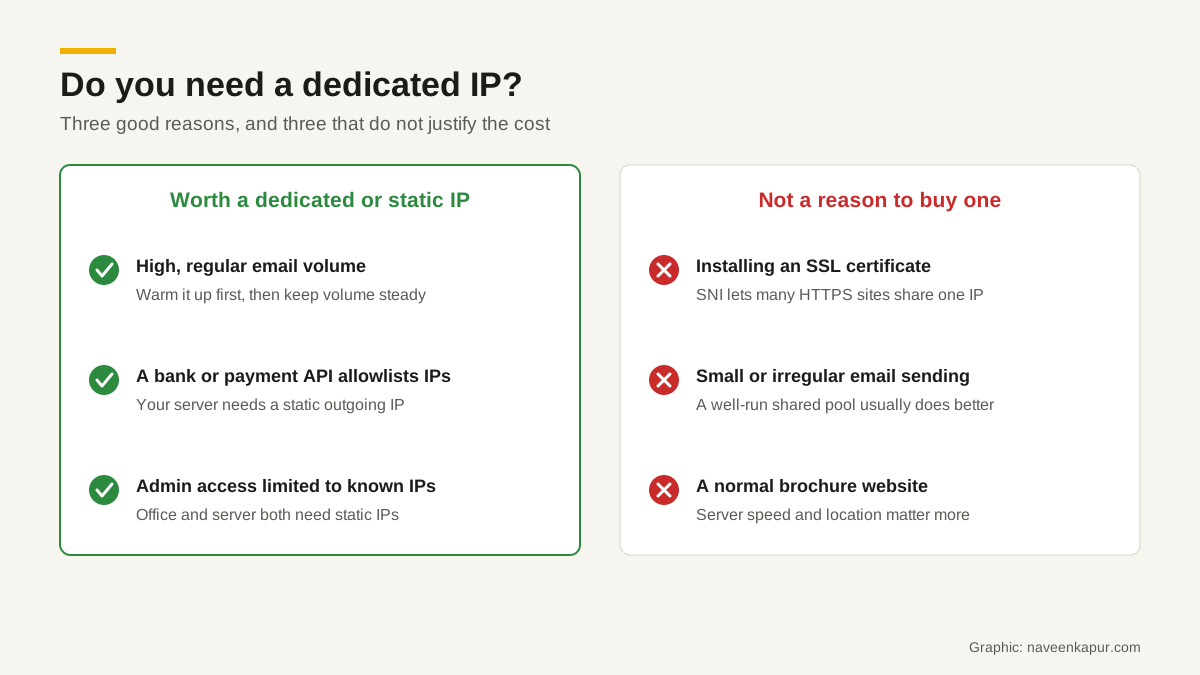
1. Sending email at volume
Mailbox providers judge incoming email partly by the reputation of the IP address that sent it. Google’s email sender guidelines put it plainly: “The activity of any senders using a shared IP address affects the reputation of all senders for that shared IP address.” If another sender on your shared IP sends spam, your newsletters and invoices can suffer.
That sounds like a reason to always buy a dedicated IP, but the email services themselves say otherwise. Amazon SES says: “If you don’t plan to send large volumes of email on a regular and predictable basis, we recommend that you use shared IP addresses.” A dedicated IP with low or irregular volume has no history, and mailbox providers are wary of addresses with no history. Shared pools run by a good email service are watched and managed, so a small sender usually does better there.
If you do move to a dedicated email IP, it has to be warmed up: you start with small daily volumes and increase them gradually, sending first to your most active contacts. SES says the time needed varies by mailbox provider, from around two weeks for some to up to six weeks for others, and its automatic warm-up for standard dedicated IPs runs over 45 days. SendGrid’s documentation adds that an IP which has not sent for more than 30 days should be warmed up again. Gmail also requires that a sending server’s IP has a matching reverse DNS (PTR) record.
2. IP allowlisting by banks, payment gateways and partners
Some systems only accept requests from addresses you have registered with them in advance. This is called IP allowlisting (or whitelisting). It is common for banking APIs, payout APIs, government portals and B2B partner integrations. For example, RazorpayX’s documentation says it is mandatory to allowlist the IPs you use for all payout-related API requests, that you can add up to 20 IPs, and that a request from an IP outside the allowlist will fail.
Here the need is a static IP for your server’s outgoing requests. If your app runs on shared hosting or on a cloud service whose address changes when it restarts, the partner will reject your calls one day without warning. Our guide to payment gateway integration covers this and other server-side checks.
The direction can also be reversed: some providers publish their own IP addresses so you can allow only them to reach your server. Razorpay, for instance, lists the IPs its webhooks come from, while also recommending webhook signature checks. Signatures are the stronger check; allowlisting is an extra layer.
3. Your own access rules
Businesses also use fixed IPs internally. You can restrict a website admin panel, a database or a CRM’s admin area so that it only accepts connections from your office’s static IP or a known server. That is a sensible extra layer, but it only works if the office internet connection also has a static IP. Ask your internet provider whether one is available on your plan.

When a dedicated IP is not needed
SSL certificates
Years ago, each HTTPS site needed its own IP, because the server had to send a certificate before it knew which site the browser wanted. A TLS extension called Server Name Indication (SNI) fixed that: the browser names the site at the very start of the connection, so one server on one IP can present the right certificate for each site. Cloudflare’s explanation of SNI notes that almost all browsers, operating systems and web servers support it, and only very old software does not. So if someone tells you that you need a dedicated IP to install SSL, that advice is out of date.
A brochure site or a blog
A normal business website, even a busy one, works the same on a shared IP. What affects your visitors is the speed and reliability of the server and its location, which our guide to web hosting in India covers in detail.
Small or irregular email
A business sending a few thousand emails a month, or a newsletter now and then, is better off on a reputable email service’s shared pool, with proper authentication and a clean list.
How to get a static IP on a cloud server
On the big cloud platforms, the address of a server can change if you stop and start it, unless you reserve one. Both AWS and Google Cloud let you reserve a fixed address:
- AWS Elastic IP: a static public IPv4 address that stays in your account until you release it. You can move it to another instance if the first one fails. It works only in the region where you created it, accounts get five per region by default, and AWS charges for all Elastic IP addresses whether they are in use or idle.
- Google Cloud static external IP: you reserve an address, regional for VMs or global for global load balancers, and it stays fixed until you release it. Google charges a higher rate for a reserved address that is not attached to anything.
One more detail matters for allowlisting: the IP a partner sees is the one your outgoing requests leave from. If your app runs behind a load balancer or a NAT gateway, that is the address to give them, so ask your developer which one it is before you fill in the partner’s form.
IPv4 vs IPv6, briefly
Most of this article is about IPv4, the original addressing system with 32-bit addresses such as 203.0.113.10. The 32-bit format allows only about 4.3 billion addresses in total, and cloud platforms such as AWS now charge for public IPv4 addresses. IPv6, defined in RFC 8200, uses 128-bit addresses such as 2001:db8::10, so there are far more than anyone will need, and dedicated addresses are easy to give out.
A well-configured server can answer on both IPv4 and IPv6. Two practical points: if you send email over IPv6, the reverse DNS record must also be set for the IPv6 address (Gmail’s guidelines call this out), and if a partner allowlists IPs, confirm whether they accept IPv6 or need IPv4 only.
A quick decision checklist
- 1Does a bank, payment gateway, government portal or partner ask for your server IP? You need a static IP for outgoing requests.
- 2Do you send large, regular email volumes and already pass SPF, DKIM and DMARC? A dedicated email IP may help, after a proper warm-up.
- 3Do you want to restrict admin access to known locations? You need static IPs at the office and on the server.
- 4None of the above? Keep the shared IP and spend the money on better hosting, backups or a CDN.
The same thinking applies to any web or CRM project: decide what the system has to talk to before choosing where it runs. If you are planning a site or application and are unsure whether it needs a dedicated or static IP, the web design and development service explains how that work is approached.