
What is generative AI, and what can it actually do for a business? I design CRMs, including WhatsApp AI agents that work inside them, so I see generative AI as a working part of a system, not a headline. This guide explains how it works in plain English, using the official explainers from Google, Anthropic, OpenAI, IBM and NIST. It then covers what it is good and bad at in a real business, with lessons from building those agents.
What is generative AI?
Generative AI is a type of artificial intelligence that creates new content, such as text, images, audio, video or software code, when you give it an instruction called a prompt. IBM’s explainer describes it as AI “that can create original content such as text, images, video, audio or software code”. It does this by learning patterns from a very large amount of training data and then producing new output that follows those patterns. Chat assistants, AI writing tools and image generators are all generative AI.
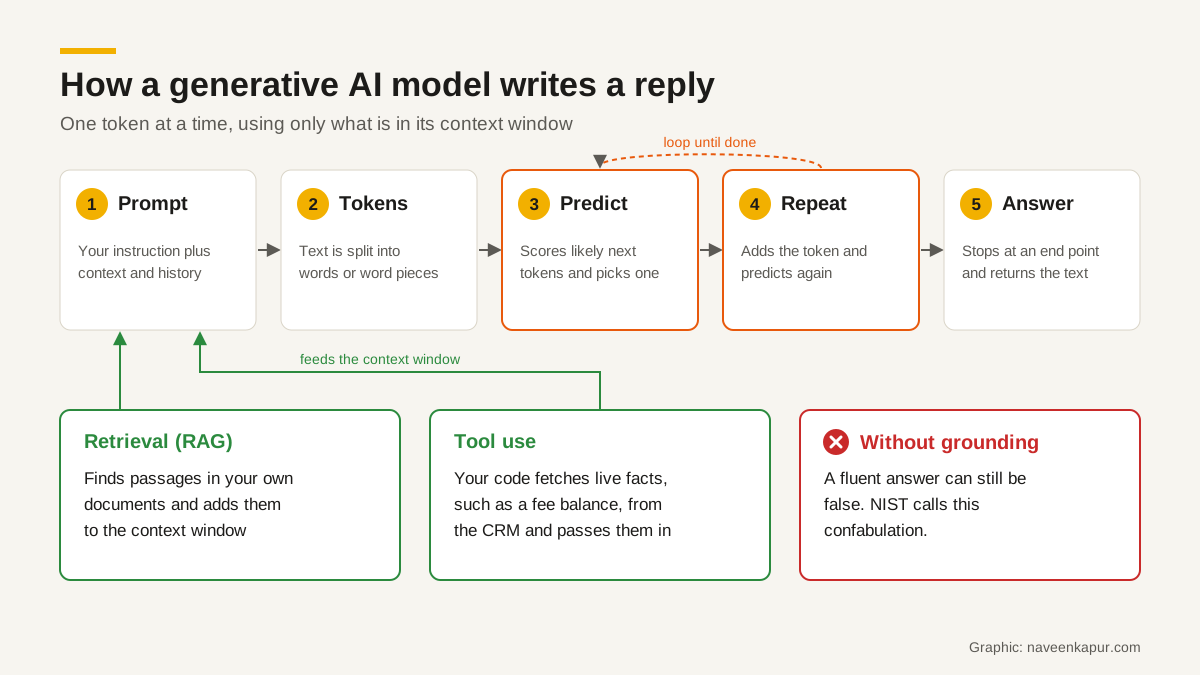
How does generative AI work? The short version
- 1Training: a model is trained on a huge amount of data and learns the patterns in it.
- 2Tokens: your prompt is split into small pieces called tokens.
- 3Prediction: the model works out which token is most likely to come next, adds it, and repeats.
- 4Context: it can only use its training plus what fits in its context window, which is everything you and the system put in front of it.
- 5Grounding and tools: well-built systems add your own documents and live data, so the answer rests on facts, not guesses.
1. Training on large data
Anthropic’s glossary defines pretraining as “the initial process of training language models on a large unlabeled corpus of text”, where the model learns to predict the next word from the words before it. On its own, a pretrained model is not good at following instructions. So it is tuned further: IBM lists fine-tuning on labelled examples and reinforcement learning from human feedback as the usual methods. Google’s Machine Learning Crash Course notes that training needs enormous datasets, months of time and a great deal of computing power and electricity.
One point matters for business owners: the model does not keep a neat copy of its training data that it looks things up in. It learns patterns. That is why it writes well, and also why it can mix up facts.
2. Tokens
Models do not read words the way we do. Google’s course explains that a token “could be a word, a subword (a subset of a word), or even a single character.” A common word may be one token, while a long or rare word may be split into several. Different models split text differently, so the same message can count as a different number of tokens on different models. This matters because usage limits and API prices are counted in tokens.
3. Predicting the next token
A language model, in Google’s words, “estimates the probability of a token or sequence of tokens”. When it writes, it scores the likely next tokens, picks one, adds it to the text, and does the same again, until it reaches a natural end. A setting called temperature controls how adventurous that choice is: higher values give more varied text, lower values stick to the most probable wording. Anthropic notes that even at temperature 0 the output is not fully deterministic, so the same question can get a slightly different answer each time.
4. Large language models
A large language model (LLM) is a language model with a very large number of parameters, trained on vast amounts of text, that can answer questions, summarise and write. Most modern LLMs use an architecture called the Transformer. Its key idea, self-attention, lets the model weigh how much every other token affects the meaning of each token, for example working out what “it” refers to in a sentence. Google’s course says Transformers can contain hundreds of billions or even trillions of parameters.
5. Prompts and the context window
The prompt is your instruction plus any material you give the model. The context window is, as Anthropic puts it, the amount of text the model “can look back on and reference when generating new text”, a kind of working memory that is separate from its training data. In practice this means the model does not remember your customer from last week. If it seems to, it is because the software around it put that history back into the context window. In a CRM, supplying the right history is the CRM’s job.
Why generative AI can be confidently wrong
OpenAI defines hallucinations as “plausible but false statements generated by language models.” Its September 2025 research note explains one main cause: standard training and evaluation reward guessing over admitting uncertainty, so a model learns that a confident guess scores better than “I don’t know”. NIST’s Generative AI Profile (NIST AI 600-1, July 2024) lists the same problem as one of 12 risks and calls it confabulation: systems that “generate and confidently present erroneous or false content”.
Here is what that looks like in a business. Ask a general chatbot the late fee for a course at your institute and it may give a neat, believable number. The number is made up, because the model has never seen your fee rules. The fix is not a better prompt. The fix is to make sure the answer comes from your records.
Retrieval: grounding answers in your own documents
Anthropic describes retrieval augmented generation (RAG) as a technique that combines information retrieval with generation to improve accuracy and “ground the model’s response in evidence”. Google Cloud’s grounding documentation says grounding connects model output to verifiable data sources to reduce hallucinations. In simple steps:
- 1Your documents (policies, course details, price lists, FAQs) are stored in a searchable form.
- 2When a question comes in, the system finds the few passages most related to it.
- 3Those passages are placed in the context window with an instruction to answer only from them.
- 4The model writes the answer, ideally saying where it came from, or saying it does not know.
Retrieval reduces errors; it does not remove them. If your price list is out of date, the model will quote the old price with full confidence. Keeping the documents current is a business task, not an AI task.

Tools and agents: when the model can act
A model on its own can only produce text. With tool use (also called function calling), it can ask for an action. Anthropic’s documentation describes the round trip: you describe the tools available, the model replies with a request to use one, your application runs it and sends back the result, and the model uses that result in its answer. An AI agent is a model that works towards a goal by using tools over several steps.
The important detail is who runs the tool. The model only asks; your code decides what actually happens. That is where you put the rules: which records it may read, what it may change, and when a person must approve.
Text models and image models
Text models are usually Transformers, as above. Many image generators use diffusion models, which IBM explains are trained by adding noise to images and learning to recover the original, so they can build a new image out of noise to match a prompt. Some newer models are multimodal: Google describes its Gemini models as able to understand many types of input and combine them. For a business, image models are useful for concept drafts and visual ideas. Treat the output as a draft, check it for errors and brand fit, and remember that NIST lists intellectual property among the risks to manage.
Generative AI examples in a business: good and bad fits
| Task | Fit | What makes it work |
|---|---|---|
| Drafting replies, emails and posts | Good | A person reviews before anything goes out |
| Summarising a long WhatsApp or call history | Good | The full history is in the context window |
| Sorting enquiries by course, product or urgency | Good | Clear categories and a check on a sample |
| Answering FAQs from your policies | Good with retrieval | Current documents and an “I don’t know” route to staff |
| Quoting a fee, balance or booking status | Only through tools | The figure comes from the system of record, never from the model |
| Calculations such as late fees or discounts | Poor on its own | Your software calculates; the model only explains |
| Refunds, admissions, credit or legal calls | Not for the model | A named person decides; AI can prepare the summary |
What building WhatsApp AI agents inside a CRM taught me
I designed CampusFlow CRM, an education CRM used every day at a training institute. It follows a student from enquiry to alumni, with fee collections, late-fee rules, webforms, an automation builder and role-based access. It can add optional AI agents on WhatsApp: a counselling agent, an accounts agent and a student life cycle agent. The design rule behind them is simple: “the CRM owns the records, the agents own the conversations.” Staff can see any conversation and take it over.
Designing around that rule makes the strengths and weaknesses of generative AI very concrete:
- Facts come from the record. An accounts agent should never work out a fee or a late fee itself. The CRM’s fee and late-fee rules produce the figure; the agent explains it in plain words.
- The model writes, the system decides. Changing a record, confirming a payment or approving anything is done by the CRM’s own logic and roles, not by a model’s guess.
- Handover is a feature, not a failure. When a question is unclear, sensitive or about money, a staff member takes over, and they can see the whole thread.
- Every message stays on the student record. That gives context for the next reply and a record for the manager. Our guide to WhatsApp CRM explains why this matters.
- Start narrow. One agent with a clear job is easier to check than one that tries to do everything.
If you are planning something similar, read how an AI CRM differs from a plain chatbot, and see the CRM development service for how this kind of system is scoped and built.
A short checklist before you use generative AI at work
- 1Write down the one job you want it to do, and who checks the output.
- 2List the facts it must never invent (prices, fees, dates, policies) and connect those to your records.
- 3Decide what customer or student data it may see. NIST lists data privacy as a core generative AI risk.
- 4Test it on 30-50 real past questions before customers see it, and note every wrong answer.
- 5Give it an easy way to say “I don’t know” and hand over to a person.
- 6Review a sample of conversations every week, and fix the documents or rules, not just the prompt.
Generative AI is a strong writer and a weak source of truth. Used that way round, with your records supplying the facts and your people making the decisions, it saves real time without putting customers at risk.