
Every major CRM now sells itself as an AI CRM. Salesforce has Agentforce, Zoho CRM has Zia and HubSpot has Breeze. In India, “ai crm” and “ai in crm” are each searched about 880 times a month (OpenSEO, October 2026), mostly by business owners trying to work out what the AI part should actually do.
This guide answers one practical question: what should an AI agent be allowed to do inside your CRM, and what should it never do on its own? The answer decides whether AI saves your team time or creates a mess that someone has to clean up by hand.
What an AI CRM actually is
A CRM is the system of record for your customers or students: who they are, what they enquired about, who owns them, what they paid and what stage they are at. An AI CRM adds AI in two ways. The first is assistive AI: scoring, predictions, summaries and suggested replies that a person reads and acts on. The second is AI agents: software that reads a conversation or a trigger, decides on a next step and carries it out, such as replying to a customer or booking a slot.
Assistive AI is low risk because a person stays in the loop. Agents are where the real time savings are, and also where the real risk is, because they act. So the rules below are mostly about agents.
What the big vendors say their AI does
Here is how three common CRMs describe their AI, quoted or summarised from their own pages. Features change often and some depend on the edition you buy, so confirm on the vendor’s page and in a demo before you plan around any of them.
| CRM | AI name | What the vendor says it does |
|---|---|---|
| Salesforce | Agentforce | “The AI agent platform that delivers 24/7 autonomous support at enterprise scale.” Agents answer questions and take actions, work “within set guardrails” and can escalate to human agents. Its Einstein Trust Layer lists data masking, toxicity detection, an audit trail and zero data retention agreements with third-party LLM partners. |
| Zoho CRM | Zia | Lead and deal scoring, win or loss prediction, churn prediction, anomaly detection, call transcription with summaries and sentiment, data enrichment, suggested workflows and owner assignment, and “AI agents capable of executing business tasks autonomously”. |
| HubSpot | Breeze | A Customer Agent to “answer questions and resolve support tickets automatically”, a Prospecting Agent to research accounts and draft outreach, a Data Agent, and controls to “test your agent before you turn it live” and “control which actions run on their own”. |
Notice what all three stress: guardrails, testing, control over which actions run on their own, and escalation to people. The vendors themselves do not suggest letting agents loose on everything. If you are still choosing a platform, our Zoho CRM vs Salesforce comparison covers price and fit.
AI agents in CRM: what they should do
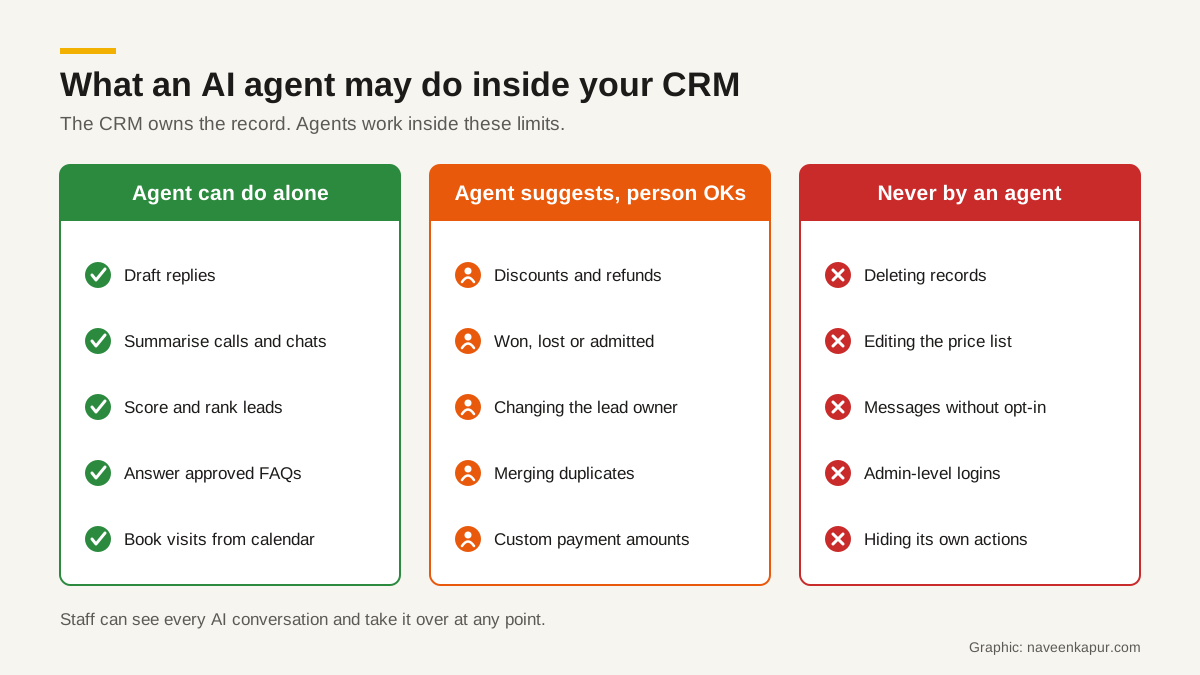
These are the jobs where AI agents in CRM earn their keep. Each one either produces a draft a person checks, or takes an action that is easy to undo.
- Draft replies. The agent writes the email or WhatsApp reply from the record and the conversation history. A person sends it, or approved templates go out automatically.
- Summarise. Call recordings, long chat threads and email chains turned into five lines on the record, so the next person does not start from zero.
- Score and prioritise. Rank leads by likelihood to convert, flag deals that have gone quiet, show which enquiries nobody has touched today.
- Answer common questions. Fees, timings, location, documents needed, course duration, menu or room details, using only an approved knowledge base.
- Book visits and calls. Offer free slots from a real calendar, confirm, send reminders and log the booking on the record.
- Clean data. Suggest duplicates to merge, fill a missing city from a pin code, correct obvious typos, with the change shown for review.
What AI agents should not do without rules and approval
Three kinds of change should never happen just because an agent decided they should. Each can cost money, upset a customer or break your reports.
1. Money
Fees, prices, discounts, refunds, late-fee waivers, payment links with custom amounts and credit notes. An agent can explain the fee structure that is already in the CRM. It should not invent a discount to close a deal or promise a refund. If an agent is allowed to send a payment link at all, the amount must come from the record, not from the conversation.
2. Status
Marking a deal won or lost, an applicant admitted or rejected, a booking confirmed or cancelled, a customer churned. These statuses drive revenue reports, targets, ad optimisation and sometimes staff incentives. A wrong status quietly corrupts all of them. Let the agent suggest the change; let a person or a hard rule make it. For example, a booking is confirmed only when the payment is verified on the server, not because a customer typed “paid”.
3. Ownership
Reassigning a lead to another salesperson or counsellor, merging two customer records, or deleting anything. Ownership decides who gets credit and who follows up. Merges and deletes are hard to undo. An agent can flag a likely duplicate; a person should approve the merge.
Five controls every AI CRM needs
Its own permissions
Give each agent its own user or role in the CRM, never an admin login. A FAQ agent needs to read course or product details and write a conversation note. It does not need to see salary fields, edit fee records or export contacts. Role-based access that limits staff should limit agents in the same way.
An audit log
Every action an agent takes should be logged on the record: what it read, what it wrote, what it sent and when. When a customer says “your bot told me the fee was lower”, you need to see exactly what was said. Salesforce lists an audit trail as part of its Einstein Trust Layer; whatever CRM you use, check where agent actions are recorded and for how long.
Opt-in before messaging
An agent that sends WhatsApp, SMS or email must check the consent field first. On WhatsApp, Meta’s opt-in rules require that the opt-in clearly states the business name and that the person agrees to receive messages from that business, and opt-outs must be honoured. Store both as fields on the record, with the date and source. Our guide to WhatsApp CRM explains how to keep those chats on the record.
Hand-over to staff
Staff must be able to see every AI conversation as it happens and take it over at any point, and the agent must hand over on its own when it is unsure, when the customer asks for a person, or when the topic is money, a complaint or anything legal. Set these triggers in writing. This is the principle behind CampusFlow CRM, the education CRM Naveen Kapur designed for a training institute: “the CRM owns the records, the agents own the conversations”. Its optional WhatsApp agents (counselling, accounts and student life cycle) work on top of the record, and staff can see and take over any conversation.
A test set before go-live
Write 30 to 50 real questions your team gets, including awkward ones, and run them through the agent before it talks to a single customer. Check every answer against your price list and policies. Repeat whenever you change the knowledge base or the model.

Data protection: what India’s DPDP Act says
A CRM holds personal data, and an AI agent reads and writes it. India’s Digital Personal Data Protection Act, 2023 applies. Read the official text with your lawyer; at a basic level, it says:
- Data Fiduciary
- The person or business that decides the purpose and means of processing personal data. If the CRM holds your customers’ data, that is usually you.
- Data Processor
- Anyone who processes personal data on your behalf. Your CRM vendor and AI provider can fall here. Section 8(2) says you may engage one only under a valid contract.
- Notice
- Section 5: every request for consent must come with or after a notice describing the data, the purpose, and how the person can exercise rights and complain to the Data Protection Board.
- Consent
- Section 6(1): consent must be “free, specific, informed, unconditional and unambiguous”, with a clear affirmative action, and limited to data needed for the purpose.
- Withdrawal
- Section 6(4): a person can withdraw consent at any time, and withdrawing must be as easy as giving it.
- Security and erasure
- Section 8(5) requires reasonable security safeguards, including for data your processors handle. Section 8(7) requires erasure once consent is withdrawn or the purpose is served, unless the law requires you to keep it.
The Schedule to the Act allows a penalty of up to ₹250 crore for failing to take reasonable security safeguards. The government notified the DPDP Rules, 2025 in November 2025, and its press release describes an 18-month phased compliance timeline, so check with your lawyer which duties already apply to you.
In practice for an AI CRM: send the agent only the fields it needs, ask your vendor whether your data is used to train models (HubSpot, for example, says its third-party AI providers are contractually prohibited from training on customer data), make opt-out work from the chat itself, and make sure deleting a record also deletes the agent’s copies.
A simple rollout plan for CRM automation with AI
- 1Clean the CRM first. Sources, owners, stages and consent fields must be right. AI on top of messy data gives confident wrong answers.
- 2Start with summaries and drafts. No customer sees anything until a person approves it. Measure time saved per day.
- 3Add a FAQ agent on one channel, using a short approved knowledge base and a clear hand-over rule.
- 4Add booking of visits or calls from the real calendar, with reminders.
- 5Review logs weekly for the first two months: wrong answers, missed hand-overs, opt-outs not honoured.
- 6Only then consider wider CRM automation such as scoring-based routing, with money, status and ownership still behind rules and approval.
Is an AI CRM worth it?
For most teams that answer the same questions every day and lose leads because nobody replied in time, yes, as long as the CRM stays the owner of the record and people stay in charge of money, status and ownership. If you are unsure whether you need outside help to set this up, read when a business needs a CRM consultant. If you want a CRM built or adapted with these rules from day one, the CRM development service page explains how that work is done.