A customer pays, sees “Payment successful”, and walks away happy. Two days later your accounts team finds the money never arrived, or that the same order was marked paid twice. Both problems come from the same design mistake in a payment gateway integration: trusting what the browser says instead of checking with the gateway on your own server.
This guide is for business owners and managers who are paying for a website, an online booking system or a CRM that takes payments. It explains how the flow should work, what your developer must verify, and which questions to ask before you go live. It uses Razorpay’s documentation as the main example because it is widely used in India, but the same principles apply to Stripe, PayU, Cashfree and other gateways.
How a payment gateway integration works, step by step
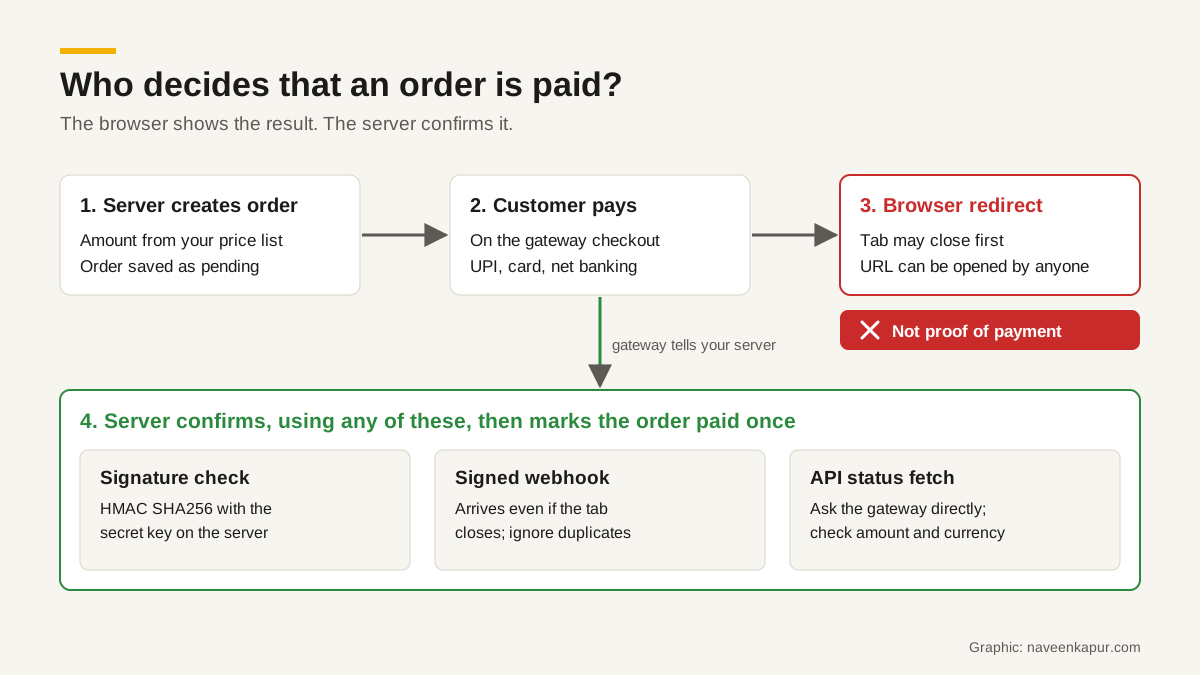
- 1Your server creates the order. It decides the amount from your own price list or cart, saves the order as “pending”, and asks the gateway to create a matching order. Razorpay’s docs say an order should be created for every payment, with the amount in the currency subunit (paise for rupees).
- 2The customer opens checkout. Your page loads the gateway’s checkout with the order ID. The customer chooses UPI, card, net banking or a wallet and pays on the gateway’s page or popup.
- 3The gateway processes the payment with the bank or UPI app.
- 4The browser is sent back to you. The checkout calls your success handler or redirects to your return URL with a payment ID and, for Razorpay, a signature.
- 5The gateway also tells your server directly through a webhook, a signed HTTPS request from the gateway to an address on your server.
- 6Your server confirms the payment and only then fulfils the order: sends the confirmation, books the slot, releases the download or ships the goods.
Why the browser redirect is not proof of payment
Everything that happens in the customer’s browser can fail or be changed. Stripe’s fulfilment guide puts the first problem plainly: you cannot rely on the landing page alone because the customer is not guaranteed to reach it, for example if they pay and then lose their internet connection. The second problem is that a success URL can be opened by anyone who knows it. If your system marks an order paid simply because someone reached /payment-success?order=123, a person can book or buy without paying.
So the rule for every integration is: the redirect decides what page the customer sees next, and the server decides whether the order is paid.
Payment verification on the server: three ways
1. Signature verification
After a successful Razorpay checkout, your page receives three values: razorpay_payment_id, razorpay_order_id and razorpay_signature. Your page sends them to your server. The server recomputes the signature as an HMAC SHA256 of your own order ID, a pipe character and the payment ID, using your secret key, and compares it with the one received. Razorpay’s docs say to use the order ID stored on your server, not the one returned by checkout, and that a failed check indicates a potentially fraudulent or tampered payment. The secret key lives only on the server, never in your website’s JavaScript or mobile app.
2. Signed webhooks
A payment webhook reaches your server even if the customer closes the tab, which makes it the most reliable signal. Razorpay describes webhooks as the primary and most efficient way to receive event notifications. Each webhook carries a signature in the X-Razorpay-Signature header, calculated with HMAC SHA256 over the request body using a webhook secret you set. Your server must check it before trusting the content, and Razorpay warns not to parse or change the body before verifying. Stripe uses the same idea with its own Stripe-Signature header and states that webhooks are required for fulfilment.
3. Fetching the status from the API
For a high-value or time-sensitive action, your server can call the gateway’s API and fetch the payment or order status directly. Razorpay suggests this polling approach where an immediate status is needed. It is also the right fallback when a webhook is late.
Most solid integrations use all three: the signature check for an instant answer while the customer waits, the webhook as the guaranteed record, and the API fetch for anything that looks odd. Whichever arrives first, the server also checks that the amount and currency paid match the order it created.
Duplicate webhooks and idempotency
Gateways deliver webhooks “at least once”, so you should expect the same event more than once. Razorpay retries failed deliveries with backoff for 24 hours, treats any response that is not 2xx as a failure, and resends if your server does not reply within 5 seconds, even if it did process the event. If deliveries keep failing for 24 hours, the webhook is disabled until you fix it and switch it back on. Razorpay also says events may not arrive in the order they happened.
Your developer handles this with idempotency, which simply means that processing the same event twice has the same result as processing it once:
- Save each event ID (Razorpay sends a unique x-razorpay-event-id header) and skip any ID you have already processed.
- Update an order to “paid” only if it is not already paid, in a single database step, so two copies arriving together cannot both send a confirmation.
- Reply 2xx quickly and do slow work, such as sending emails or generating invoices, afterwards.
- Never move an order backwards because an older event arrived late.
Pending, failed and refunded states
Real payments are not just paid or unpaid. Plan for each state in your order table and your customer messages:
| State | What it usually means | What your system should do |
|---|---|---|
| Created / pending | Order made, payment not confirmed yet | Hold the stock or slot for a set time; do not confirm |
| Authorised | Payment approved, money not yet captured | Capture it, or turn on auto-capture; Razorpay auto-refunds uncaptured payments after a set period |
| Captured / paid | Gateway confirms the money is yours | Confirm the order once, send the receipt |
| Failed | Bank or UPI declined | Let the customer retry on the same order; a later attempt can still succeed |
| Refunded | Full or partial money returned | Record the refund ID and amount against the order; update reports |
Razorpay’s payment events include payment.authorized, payment.captured and payment.failed, and the order.paid event fires when an order’s status changes to paid. Its docs note that a payment.failed can be followed by a successful capture if the customer retries, which is why a failure should not cancel the booking at once. Refunds should be issued from your system through the gateway’s refund API or dashboard and stored against the order, so accounts and support see the same truth.

A real example: restaurant reservations
Naveen Kapur built a reservation and coupon CRM for the restaurants at Country Inn & Suites by Radisson, Sahibabad. In that system a booking is confirmed only after the payment is verified on the server, and each visit is proved by a redeemed coupon. The same rule is worth copying by any business where a confirmation has value on its own: a table, a seat, a class or an appointment. For more on reservation-led marketing, see restaurant marketing.
Razorpay integration: how the flow works
If you searched for Razorpay integration, this is the shape of its Standard Checkout as described in Razorpay’s own docs, not a full coding tutorial:
- 1Your server creates an order with the Orders API (amount in subunits, currency, optional receipt).
- 2Your page opens Razorpay Checkout with the order ID and your public key ID.
- 3On success, the handler returns razorpay_payment_id, razorpay_order_id and razorpay_signature; your page posts these to your server.
- 4Your server verifies the signature with the key secret and checks that the payment is captured.
- 5Turn on auto-capture in the Dashboard, or capture authorised payments yourself.
- 6Set up webhooks with a webhook secret and verify the X-Razorpay-Signature on every call.
Test the whole flow in test mode, including a failed payment, a closed tab and a duplicate webhook, before switching to live keys.
Reconciliation: matching orders to settlements
Verification tells you a payment happened. Reconciliation tells you the money reached your bank. The gateway settles to your account in batches, after deducting its fees and the tax on those fees, and minus any refunds. Razorpay’s settlement API reports fees and tax for each settlement and offers settlement recon details. A simple daily routine:
- Export paid orders from your system and the settlement report from the gateway for the same period.
- Match on the gateway payment ID, not the customer’s name or amount.
- List orders marked paid with no payment in the report, and payments with no order. Both need a person to look.
- Check that the settled amount equals payments minus fees, tax and refunds.
This is where a CRM earns its keep: if the payment ID, refund ID and settlement date sit on the customer record, accounts can close the day without spreadsheets. That is the kind of work covered under CRM development.
PCI DSS and RBI rules in plain words
PCI DSS is the card industry’s security standard, managed by the PCI Security Standards Council. The less card data your systems touch, the less of it applies to you. The PCI SSC says a merchant can use the shortest self-assessment, SAQ A, only when the entire payment page comes from a PCI DSS validated third party, such as a full redirect or an iframe; if any part of the payment page comes from your own site, you are not eligible. From 31 March 2025, SAQ A merchants must also confirm their site is not susceptible to attacks from scripts that could affect their e-commerce systems. Confirm your exact obligations with your gateway or acquiring bank.
RBI rules on card data. Since 1 October 2022, no entity in the card payment chain other than card issuers and card networks may store actual card data (card-on-file). Saved cards now work through tokenisation, which needs the customer’s explicit consent. In practice: never store card numbers in your database or CRM, even “temporarily”.
Payment aggregators. Gateways that collect money for merchants are regulated by RBI. Its Master Direction on payment aggregators, issued on 15 September 2025, requires non-bank aggregators to be authorised, to hold merchant funds in an escrow account, and to carry out due diligence on merchants. Expect KYC checks when you sign up, and read the settlement timelines in your agreement.
Questions to ask your developer before go-live
- Is the amount calculated on the server, and is the secret key kept only on the server?
- Where is the signature verified, and what happens if it fails?
- Is the webhook signature checked, and are duplicate events ignored?
- What does the customer see, and what happens to the order, if they close the tab mid-payment?
- How are refunds issued and recorded?
- Who reconciles settlements, how often, and from which report?
If your current website or booking system cannot answer these clearly, fix it before you scale your ads. Building payment flows that verify on the server is part of our web design and development service. A slow checkout page also loses buyers, so pair this with website speed optimisation.