
Most businesses start looking for a CRM developer when their CRM stops matching how they actually work. Leads arrive from a form the CRM cannot read, invoices sit in a separate tool, or a process lives in someone’s head and a spreadsheet. The first question is not “who should I hire?” It is “do I need a platform configured, or a CRM built from scratch?” The answer changes the kind of developer you hire, the budget and the risks.
I have worked on both sides of that choice, configuring platforms and building custom systems, so this guide is written from the buyer’s side of the table. It covers what a CRM developer does, how to choose between custom CRM development and a platform, what the scope must say, and how to check the work.
What a CRM developer does (and how that differs from a consultant and an admin)
| Role | Main job | Typical output |
|---|---|---|
| CRM consultant | Understands your sales or admissions process and designs how the CRM should support it | Process map, field list, reports, vendor shortlist, rollout plan |
| CRM admin | Runs the CRM day to day: users, roles, fields, simple workflows, data quality | Clean data, working permissions, small changes on request |
| CRM developer | Builds what settings alone cannot: code, integrations, custom screens, data migration | Scripts, integrations, custom modules or a full custom CRM, with documentation |
If you are not yet sure what the CRM should do, start with the design, not the code. Our guide on when a business needs a CRM consultant explains that step. A developer working from an unclear process will build the wrong thing quickly.
Configuring a platform: what developers actually write
“Configuring” Zoho, Salesforce or HubSpot still often involves code. Each platform has its own tools, and a developer should name them correctly and know when to use each one. These are the names the vendors use in their own documentation:
| Platform | No-code or low-code tools | Code options (vendor’s own names) |
|---|---|---|
| Zoho CRM | Workflow rules, custom modules, layouts | Deluge (Data Enriched Language for the Universal Grid Environment) for Functions; Client Script in JavaScript, which runs in the user’s browser |
| Salesforce | Flow, built in Flow Builder, which Salesforce describes as declarative automation | Apex, which Salesforce calls “like Java for Salesforce”; Lightning Web Components for custom screens |
| HubSpot | Workflows, properties, pipelines | Custom code actions in workflows, in JavaScript or Python (beta); UI extensions built as React components for app cards on records |
A few platform rules affect cost and testing. Salesforce requires at least 75% Apex code coverage by tests to deploy code to production. HubSpot’s custom code actions need a Data Hub Professional or Enterprise subscription, and each action must finish within 20 seconds with a 128 MB memory limit. Zoho’s Functions run on Zoho’s servers, so there is no separate hosting to manage. If you are still choosing between the two big names, see our Zoho CRM vs Salesforce comparison.
Custom CRM development: when building makes sense
Custom CRM software development means building your own application: your own database, screens, rules and integrations. You get exactly the process you want, and you take on everything a vendor would otherwise do: hosting, security, backups, updates and bug fixes, for as long as you use it.
Two systems I built show where custom makes sense. CampusFlow CRM, an education CRM used every day at a training institute, follows a student from enquiry to alumni, with fee collections, late-fee rules, webforms, an automation builder and role-based access. Fee rules and the student life cycle were the heart of the institute’s work, so they were worth owning. For the restaurants at Country Inn & Suites by Radisson, Sahibabad, I built a reservation and coupon CRM where a booking is confirmed only after the payment is verified on the server, and each visit is proved by a redeemed coupon. That payment-then-confirm rule was the whole point, and it had to work exactly one way.
In both cases, the process was specific, central to the business, and stable enough to be worth maintaining. If your process looks like a standard sales pipeline, a platform will usually serve you better.
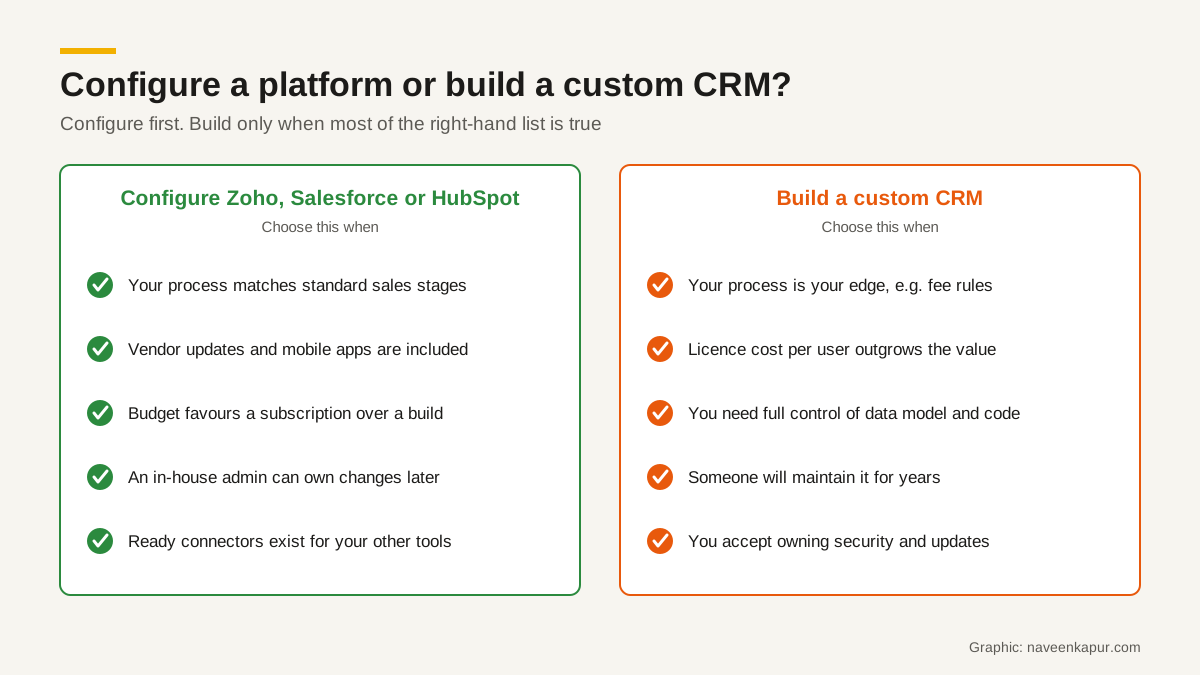
Decision table: configure or build?
| Question | Points to configuring a platform | Points to custom build |
|---|---|---|
| How standard is your process? | Leads, deals, follow-ups, quotes | Unusual rules that drive revenue, such as fee schedules or payment-verified bookings |
| How many users, and growing? | Few to moderate; per-user licences are affordable | Many users where licence cost keeps rising faster than value |
| Who changes it later? | An in-house admin using settings | A developer you will keep on retainer |
| Integrations needed | Ready connectors exist | Several in-house or local systems with no connector |
| Time to first use | Weeks | Months, built in phases |
| Who handles security and updates? | Mostly the vendor | You and your developer |
What a good scope document contains
Whether you configure or build, the scope document is what you are buying. Without it, every disagreement becomes “I thought that was included.” A useful scope for a CRM developer covers:
- 1Goals: two or three outcomes in plain words, for example “every enquiry has an owner within one hour”.
- 2Users and roles: who uses it, and what each role can see, edit and delete.
- 3Modules and fields: each record type, its fields, which are mandatory, and the stages a record moves through.
- 4Rules and automations: every trigger, condition and action, written as “when X happens, do Y”.
- 5Integrations: each system it connects to, which way data flows, and who provides access.
- 6Data migration: what old data moves, who cleans it, and how duplicates are handled.
- 7Reports: the exact reports and dashboards, with the questions each one answers.
- 8Acceptance tests: the real cases that must work before you sign off.
- 9Deliverables: source code, documentation, admin guide and training sessions.
- 10Out of scope: what is not included, so it can be quoted separately later.

Data ownership and code ownership
These two are where buyers lose the most, usually years later, when they want to change developers.
- Data: the CRM account should be in your company’s name, with your email as the main admin. You should be able to export everything yourself. Platforms provide this: Salesforce, for example, offers a Data Export Service that delivers your data as CSV files, weekly or monthly depending on edition.
- Code: for a custom build or custom scripts, the contract should say in writing that the source code and documentation are assigned to you on payment. Do not assume that paying for code means you own it; check the wording with your lawyer.
- Access: you hold the master logins for the CRM, the hosting, the domain and any API keys. The developer gets their own user, which you can switch off.
- Repository: for a custom CRM, the code should live in a repository your company owns, not only on the developer’s laptop.
Questions to ask before you hire a CRM developer
- 1Which platforms and languages have you worked in? Ask them to name the exact tools, such as Deluge, Apex or Flow.
- 2Can you show a similar project, and talk me through one problem you solved in it?
- 3Will you work in a sandbox or test copy first? How do changes reach the live CRM?
- 4How will you document what you build, so another developer could take over?
- 5What happens if a workflow fails at night? Who is told, and how fast?
- 6What support do you offer after go-live, for how long, and at what cost?
Red flags
- They start quoting before they have asked how your process works today.
- They want the CRM or hosting account registered in their own name.
- They promise “unlimited changes” or a fixed price for an undefined scope.
- They make changes directly in your live CRM with no test copy.
- They cannot explain the difference between configuring and coding on the platform you use.
- There is no written plan for handing over code, logins and documentation.
How to test the developer’s work
Do not sign off on a demo. Test it yourself, with your team, on realistic cases. Platforms support this: Zoho’s sandbox lets you test changes without affecting production data, and Salesforce blocks Apex deployment below 75% test coverage. Tests prove code runs, not that it does what your business needs, so add your own checks:
- 1Prepare 15-20 real cases from last month, including the awkward ones: a duplicate lead, a part payment, a cancelled booking.
- 2Run each case end to end in the sandbox, logged in as each role.
- 3Check that every automation fired once, not twice, and at the right time.
- 4Try what should be blocked: a counsellor opening an accounts screen, a booking confirmed before payment.
- 5Import a sample of old data and compare record counts and totals with the source.
- 6Export everything and open the files, to prove your exit route works.
Support after go-live
The first weeks after launch decide whether people keep using the CRM. Agree a short, intensive support period when the developer fixes problems quickly, then a monthly arrangement for small changes and platform updates. Ask for a simple log of every change after go-live. Train one person inside your business as the admin, so small changes do not wait for the developer.
If WhatsApp is how your customers reach you, plan that integration from the start; our WhatsApp CRM guide explains why. And if you want help deciding between configuring and building, or need the build itself, the CRM development service explains how that work is scoped and delivered.