Your sales team sends a quotation and the client never sees it. Your fee reminder lands in the spam folder. Your newsletter open rate falls for no clear reason. In many of these cases the problem is not the content. It is that the receiving mail server cannot prove the email really came from you. SPF, DKIM and DMARC are the three DNS records that give it that proof.
This guide explains each record in plain English, shows what the records look like, sets out what Gmail, Yahoo and Microsoft Outlook now require from senders, and gives a step-by-step plan to roll them out without blocking your own mail. You do not need to be technical to follow it, but you will need access to your domain’s DNS settings, or someone who has it.
Why receivers care about email authentication
Anyone can type your company name and your email address into the “From” line of a message. That is how most phishing works. Email authentication lets a receiver such as Gmail check two things: was this message sent by a server you allowed, and was it changed on the way? If the answers are unclear, the message is more likely to go to spam or be rejected. Authentication does not guarantee the inbox, because content, complaints and sending history still count, but without it you start at a disadvantage.
SPF, DKIM and DMARC in one table
| Record | What it answers | Where it lives | Plain example |
|---|---|---|---|
| SPF | Which servers may send email for this domain? | TXT record on your domain | v=spf1 include:_spf.google.com ~all |
| DKIM | Was this message signed by the domain, and is it unchanged? | TXT record at selector._domainkey.yourdomain | google._domainkey.yourdomain.com |
| DMARC | What should a receiver do if SPF and DKIM fail, and where should reports go? | TXT record at _dmarc.yourdomain | v=DMARC1; p=none; rua=mailto:dmarc@yourdomain.com |
SPF: the guest list
SPF (Sender Policy Framework) is a TXT record that lists the servers and services allowed to send mail for your domain. A business that uses Google Workspace and one marketing tool might publish something like this:
“yourdomain.com TXT "v=spf1 include:_spf.google.com include:servers.mailtool.example ~all"”
The last part, ~all or -all, says what to think of any server not on the list. Two rules from the SPF standard, RFC 7208, cause most real-world problems:
- One SPF record only. RFC 7208 says a domain must not have multiple SPF records. If there are two, the check returns a permanent error, which is the same as having no working SPF at all. When you add a new tool, edit the existing record. Do not add a second one.
- The 10 lookup limit. Each include:, a, mx, ptr and exists term, and the redirect modifier, makes the receiver do a DNS lookup. RFC 7208 limits these to 10 per SPF check, counting the lookups inside the includes too. Go over 10 and SPF fails with a permanent error. Every extra tool you add with an include eats into this budget.
DKIM: the signature
DKIM (DomainKeys Identified Mail) adds a digital signature to every outgoing email. Your sending service keeps a private key and signs the message. You publish the matching public key in DNS, under a name called a selector. The receiver fetches the key, checks the signature, and knows the message came from a system holding your key and was not altered in transit.
Each sending service gives you its own DKIM record to publish, so you can have several DKIM keys at once, one per tool. That is normal and is not the same mistake as having two SPF records. On key length: RFC 8301 says signers must use RSA keys of at least 1024 bits and should use at least 2048 bits. Google Workspace recommends 2048-bit keys where your DNS host supports them. If your DNS provider cannot accept a long TXT value, ask for help before falling back to 1024.
DMARC: the policy and the reports
A DMARC record sits at _dmarc.yourdomain.com and does two jobs. It tells receivers what to do with mail that fails, and it asks them to send you reports about all mail using your domain. A starting record looks like this:
“_dmarc.yourdomain.com TXT "v=DMARC1; p=none; rua=mailto:dmarc-reports@yourdomain.com"”
- p=none
- Monitor only. Receivers deliver as usual but send you reports. Always start here.
- p=quarantine
- Treat failing mail as suspicious, usually by sending it to spam.
- p=reject
- Refuse failing mail outright. This is full protection against spoofing of your domain.
- rua
- The address for daily aggregate reports. It must start with mailto:. Google advises against using a personal inbox; use a group mailbox or a DMARC reporting service.
- Alignment
- DMARC passes only when SPF or DKIM passes for a domain that matches the domain in the visible From address. Relaxed alignment (the default) accepts subdomains; strict needs an exact match.
Alignment is the part most people miss. A marketing tool can pass SPF for its own domain and still fail DMARC for yours, because the domain it authenticated is not the one in your From line. The fix is to set up the tool’s custom DKIM for your domain, or a custom return-path, so the authenticated domain matches. In May 2026 the IETF published RFC 9989, which replaces the original DMARC specification (RFC 7489). The basic record above still works; the changes matter mostly to people who build mail systems.
What Gmail, Yahoo and Outlook require now
From February 2024, Google and Yahoo began enforcing new sender rules, and Microsoft followed with rules for Outlook.com in 2025. The table summarises what each says on its own help pages, checked on 16 October 2026.
| Mailbox provider | Who counts as bulk | What bulk senders need |
|---|---|---|
| Gmail | Anyone sending close to 5,000 or more messages to personal Gmail accounts in 24 hours. Once you hit it, you are permanently a bulk sender. | SPF and DKIM; a DMARC record (p=none is allowed); From domain aligned with SPF or DKIM; one-click unsubscribe for marketing and subscribed mail; spam rate in Postmaster Tools below 0.30% |
| Yahoo | Bulk senders (Yahoo’s best-practices page does not state a fixed number) | SPF and DKIM; DMARC of at least p=none that passes; aligned From domain; one-click unsubscribe; honour unsubscribes within 2 days; spam rate below 0.3% |
| Outlook.com, Hotmail, Live | Domains sending 5,000 or more messages to Microsoft consumer mailboxes | SPF and DKIM passing; a DMARC record (p=none example given); DMARC must pass with SPF or DKIM aligned. Failing mail is rejected with error 550 5.7.515 |
Gmail also has rules for every sender, not only bulk senders: set up SPF or DKIM, have valid forward and reverse DNS for sending servers, use TLS, keep the spam rate below 0.3%, and follow the RFC 5322 message format. Google’s FAQ says that from November 2025 it is ramping up enforcement on non-compliant traffic, with temporary and permanent rejections. Its guideline is to stay below a 0.10% spam rate and never reach 0.30%.

A step-by-step rollout plan for SPF, DKIM and DMARC
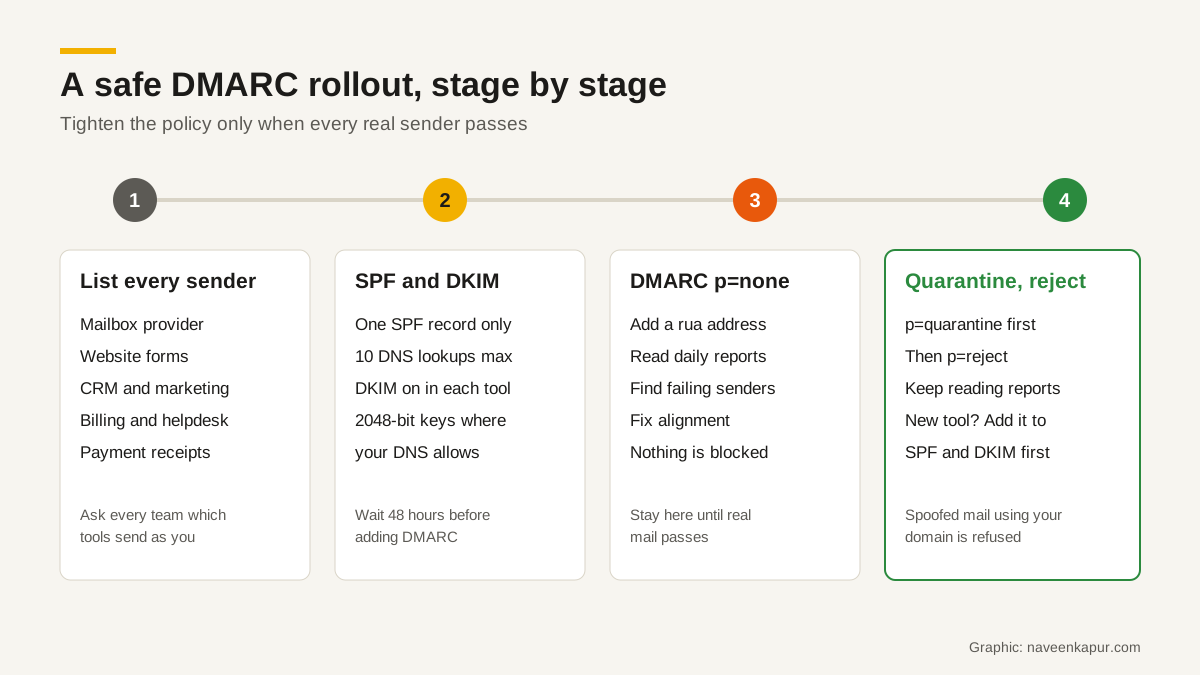
- 1List every system that sends email as your domain. Your mailbox provider, website contact forms, CRM, marketing tool, billing or invoicing software, helpdesk, payment gateway receipts, HR and job portals. Ask each team. This list is the single most important step.
- 2Check what is already published. Look up your current SPF, DKIM and DMARC records with your DNS host or a free lookup tool. Note any duplicate SPF records.
- 3Build one SPF record. Add an include for each service that needs it, keep within 10 lookups, and end with ~all while you test.
- 4Turn on DKIM in every tool. Each one gives you a selector and a key to publish. Use 2048-bit keys where you can. Confirm in each tool that DKIM shows as active.
- 5Wait, then publish DMARC at p=none. Google advises allowing 48 hours after setting up SPF and DKIM before you add DMARC. Include a rua address so reports start arriving.
- 6Read the reports for at least a few weeks. Aggregate reports are XML files, so use a DMARC report reader. Look for legitimate sources that fail, and fix them one by one.
- 7Move to p=quarantine, then p=reject. Only when every legitimate sender passes. Google’s DMARC help explains how the pct tag can apply a policy to a share of failing mail during this step; check that your reporting tool and providers still support it, as RFC 9989 replaces pct with a simpler test flag.
- 8Keep it maintained. Every new tool that sends email goes on the checklist before it goes live, not after a client complains.
Common mistakes that send mail to spam
Two SPF records
The most common one. A developer adds a record for the website’s mail plugin, the CRM vendor tells you to “add this SPF record”, and now the domain has two. Both stop working. Merge them into one.
Forgetting a tool that sends on your behalf
Your CRM sends follow-ups, your invoicing tool sends bills, and your email platform sends campaigns, all using your domain. If any of them is not authenticated and aligned, a strict DMARC policy will send its mail to spam or block it. This is a common surprise after a CRM rollout. When we plan a CRM project, as covered in when a business needs a CRM consultant, domain authentication for every outgoing message is on the go-live checklist. WhatsApp messages do not use your email domain, but the email confirmations many WhatsApp tools send alongside them often do. Check those too if you run WhatsApp automation.
Jumping straight to p=reject
It feels like the secure choice, but if you have not found every legitimate sender, you will block your own invoices, password resets or admission confirmations, and you may not find out for days. Start at none, read the reports, then tighten.
Going over the 10 lookup limit
Adding includes for every tool you ever tried pushes SPF over 10 lookups and breaks it for everyone. Remove tools you no longer use. If you still need more, move some sending to a subdomain such as mail.yourdomain.com with its own SPF record.
Blaming the IP address first
When mail lands in spam, people often ask for a new or dedicated sending IP. That can help high-volume senders with a good reputation, but it does not fix missing authentication. Read what a dedicated IP address does and does not change before paying for one.
Who should own this in your business
Email authentication sits between IT, marketing and whoever manages the website and domain. In small businesses nobody owns it, which is why it breaks. Give one person the list of sending tools and the DNS access, and make every new tool pass through them. If your domain and website were set up by an agency, ask them for the current records in writing. Setting up DNS, email authentication and the website together is part of our web design and development work, and it is far cheaper to get right at launch than to fix after a client’s inbox has started filtering you.