
Most business owners in India buy hosting once, at the same time as the domain, and never look at it again until the site goes down or a developer says it is “too slow”. A search for “web hosting India” brings up plans that all look alike, and the words used to sell them (shared, VPS, cloud, managed, unlimited) hide real differences in speed, safety and cost. This guide explains each type in plain terms, shows which one fits which kind of site, and gives you a checklist to use before you pay.
If you searched for the best web hosting in India, you will not find a ranked list of brands here, because the best host for a five-page brochure site is the wrong host for an online store. A better approach is to know what your site needs, then compare any provider against the same checks.
What web hosting actually is
Your website is a set of files, and often a database, stored on a computer that is always connected to the internet. That computer is the server. When someone types your domain, their browser asks the server for the page, and the server sends it back. Hosting is the service of renting that server, or a part of it, along with the network, power and support around it.
If your site runs on WordPress or another content management system, the server also runs the software that builds each page. Our guide on what a CMS is explains how that works. The more work the server does for each visit, the more the quality of hosting matters.
The five types of hosting, in plain terms
- Shared hosting
- Many websites on one server, sharing its processor, memory and disk. Cheapest and easiest. A busy or badly behaved neighbour can slow your site down.
- VPS hosting
- A virtual private server: one physical server split into several virtual machines, each with its own fixed share of resources and its own operating system. More control and more predictable speed than shared hosting.
- Dedicated hosting
- A whole physical server for your business alone. Full control and full responsibility. Usually more than a small business needs.
- Cloud hosting
- Your server runs on a provider’s large pool of machines. You can add memory, storage or extra servers when traffic grows and pay for what you use. AWS, Google Cloud and Microsoft Azure are the big cloud platforms.
- Managed hosting
- Not a separate kind of server but a level of service: the provider handles software updates, security patches, backups and monitoring. Managed WordPress hosting is the common example. Unmanaged means you or your developer do all of that.
VPS hosting vs cloud hosting
These two overlap. A VPS usually has a fixed size you choose (for example a set amount of memory and storage) and a fixed monthly fee. Cloud hosting is built to change size, so you can add resources in minutes, run several servers behind a load balancer, and pay by usage. For a single business website, a well-sized VPS is often enough. For an application whose traffic rises sharply in season, such as admissions or festive sales, cloud hosting gives more room.
How to choose by type of site
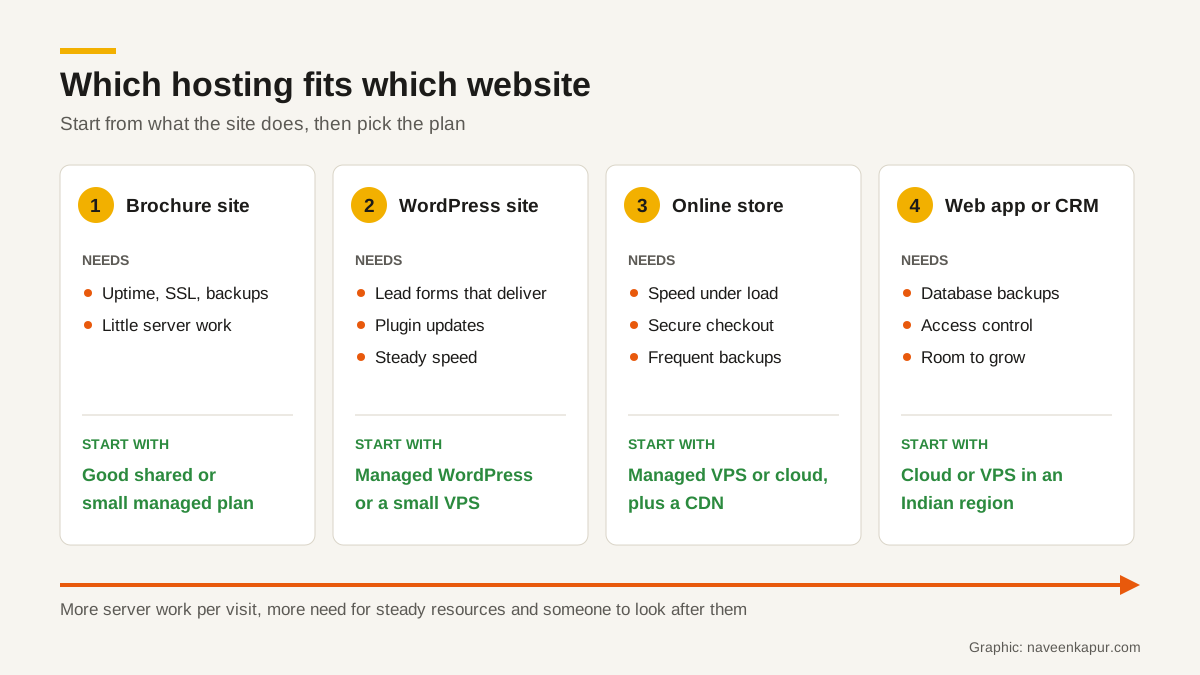
| Type of site | What it needs | Sensible starting point |
|---|---|---|
| Brochure site (5 to 20 pages, contact details, maybe a simple form) | Reliability, SSL, backups; low server work per visit | Good shared hosting or a small managed plan |
| WordPress site that brings in leads | Steady speed, plugin updates, form emails that arrive, daily backups | Managed WordPress hosting or a small VPS with someone looking after it |
| Online store | Speed under load, secure checkout, frequent backups, a CDN for images | Managed VPS or cloud hosting, with a staging copy for testing changes |
| Web app, portal or CRM | Own server or containers, database backups, access control, room to grow | Cloud or VPS in an Indian region, set up and monitored by a developer |
The common mistake is buying for today’s traffic and forgetting what the site does. A ten-page site with a contact form can run happily on shared hosting for years. An online store on the same plan will struggle during a sale, because every search and cart update makes the server work.
Server location and speed for Indian visitors
Data still has to travel. If most of your customers are in India and your server is in the United States or Europe, every request crosses oceans and back. Hosting in India, or close to it, shortens that trip. The large cloud providers publish their Indian regions:
- AWS: Asia Pacific (Mumbai), code ap-south-1, and Asia Pacific (Hyderabad), code ap-south-2. AWS notes that Hyderabad is an opt-in region you must enable in your account first.
- Google Cloud: Mumbai (asia-south1) and Delhi (asia-south2).
- Microsoft Azure: Central India (Pune), South India (Chennai), West India (Mumbai) and India South Central (Hyderabad).
Many hosting companies that sell shared hosting or VPS plans also offer an India data centre; ask which city, and confirm it on the order page before you pay. If your visitors are spread across India and abroad, a content delivery network (CDN) keeps copies of images, scripts and often whole pages on servers in many cities, so each visitor is served from somewhere nearby. Google’s web.dev guide on optimising TTFB says that if you do not use a CDN yet, adopting one “should be a high priority”.

How hosting affects Core Web Vitals
Google’s Core Web Vitals measure loading (LCP, good within 2.5 seconds), responsiveness (INP, good at 200 milliseconds or less) and visual stability (CLS, good at 0.1 or less), each at the 75th percentile of page loads. Hosting mainly affects the first one, through a measurement called Time to First Byte (TTFB): how long the browser waits before the first byte of the page arrives.
web.dev says a good TTFB is 0.8 seconds or less and a poor one is more than 1.8 seconds. It also says clearly that TTFB is not a Core Web Vital, so a site does not have to hit that number as long as it still passes LCP. In practice, a slow server eats into the 2.5 seconds you have for LCP before a single image has loaded. The same guide says hosting “should be the first thing you consider” and notes that shared hosting is generally slower, though probably fine for a small site serving mostly static files.
Web hosting India checklist: what to check before you pay
- 1Backups: how often, how many days are kept, where they are stored (not only on the same server), and whether you can restore one yourself.
- 2SSL: a free certificate should be included and renew automatically. Let’s Encrypt is a free, automated certificate authority that many hosts use. Your site should load only on https.
- 3Uptime terms in the SLA: read what the provider commits to, how downtime is measured, what is excluded, and what you get if it fails. Usually it is a credit against future bills, and you must ask for it.
- 4Support: which channels and hours, and whether they help with a slow site or only with their control panel.
- 5Renewal price vs first-term price: many plans advertise a low price that applies only to the first term, often for a long upfront commitment. Note the renewal price in writing and compare plans on that.
- 6Resources, not “unlimited”: look for the real limits on processor, memory, number of files (inodes) and database connections. “Unlimited” plans still have a fair-use policy.
- 7Server location and CDN: the data centre city, and whether a CDN is included or easy to add.
- 8Access and exit: own the domain, keep full admin access, and be able to download every file and database yourself.
What an uptime figure really means
| Uptime promised | Allowed downtime in a 30-day month |
|---|---|
| 99% | About 7.2 hours |
| 99.5% | About 3.6 hours |
| 99.9% | About 43 minutes |
| 99.99% | About 4.3 minutes |
For comparison, Amazon’s published compute SLA commits to 99.99% at region level for instances spread across two or more availability zones, and 99.5% for a single instance, with service credits of 10%, 30% or 100% of the bill depending on how far uptime falls. Credits must be requested through a support case with logs. That is typical: an SLA is a promise of a partial refund, not a promise that your site will never go down. Backups and a tested restore plan matter more than the uptime number.
Keep email hosting separate
Many hosting plans include email accounts on your domain. It is tempting, but it ties your business email to your web server. If the server is slow, suspended or being moved, email suffers too. And if another site on the same shared server sends spam, the server’s IP address can be blocklisted, which hurts your email delivery. Our article on when you need a dedicated IP address explains how shared IPs affect sending reputation.
A cleaner setup is a dedicated business email service for staff mailboxes, a transactional email service for website forms and order emails, and the web host only for the website. Whichever you use, set up SPF, DKIM and DMARC records correctly; our guide on SPF, DKIM and DMARC covers that step by step.
Moving to better hosting without losing anything
- 1Take a full backup of files and database from the old host, and download it to your own storage.
- 2Set up the site on the new host and test it on a temporary address before changing anything public.
- 3Lower the DNS TTL (time to live) at least a week before the move, as Google’s hosting-change guide recommends, so the switch spreads faster.
- 4Point the domain to the new server, check SSL, forms, payments and email records, then watch errors for a few days.
- 5Keep the old hosting running until its traffic drops to zero, then cancel it.
If your URLs stay the same, Google’s guide calls this a hosting change rather than a full site move. It says a temporary drop in Googlebot’s crawl rate right after the switch is normal, followed by a steady increase over the next few days. Use the URL Inspection tool in Search Console to check that Googlebot can reach the new server.
So, what do you actually need?
For most small Indian businesses with a brochure site, good shared or managed hosting with Indian or nearby servers, daily off-server backups and free SSL is enough. Once the site brings in leads or sales, pay for steadier resources and someone who looks after updates. Once it becomes an application, such as a portal, a booking system or a CRM, it belongs on a VPS or cloud server in an Indian region, set up with backups, monitoring and access control from day one.
A CRM, a booking system or anything that takes payments needs hosting chosen for the application, not a plan picked because it was cheapest in the first year. If you would like help choosing, setting up or moving hosting as part of a new site or a rebuild, see the web design and development service.