
In many Indian colleges the conversation goes like this. The admissions head wants a CRM to manage enquiries. The registrar says the college already has an ERP. The ERP vendor says its admissions module can handle enquiries. Six months later, counsellors are back on spreadsheets because the ERP was never built to chase leads.
The confusion comes from treating two different systems as one. This guide explains what a student information system does, what a CRM does, which office needs which, and how to connect them.
What a student information system is
Ellucian, a higher education software company, defines a student information system as a centralised software platform that manages all student-related data and academic processes throughout a student's lifecycle at an institution. Salesforce, which now offers SIS capabilities in Education Cloud, calls it a central source of truth for all student data.
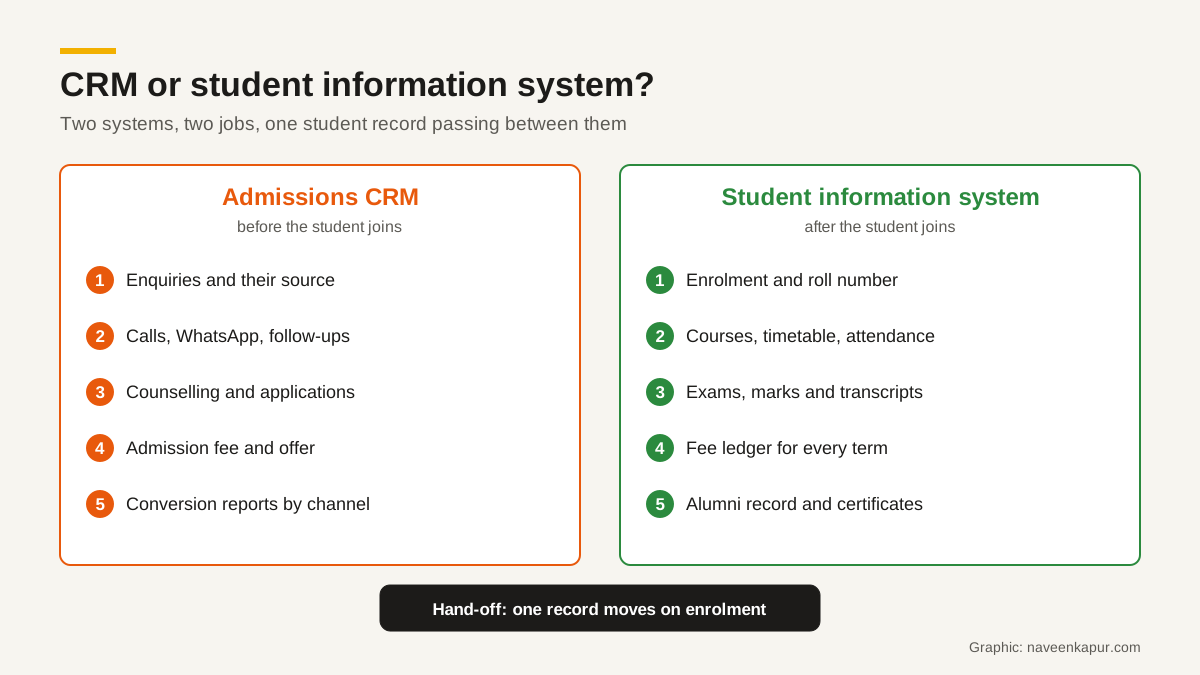
In practice an SIS holds the official academic record:
- Enrolment, roll number and programme
- Course registration, timetable and sections
- Attendance
- Exams, marks, grades and results
- Transcripts, degree and certificates
- Fee ledger for every term or semester
- Hostel, library and transport records, often as ERP modules
In India the SIS is often part of a wider college ERP that also runs HR, payroll, purchase and accounts.
What a CRM is
Salesforce's India education page says higher education CRM technology enables institutions to manage relationships with all of their customers. For most colleges that starts with prospective students. The CRM holds:
- Every enquiry, with source, medium and campaign
- Counsellor assignment and follow-up tasks
- Calls, WhatsApp messages and emails on the record
- Application, document and admission fee status
- Conversion and cost reports by channel and counsellor
- Later, alumni engagement, events and fundraising
A CRM is designed for many people at an early, uncertain stage, most of whom will never join. An SIS is designed for a smaller number of people with an official, auditable record. That difference in purpose is why one rarely does the other's job well. Our guide to CRM for colleges covers the CRM side in detail, and when a business needs a CRM consultant helps you decide whether to set it up in-house.
Which office needs which
| Office | Main system | Needs to see from the other |
|---|---|---|
| Marketing | CRM | Which enrolled students came from which campaign (from the SIS, via the CRM) |
| Admissions and counselling | CRM | Whether an admitted student actually registered for classes |
| Accounts | Accounting or ERP | Admission fee status in the CRM; term fees in the SIS |
| Registrar | SIS | Application documents and verified details from the CRM |
| Exam cell and departments | SIS | Usually nothing from the CRM |
| Alumni and placement | CRM (or SIS alumni module) | Graduation and programme data from the SIS |
How to connect them
1. One student ID
Create the student ID once, at application or admission, and use it in both systems. Without a shared ID, matching depends on names and phone numbers, and errors creep in.
2. A written field map
List every field that moves at enrolment: name, date of birth, parents' details, address, programme, category, documents, admission fee receipt, and the original lead source and campaign. For each, decide which system is the master. After enrolment, the SIS is usually the master for academic and personal details; the CRM keeps the marketing history.
3. A clear trigger
Decide the exact event that creates the student in the SIS: admission fee paid, documents verified, or registrar approval. Then automate it, through an integration or at least a scheduled import, so nobody retypes forms.
4. Status back to the CRM
Send key statuses back: enrolled, withdrawn, refunded, completed first semester. That lets marketing measure which channels bring students who stay, not just students who pay a deposit.

Indian records the SIS has to handle
Indian institutes also deal with national academic IDs. The Ministry of Education's APAAR (Automated Permanent Academic Account Registry) is a 12-digit ID that its official site calls a lifelong academic passport, added to DigiLocker after verification. For registration, institutions must obtain parental consent if the student is a minor. Schools also report student data on UDISE+, where each student gets a system-generated PEN (Permanent Education Number).
These belong in the SIS as part of the academic record, not in the marketing CRM. Under the Digital Personal Data Protection Act, 2023, the institution must process personal data for the purpose consent was given for, and protect it with reasonable security safeguards. Share only what each system needs.
A worked example: one student, two systems
Take a student who enquires about a BBA programme through a Google Ads campaign in February. The CRM creates her record with source google, medium cpc and the campaign name, the same values Google Analytics 4 reports for the visit. A counsellor calls the same day, logs the call, and sends the fee structure on WhatsApp. She applies in March, uploads her Class 12 marksheet and pays the admission fee in April. Every step is on one CRM record.
In June the registrar verifies her documents and approves enrolment. That approval is the trigger: the SIS creates her student record with the same student ID, her verified personal details, programme and admission fee receipt, and a read-only note of the original source and campaign. From July, the SIS runs her timetable, attendance and exams. The CRM receives one status back, enrolled, and later another, first semester completed.
A year later, marketing can report how many students from that February campaign enrolled and stayed, without asking anyone to match names across spreadsheets. That is the whole point of connecting the two systems.
Questions to ask your SIS or ERP vendor
- 1Can we create a student through an API or a scheduled import from our CRM, using our own student ID?
- 2Which fields can be imported, and which must be entered in the SIS?
- 3Can the SIS send statuses such as enrolled, withdrawn or completed back to another system?
- 4Can we store the original lead source as a read-only field?
- 5Who at your company can see our students' data, and where is it stored?
Mistakes to avoid
- Buying an ERP's admission module to chase leads, then finding it has no follow-up or source tracking.
- Letting counsellors edit official records in the SIS. Keep write access with the registrar.
- Two student IDs, one per system, matched by hand.
- Dropping the lead source at enrolment, so marketing can never measure results.
- Copying every field both ways. Move only what each office needs.
The registrar, accounts, admissions and marketing all touch the same student. Our guide to the admission management system shows how those four offices can work from one record, and the colleges and universities service page explains how such a setup is planned.