
Walk into the sales office of almost any Indian business, or the admissions office of almost any college, and you will see the same thing. The real conversations with customers and students are happening on WhatsApp, on the phones of individual staff. The CRM, if there is one, holds a name, a number and a status that someone updates when they remember.
That gap costs money. A WhatsApp CRM closes it by putting the conversation where the rest of the customer's history already lives. This article explains why that matters, what the main CRMs offer, and what to set up first.
What goes wrong when chats live on phones
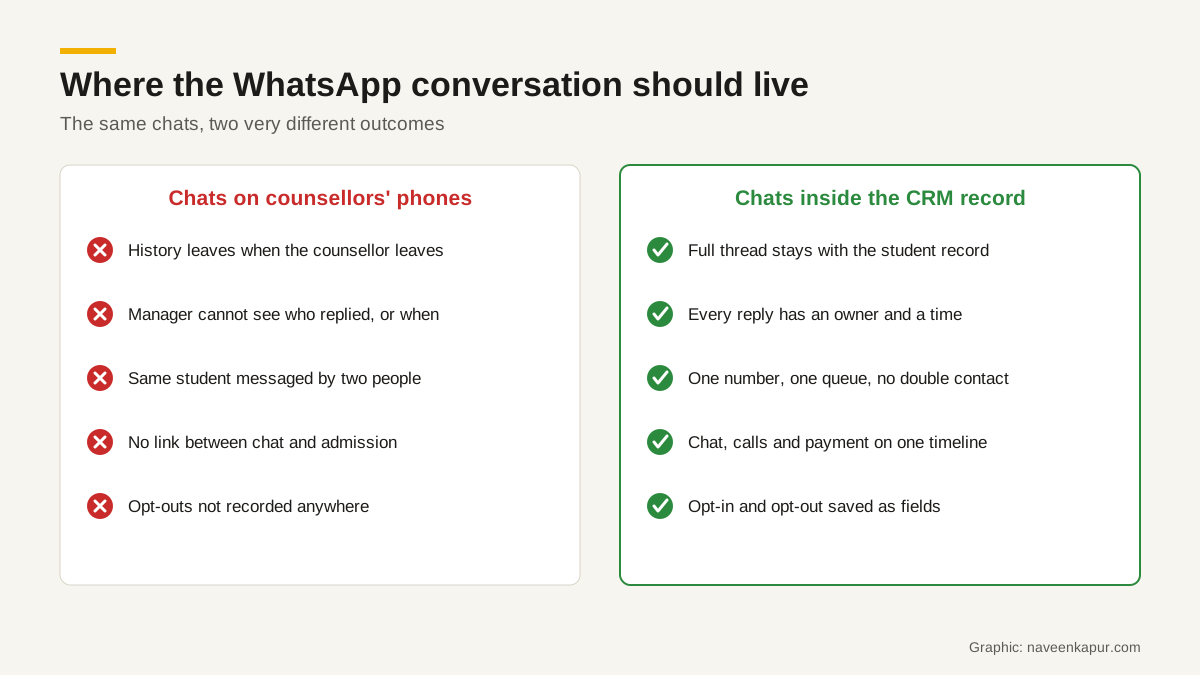
- The history leaves with the person. When a counsellor or salesperson resigns, months of conversations go with their phone.
- Managers cannot see the work. Nobody knows whether the hot lead from Tuesday got a reply, or what was promised.
- Double contact. Two people message the same customer with different prices or dates.
- No link to results. You cannot tell whether WhatsApp follow-up turned into a booking, a sale or an admission.
- Opt-outs get lost. A customer who said stop to one person gets a promotion from another. Meta's WhatsApp Business Messaging Policy requires businesses to respect every opt-out request.
What a WhatsApp CRM actually is
It is not a separate product category so much as a connection. Your business number runs on the WhatsApp Business Platform (the WhatsApp API), which Meta describes as a set of APIs for larger businesses, rather than an app on one phone. The CRM, or a connector your CRM vendor supports, sends and receives messages through it. Each message is then stored against the lead, contact or deal it belongs to.
Because it uses the platform, Meta's rules apply: opt-in before business-initiated messages, approved templates outside the 24-hour customer service window, and per-message pricing since 1 July 2025. Our guide to WhatsApp automation explains those rules in detail.
How the main CRMs handle WhatsApp
| CRM | What the vendor's own pages say | Check before you buy |
|---|---|---|
| Zoho CRM | Keeps a common repository of all customer interactions on WhatsApp, lets you create WhatsApp templates inside Zoho CRM, and add WhatsApp notifications to workflow rules | Which edition and connector you need, and how chats show on the lead record |
| Salesforce | Connect a WhatsApp account to Salesforce messaging; agents reply from the Service Console. A messaging user record can be linked to a contact, grouping that customer's messaging sessions. Marketing Cloud sends approved templates through Journey Builder | Which cloud and licence your use case needs: service conversations and marketing sends are set up differently |
| HubSpot | Messages to your WhatsApp number create threads in the conversations inbox and are logged on the contact's activity timeline when the number matches the contact's phone property | Needs Marketing Hub or Service Hub Professional or Enterprise; only messages after connection are synced; HubSpot lists a shared limit of 1,000 template messages per month |
Education CRMs such as LeadSquared also include WhatsApp in their admissions products. Whatever you choose, the test is the same: send a message from a test phone, and see it arrive on the right record, with the right owner, within seconds. Our LeadSquared review for colleges lists the other checks.
The five things to set up first
1. One clean phone number field
The phone number is the key that links a chat to a record. HubSpot's help page, for example, says the conversation is logged on the contact when the number matches the contact's phone property. Store mobile numbers in one format with the country code (+91 for India), and clean old data before you connect. A number saved as “98XXXXXXXX” in one record and “+91 98XXX XXXXX” in another creates duplicates.
2. Opt-in and opt-out as fields
Add fields for WhatsApp opt-in (yes or no), the date, and where it came from (web form, walk-in, ad). Add an opt-out flag that every automation checks before sending. This is your proof if anyone asks, and it protects your number's quality rating.
3. Ownership and routing
Decide who answers a new WhatsApp message: the lead's owner, a team queue, or a first-response desk. Set a time target for the first reply in business hours, and show unanswered chats on a manager's dashboard.
4. Approved templates for common moments
Prepare utility templates for the moments that happen every day: enquiry received, appointment or counselling slot confirmed, document missing, payment link, receipt. Meta says template review can take up to 24 hours, so do this before launch.
5. Reports that use the chat
Once chats are on records, you can report on them: first reply time, chats without a reply, conversion of WhatsApp leads compared with other sources. Join this with lead source data from Google Analytics 4 and your ad platforms, as covered in our GA4 setup checklist.

The rule that makes it work: the CRM owns the record
Many teams add a WhatsApp tool that has its own inbox, its own contact list and its own reports, separate from the CRM. That creates a second record for every customer. Within a month the two disagree.
The better design is simple. The CRM holds the one record for each lead or customer. WhatsApp, calls, email, web forms and payments all write to that record. Chatbots and AI tools can read the history and draft replies, but the record, the owner and the status live in the CRM. When someone asks “what happened with this student?”, there is one place to look.
Write this rule down before you buy any tool, and test every vendor against it. If a product cannot write the conversation back to your CRM record, it is a second CRM, however good its inbox looks.
Who needs a WhatsApp CRM?
Any team where more than one or two people talk to customers on WhatsApp, and where a lost conversation means a lost sale or admission: colleges and coaching institutes, real estate, hotels and restaurants taking bookings, clinics, B2B sales teams. A single owner replying to a few chats a day can manage with the WhatsApp Business app; Meta describes that app as ideal for small businesses. For a small local business, a complete Google Business Profile with a WhatsApp-ready number often matters more than any CRM at first.
If you are planning one, start with your process on paper: where leads come from, who replies, what happens next. Then pick the CRM and connector that fit it. The CRM development service page describes how this kind of setup is designed and built, and when a business needs a CRM consultant helps you decide whether to do it yourself.