Call a student who enquired about an MBA programme and you may get no answer. Send a WhatsApp message and there is a good chance you get a reply within the hour. That is why every admissions and sales team in India wants WhatsApp automation: an enquiry arrives, a message goes out in seconds, reminders follow, and the team spends its time on people who reply.
Done badly, it gets your number blocked, your templates rejected and your brand reported as spam. This guide explains the rules Meta sets for the WhatsApp Business Platform, as written on its developer pages in October 2026, and a follow-up plan that teams actually keep using.
App or platform: which one automates?
Meta offers two products. The WhatsApp Business app is free and, in Meta's words, ideal for small businesses. One person, one phone, typing replies. The WhatsApp Business Platform, also called the WhatsApp API, is described by Meta as a collection of APIs for larger businesses that offers more automation features. It is not an app at all. Your CRM, a chatbot tool or a provider connects to it, usually through Meta's Cloud API.
If you want messages to go out automatically when a form is filled, or reminders to run on a schedule, you need the platform. The older On-Premises API was switched off on 23 October 2025, so new setups use the Cloud API.
Rule 1: opt-in comes first
Meta's opt-in guidance says a business must obtain opt-in before sending proactive, business-initiated messages. The opt-in must clearly state the name of the business the person is agreeing to hear from, and people must be told how to opt out. The WhatsApp Business Messaging Policy adds that you must respect every request to stop, whether it comes on WhatsApp or somewhere else.
In practice, for an enquiry form:
- Add a clear, unticked checkbox: “I agree to receive admission updates from [Institute name] on WhatsApp.”
- Store the answer, the date and the form in the CRM record, not only in the form tool.
- Mention the opt-out in the first message, for example “Reply STOP to stop these messages.”
- When someone opts out, update the record so no automation sends again.
For students under 18, India's Digital Personal Data Protection Act, 2023 requires verifiable consent of a parent before processing a child's personal data. Schools and colleges admitting minors should collect the parent's consent and keep the record.
Rule 2: templates outside the window
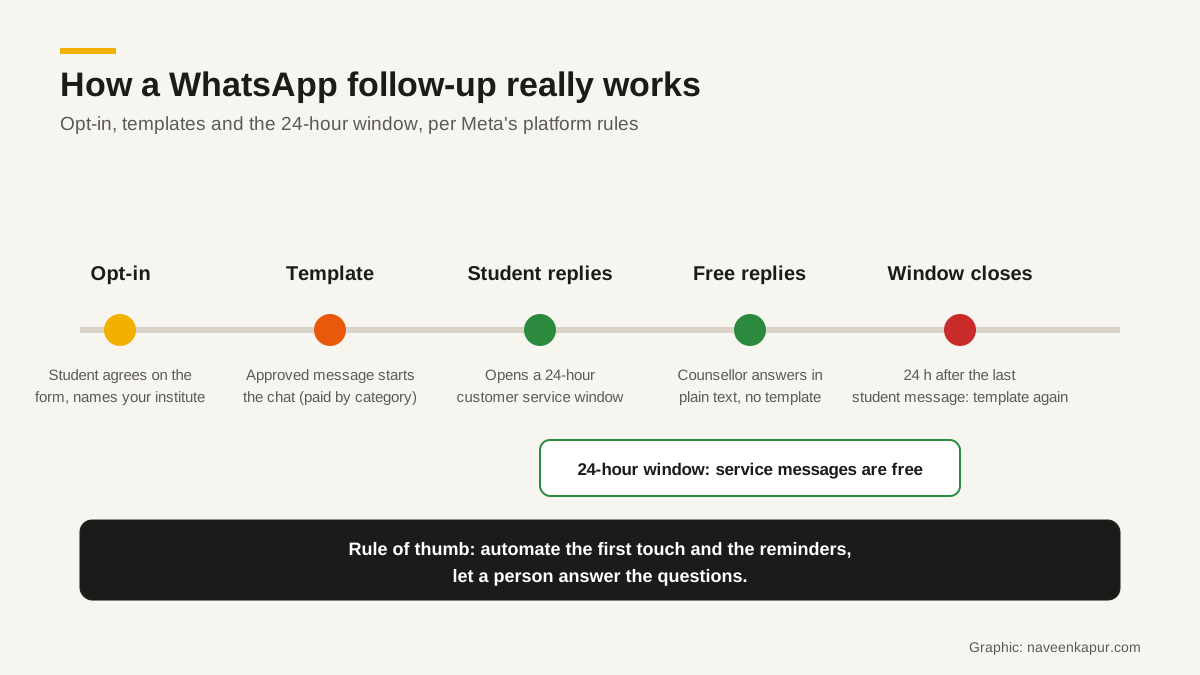
When your business starts the conversation, you must use an approved template. Meta's pricing page says template messages are the only type that can be sent outside a customer service window. Templates fall into three categories:
| Category | What Meta says it is for | Admissions or sales example |
|---|---|---|
| Marketing | Awareness, sales and retargeting | Scholarship test dates, new batch announcement, open day invite |
| Utility | Following up on a user's action or request | Application received, document missing, fee receipt, counselling slot confirmed |
| Authentication | Verifying a user's identity | One-time password for the student portal login |
A template must have APPROVED status before it can be sent, and Meta says review can take up to 24 hours. Write templates before the season starts, not on the day of the open house. Keep them short, use variables for the name and programme, and choose the category honestly; putting a promotion in a utility template is likely to be rejected or recategorised.
Rule 3: the 24-hour window and what it costs
When a person messages your business, Meta opens a 24-hour customer service window. It stays open until 24 hours after their last message. Inside it, you can reply with normal, free-form messages, and Meta says all non-template messages are free. Utility templates delivered inside an open window are free too.
Pricing changed on 1 July 2025, when Meta moved from conversation-based pricing to charging per message. Templates are charged by category and by the recipient's country. Meta says it may change prices only on the first day of a quarter. Indian businesses could move WhatsApp billing to rupees from 1 January 2026, and eligible accounts need to switch by 31 December 2026. Check the current rate card on Meta's pricing page before you budget, and plan WhatsApp alongside your other channels, as a digital marketing consultant would.
One more window matters for paid campaigns. When someone messages you from a Click to WhatsApp ad or a Facebook Page button, and you reply within 24 hours, a free entry point window opens and all messages, including templates, are free for 72 hours.
Rule 4: messaging limits grow with quality
Meta limits how many unique people a business can reach with business-initiated messages in a moving 24-hour period. Newly created business portfolios start at 250. Verifying the business, or sending good-quality messages to enough people, moves you to 2,000. Above that, the limit rises a level at a time (10,000, 100,000, then unlimited) when your messages are high quality and you have used at least half your limit in the last seven days. The limit is shared across all phone numbers in the business portfolio.
Meta may also cap how many marketing templates one person receives from businesses, based on how likely they are to engage. Blocked messages come back as failed with error code 131049. Sending more marketing messages does not always reach more people.

A follow-up plan teams actually use
Here is a simple sequence for an admissions enquiry. The same pattern works for a sales enquiry, with a demo or site visit in place of counselling.
- 1Minute 0 (utility): thank the student, confirm the programme, name the counsellor, offer two call times.
- 2Same day: the counsellor calls. If the student replies on WhatsApp, the counsellor answers inside the window in plain text.
- 3Day 1, no reply (utility): a short reminder with the brochure or fee structure they asked for.
- 4Day 3: a second call attempt, logged on the record.
- 5Before deadlines (marketing, only with opt-in): test dates, last date to apply, scholarship windows.
- 6After application (utility): document checklist, missing documents, payment link, receipt.
Notice what is not automated: answering questions about fees, hostels or placements. A bot can collect the question and route it, but the answer should come from a person who can read the student's history. That history needs to live in your CRM, which is the subject of our guide to WhatsApp CRM.
Common mistakes to avoid
- Buying a database and messaging it. There is no opt-in, and your quality rating will fall fast.
- Sending from counsellors' personal numbers. The history leaves with the person, and nothing reaches the CRM.
- Promotions in utility templates. They are likely to be rejected, and they erode trust.
- A bot with no way to reach a human. Students drop off when they cannot ask a real question.
- No link to the lead source. If the WhatsApp reply is not tied to the campaign, you cannot judge what the campaign was worth. See GA4 setup for lead sources.
Set up well, WhatsApp automation shortens the time between enquiry and first conversation, which is where most admissions and sales are won or lost. For how this fits into a full CRM setup, see the CRM development service page, and for the bigger picture of capturing every lead, read when a business needs a CRM consultant.