Most colleges in India already have something they call a CRM. Often it is a spreadsheet shared between counsellors, a portal's lead dashboard, an inbox, and a WhatsApp group. Each holds part of the picture. None can answer the question that matters at the end of the season: which of our channels produced students who actually joined, and at what cost?
A proper CRM for colleges answers that question. This guide sets out what it must do, in the order a student moves through it. It applies whether you buy an education CRM such as LeadSquared, Meritto or ExtraaEdge, or configure Salesforce, Zoho or HubSpot. Our LeadSquared review compares the options.
1. Capture every enquiry, with its source
Indian colleges get enquiries from more places than most businesses:
- The college website and landing pages
- Google Ads and Meta lead forms
- Education portals and directories
- Education fairs, school visits and roadshows
- Phone calls and missed calls
- WhatsApp messages and walk-ins
- Referrals from students, alumni and agents
Each one needs a route into the CRM that creates the record automatically, or a fast form for staff to log it the same day. The record must store the source (portal, Google, fair), the medium (paid, organic, event) and the campaign at the moment it is created. For website enquiries, UTM parameters carry this information into Google Analytics 4; our GA4 setup checklist explains how to keep them clean.
2. Remove duplicates before anyone calls
The same student will often enquire three or four times: your form, two portals and a fair. Set a duplicate rule on mobile number (stored with country code) and email. Decide which record wins and who owns it, usually the first counsellor assigned, and keep every source in the history so you know the student came through several channels.
3. Assign a counsellor and a time limit
Each new enquiry should get an owner automatically, by programme, city, language or in turn. Then set a rule for first contact, for example a call within two working hours, and alert the team lead when it is missed. The report that saves the most money is simple: untouched enquiries per counsellor, today.
4. Log every conversation on the record
Counselling happens on calls and WhatsApp. If those are not logged on the student's record, the next person has no idea what was said. Connect telephony so calls are recorded with duration and outcome, and connect WhatsApp through the WhatsApp Business Platform so messages land on the record. Our guide to WhatsApp CRM explains why this matters, and WhatsApp automation for admissions covers templates, opt-in and the 24-hour window.
5. Track six clear stages
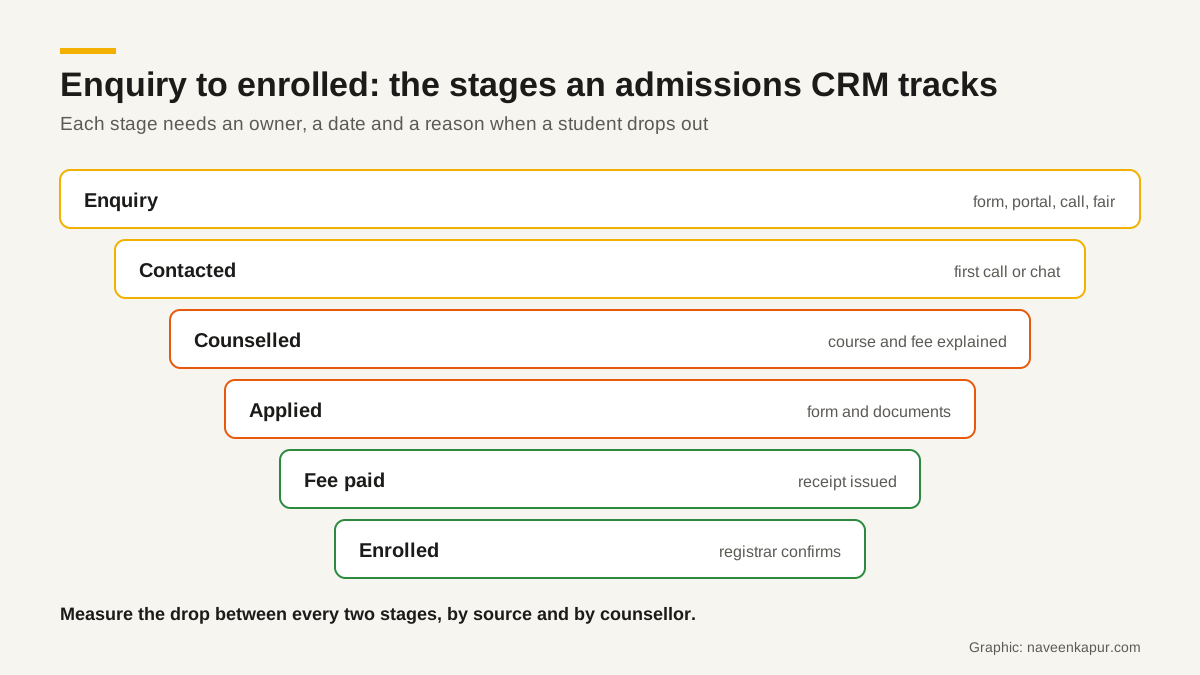
| Stage | What it means | Who moves it |
|---|---|---|
| Enquiry | A new record with source and campaign | Automatic |
| Contacted | A real two-way conversation happened | Counsellor |
| Counselled | Programme, eligibility and fees explained | Counsellor |
| Applied | Application form submitted with documents | Student portal or counsellor |
| Fee paid | Admission or seat fee received and receipted | Accounts (or payment gateway) |
| Enrolled | Registrar has confirmed the seat | Registrar |
Two rules keep the stages honest. First, every stage change has a date, so you can measure how long students take. Second, a student who drops out gets a reason from a short list (fee, distance, chose another college, not eligible, no response). After one season, those reasons tell you more than any survey.
Notice that the last two stages belong to other offices. A CRM that stops at “Applied” cannot tell you which leads became students. The connection between admissions, accounts and the registrar is covered in our guide to closing the four-office gap.

6. Report on admissions, not leads
Lead counts are easy to grow and easy to misread. A portal can send many enquiries with a low join rate; a smaller channel can produce more students. The reports an admissions head should see every week:
- Enquiries, applications, fee paid and enrolled, by source and campaign
- Conversion between each pair of stages, by counsellor
- Cost per application and cost per admission, by channel (spend from your ad accounts and portal contracts)
- Average time from enquiry to first contact, and from enquiry to fee paid
- Drop-out reasons, by programme
When fee-paid status is in the CRM, you can also send admissions back to Google Ads as offline conversions, so campaigns learn from real students rather than form fills. That is part of what a Google Ads expert should set up.
7. Consent and data protection
India's Digital Personal Data Protection Act, 2023 defines a child as anyone who has not completed 18 years. Section 9 requires a data fiduciary to obtain verifiable consent of the parent before processing a child's personal data, and bars tracking, behavioural monitoring and targeted advertising directed at children. The DPDP Rules, 2025 were notified on 14 November 2025 with an 18-month phased timeline. Many undergraduate applicants are 17 when they enquire, so your forms and CRM should record whose consent was given, when and for what.
Consent under the Act must be free, specific, informed, unconditional and unambiguous, with a clear affirmative action. A pre-ticked box does not meet that. Keep WhatsApp and marketing consent as separate fields from consent to process an application.
8. Hand over to the student information system
Once a student enrols, day-to-day academic life (timetable, attendance, exams, transcripts) moves to the student information system or ERP. The CRM should pass the record across with its history and source intact, so the institute can later see which channels produce students who stay and graduate. Read student information system vs CRM for how the two connect.
Finally, give the CRM an owner. One person in the admissions office should be responsible for its data quality, users and reports, with time set aside for it. Without an owner, even a well-built CRM slowly fills with duplicates and blank fields.
Before you buy
- 1Write down your sources, programmes, counsellor count and the six stages above.
- 2Ask each vendor to demo with 50 of your real enquiries, names masked.
- 3Test duplicate handling, assignment, call and WhatsApp logging live.
- 4Check how fee-paid and enrolled status will reach the CRM.
- 5Check consent fields and how a parent's consent is recorded.
- 6Ask for a full three-year cost and the export format if you leave.
A college CRM is worth its cost when it changes behaviour: every enquiry gets a call, every conversation is visible, and every rupee of marketing can be traced to students who joined. If you want help designing one, the colleges and universities service page describes how that work is done.