
Most business owners do not need “an AI strategy”. They need fewer leads going cold, faster replies and less time lost to copying data between apps. That is what AI automation for business is good at today, especially in marketing and sales teams where the same steps repeat hundreds of times a week.
This guide is for owners and managers deciding where to begin. It covers which tasks to automate first, what to keep human, how to measure results, what it will cost, the risks, and the questions to ask an AI automation consultant before you hire one. If you want the narrower question of what AI agents should and should not do inside the CRM itself, read our companion guide on AI CRM.
What AI automation for business really means
Plain automation follows fixed rules: when a form is submitted, create a lead and send an email. AI automation adds a step that reads or writes language: understanding a free-text enquiry, drafting a reply, summarising a call, or picking the right next step from a few options. The best setups combine both. Rules handle anything that must be exact (who owns the lead, what the price is). AI handles anything that is language (what the customer actually asked).
Sales automation and marketing automation are not new. What has changed is that the first reply, the summary and the follow-up draft can now be written by AI, which used to take a person most of the day.
What to automate first: five tasks in order
Start where the work is repeated, the rules are clear and a mistake is easy to spot and fix. This order works for most marketing and sales teams because each step feeds the next.
1. Lead capture and routing
Every enquiry from your website, ads, WhatsApp, portals and phone should land in one CRM with its source, campaign and an owner, without anyone typing it in. AI helps here by reading free-text enquiries and tagging the product, city or urgency, so routing rules can send the lead to the right person. Check that duplicates are caught on mobile number and email.
2. The first reply
Speed of first reply is where most businesses lose leads. An automated first reply within minutes, by WhatsApp or email, should confirm the enquiry, answer the obvious question if it can, and offer a time to talk. On WhatsApp, Meta requires opt-in that names your business, and opt-outs must be honoured. Our guide to WhatsApp automation explains templates and the 24-hour window.
3. Reminders and follow-ups
Reminders for booked calls, demos, visits and payments due; nudges to staff when a lead has not been touched; a follow-up when a quote has had no reply. These are rule-based and safe to automate fully once the message templates are approved.
4. Summaries
AI can turn a call recording, a long chat or an email thread into a short note on the CRM record: what the customer wants, objections, next step and date. This saves staff time and means a manager or a new salesperson can pick up any lead in a minute. Have staff check summaries for the first few weeks.
5. Reporting
A weekly report that arrives on its own: leads by source, first-reply time, untouched leads per person, meetings booked, deals won and cost per lead by campaign. AI can add a short written explanation of what changed. The numbers themselves must come from the CRM and your analytics, set up properly in Google Analytics 4, not from AI guessing.
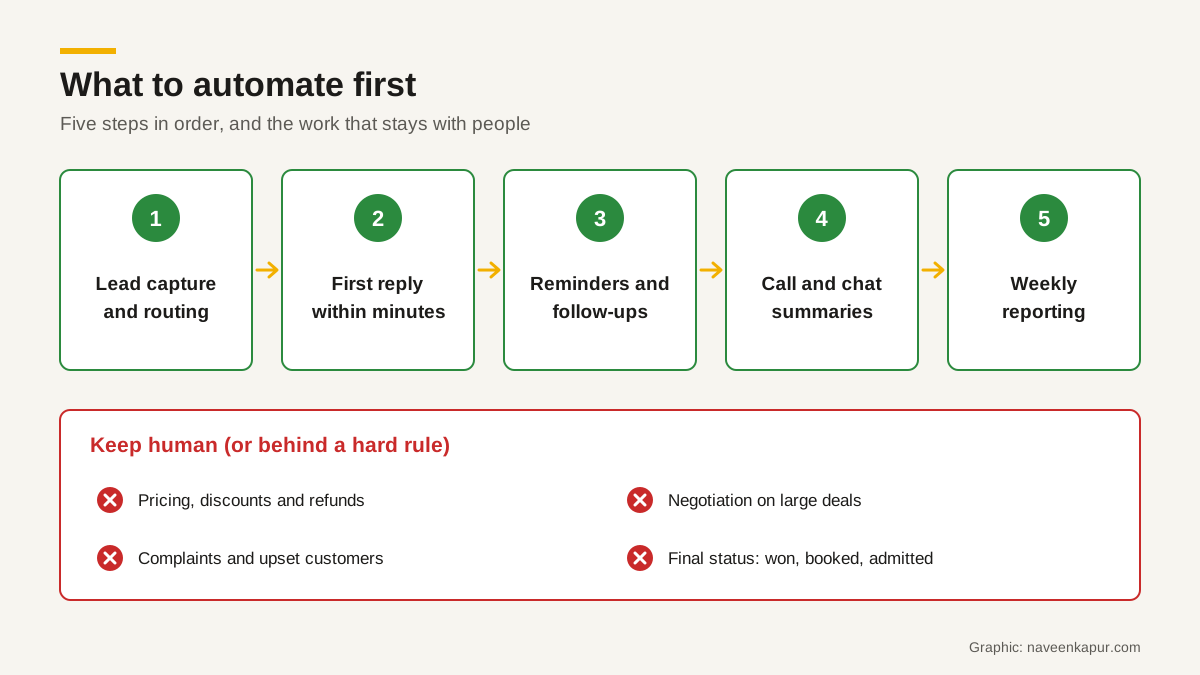
What to keep human
- Pricing, discounts and refunds. An AI that invents a discount to close a sale costs you real money.
- Negotiation and high-value deals. Customers want a person when the amount is large.
- Complaints and anything emotional. Hand these to a person immediately.
- Final status decisions. Marking a deal won, a booking confirmed or an application accepted should follow a hard rule or a person, never an AI’s guess.
- Anything legal or medical. Do not let an AI give advice that needs a qualified person.
A simple example of a hard rule for a booking business: a booking is confirmed only after the payment is verified on the server, so no message, from a customer or an automation, can mark a booking as paid. Read why in payment gateway integration.
How to measure results
Before you switch anything on, write down four numbers for the last four weeks. Then compare the same numbers four and eight weeks after launch.
| Measure | Where it comes from | What good looks like |
|---|---|---|
| First-reply time | CRM timestamps: lead created vs first message sent | Falls from hours to minutes |
| Untouched leads | CRM report: leads with no activity after 24 hours | Falls close to zero |
| Meetings or visits booked | CRM or calendar | Rises, or stays steady with less staff time |
| Hours spent on admin | Short weekly estimate by each team member | Falls, and the time moves to selling |
| Wrong or escalated AI answers | Review of logged conversations | Low, and falling as the knowledge base improves |
Be careful with credit. If you also changed your ads or your price in the same month, you cannot say the automation alone caused the change.

Costs to plan for
The software licence is usually the smallest surprise. Plan for all of these:
- Tool subscriptions. CRM, automation platform, WhatsApp provider, calendar or telephony tools, usually charged per user or per month.
- AI usage. If your automation calls an AI model directly, providers bill by tokens (pieces of text). OpenAI and Anthropic both publish prices per million tokens, with input and output priced separately and output usually costing more. Both also list a 50% discount for batch processing of work that is not urgent. Long prompts and long replies cost more, so keep them short.
- AI features sold by the CRM vendor. Some vendors charge per outcome. HubSpot, for example, lists its Customer Agent at $0.50 per resolved conversation and its Prospecting Agent at $1.00 per lead recommended for outreach, paid in HubSpot Credits.
- Messaging fees. Meta charges for WhatsApp template messages when they are delivered, at rates that depend on the template category and the recipient’s country.
- Setup and upkeep. Mapping the process, cleaning data, writing templates and the knowledge base, testing, training staff, and reviewing logs every week after launch.
Ask for a three-year cost that includes all of the above. Prices change, so check each provider’s pricing page on the day you budget.
Risks and how to reduce them
Wrong answers
AI can state a wrong fee, a wrong date or a policy you do not have, and sound confident doing it. Limit it to an approved knowledge base, test it on 30 to 50 real questions before launch, log every conversation, and set clear hand-over rules to a person.
Consent
Only message people who have opted in, store the opt-in with its date and source, and make opting out easy. India’s Digital Personal Data Protection Act, 2023 says consent must be “free, specific, informed, unconditional and unambiguous”, and that withdrawing it must be as easy as giving it.
Data handling
Every tool you connect gets a copy of some customer data. Send each tool only the fields it needs, sign a proper contract with each provider, ask whether your data is used to train models, and make sure a deletion in the CRM reaches the other tools too. The DPDP Act requires reasonable security safeguards, including for data your processors handle.
How to choose an AI automation consultant
Whether you call them an AI automation consultant, a marketing automation consultant or a CRM consultant, the good ones start with your process, not a tool. Ask these questions before you sign:
- 1What will you look at before recommending a tool? (A good answer: your lead sources, your CRM data, your team’s day and your current numbers.)
- 2Which tasks would you not automate for us, and why?
- 3How will we measure success, and what baseline will you take first?
- 4Where will every conversation and action be logged, and who can see it?
- 5How does the hand-over from AI to a person work, and how fast?
- 6How do you handle opt-in, opt-out and personal data under the DPDP Act?
- 7What is the full cost for three years, including AI usage, messaging and upkeep?
- 8If we stop working with you, what do we own: workflows, prompts, templates and data, in what format?
Be wary of anyone who promises a fixed percentage increase in sales before seeing your data, or who wants to automate pricing and status changes on day one. Our guide on when a business needs a CRM consultant covers more of the warning signs.
Where to start this week
List every step between a lead arriving and a sale closing, mark each one as rule-based, language-based or judgement, and take your baseline numbers. The rule-based and language-based steps near the start of that list are your first automation projects. If you want help designing the CRM and automations around that list, the CRM development service page explains how that work is done.