Ask a business owner where last month's leads came from and you will often hear, “GA4 says Direct.” That usually means the setup is the problem, not the marketing. Payment gateways show up as referrals, staff visits inflate traffic, campaign links have no tags, and form submissions are not tracked at all.
This checklist is for businesses that generate leads: enquiry forms, calls, WhatsApp clicks, bookings. It follows Google's own Analytics Help pages, checked on 15 October 2026, in the order the work should be done. For what GA4 is and how it replaced Universal Analytics, read our Google Analytics 4 guide first.
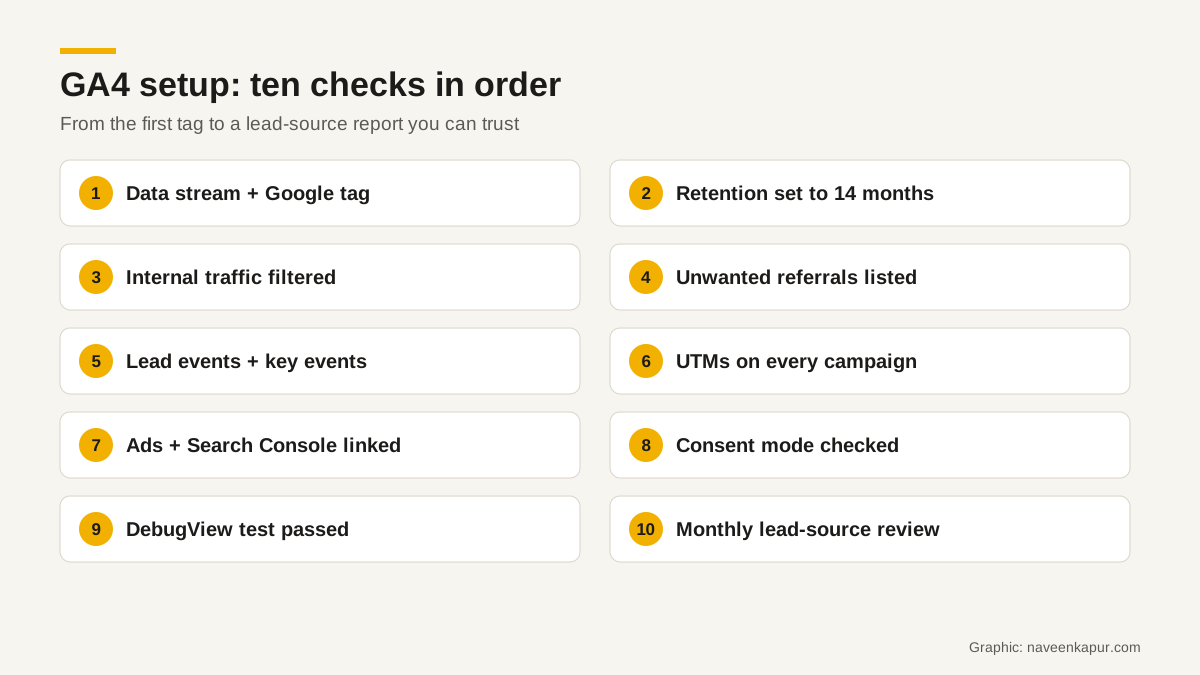
1. Data stream and the Google tag
Create one web data stream for your site and install the Google tag on every page, directly or through Google Tag Manager. Google's Tag Manager help explains the difference: gtag.js suits people comfortable changing site code and sends data only to Google services, while Tag Manager manages tags without changing the site's code, including third-party tags.
One 2026 change to note: Google announced on 20 August 2026 that Google tags will be upgraded to fully capable Google Tag Manager containers, without changing the tags' behaviour on the page. If you manage tags in two places today, plan to bring them into one.
2. Data retention: 14 months
Under Admin, Data settings, Data retention, set event data retention to 14 months. Standard properties can choose 2 or 14 months (longer options exist only on Analytics 360). Google notes that retention affects explorations and funnel reports, not standard aggregated reports, and that changes apply going forward. Do it on day one.
3. Internal traffic
Your team, your agency and your developers visit the site all day. Define internal traffic by IP address in the tag settings; GA4 then adds a traffic_type parameter to matching events. Create a data filter to exclude it, keep it in Testing for a few days to check, then make it Active. Google warns that an active filter makes permanent changes to incoming data, so test first.
4. Unwanted referrals
If customers pay or book through a gateway and return to your site, GA4 may credit the gateway as the source. List such domains under Admin, Data streams, Configure tag settings, List unwanted referrals. If you run more than one domain (say a main site and a separate booking site), set up cross-domain measurement so a visitor is counted once as they move between them.
5. Lead events and key events
Enhanced measurement collects page views, scrolls (at 90% depth), outbound clicks, site search, video engagement, file downloads and form interactions automatically. Those are useful, but a generic form_submit does not tell you a real lead came in.
Google's recommended events for lead generation map neatly to a sales pipeline:
| Event | When Google says to send it | Where it comes from |
|---|---|---|
| generate_lead | A user submits a form online or submits information offline | Website (thank-you page or form success) |
| working_lead | A user contacts or is contacted by a representative | CRM |
| qualify_lead | A user is marked as fitting the criteria to become a qualified lead | CRM |
| disqualify_lead | A user is marked as disqualified | CRM |
| close_convert_lead | A user became a converted lead (a customer) | CRM |
| close_unconvert_lead | A user is marked as not becoming a converted lead | CRM |
Send generate_lead from the website for every genuine enquiry, and add separate events for calls (click on a tel: link) and WhatsApp clicks if they matter to you. Then mark the important ones as key events: Admin, Data display, Events, and click the star. Google renamed conversions to key events on 21 March 2024; a standard property can have up to 30. The later-stage events usually come from your CRM, which is why the CRM must capture the lead source; see when a business needs a CRM consultant.
6. UTM tags on every campaign
GA4 reads campaign details from UTM parameters. Google's help page says you should always use utm_source, utm_medium and utm_campaign, and that missing UTM parameters result in (not set) in reports. Agree a naming sheet (lower case, no spaces) and use it for every email, WhatsApp, social post, QR code and portal link.
Channel grouping depends on these values. GA4's default channel group now has 19 channels, including an AI Assistant channel added on 13 May 2026 for traffic from popular AI assistants. If utm_medium does not match the rules, traffic falls into Unassigned.
7. Link Google Ads and Search Console
Under Admin, Product links, link your Google Ads account (you need edit access in GA4 and admin access in Google Ads). Then create Google Ads conversions from your GA4 key events, with auto-tagging on. Link Search Console too; Google says the integration lets you analyse organic search for your site, and one web stream links to one Search Console property. For the ads side, our guide to hiring a Google Ads expert explains what good conversion tracking looks like.
8. Consent mode
Consent mode tells Google tags how to behave based on a visitor's consent choices. In basic mode, tags do not load until the visitor interacts with the consent banner; in advanced mode, tags load on page open and adjust to the choice. Consent mode v2 uses four signals: ad_storage, analytics_storage, ad_user_data and ad_personalization. Google also said that from 15 June 2026, Analytics moves to using consent mode (within Google Ads) as the single control for data, and Google signals no longer governs ads cookie and ID collection. Our article on consent mode v2 explains where it is required.
9. Test in DebugView
Before you trust any report, test. Turn on debug mode with Tag Assistant or Tag Manager's preview, then open DebugView in GA4, which Google says shows the events and user properties Analytics collects from a user in real time. Submit a test enquiry, click the phone and WhatsApp buttons, and check each event arrives once, with the right parameters.
10. Monthly lead-source review
- Key events by session source / medium and by campaign
- Leads from the CRM for the same period, by source (they should be close; investigate big gaps)
- Share of traffic in (not set) or Unassigned (should fall over time)
- Landing pages with traffic but no leads
- Search Console queries bringing visits to service pages
A note on old data
Standard Universal Analytics properties stopped processing data on 1 July 2023, and access to Universal Analytics data in the interface and API ended on 1 July 2024. Google says unexported data is permanently deleted. Year-on-year comparisons now rely on GA4 data and whatever you exported before that date.
A clean GA4 setup takes a few hours and saves months of arguments about which marketing works. Do these ten checks once, re-check them every quarter, and connect GA4 to your CRM so leads become measurable sales. For colleges and businesses running WhatsApp follow-up, read WhatsApp automation next.