Admissions teams in India often describe the same year. Ads start when the board results come out, portal leads arrive by the thousand, the counselling team cannot call them all, and by the end the cost per admission is higher than last year. Nobody can say which channel brought the students who actually paid.
This guide sets out a 12-month education marketing plan for colleges and universities. It is written for admissions heads, marketing managers and management teams who want digital marketing for education to bring enrolled students, not just form fills. It is a template: adjust the months to your own programmes.
Start from your own calendar
Every institute has a different year. Undergraduate programmes depend on board results and, for many universities, on entrance tests such as CUET run by the National Testing Agency. Management, engineering, law and nursing programmes follow their own exams and counselling rounds. Postgraduate and working-professional programmes may have two intakes. Exam and result dates change each year, so take them from the official notices of the testing agency or regulator, not from last year's plan.
So the plan below uses months counted back from the start of the session (Month 1 is about 12 months before classes begin). Mark your own key dates on it first: entrance exam dates, result dates, your application deadline, counselling rounds and the fee deadline.
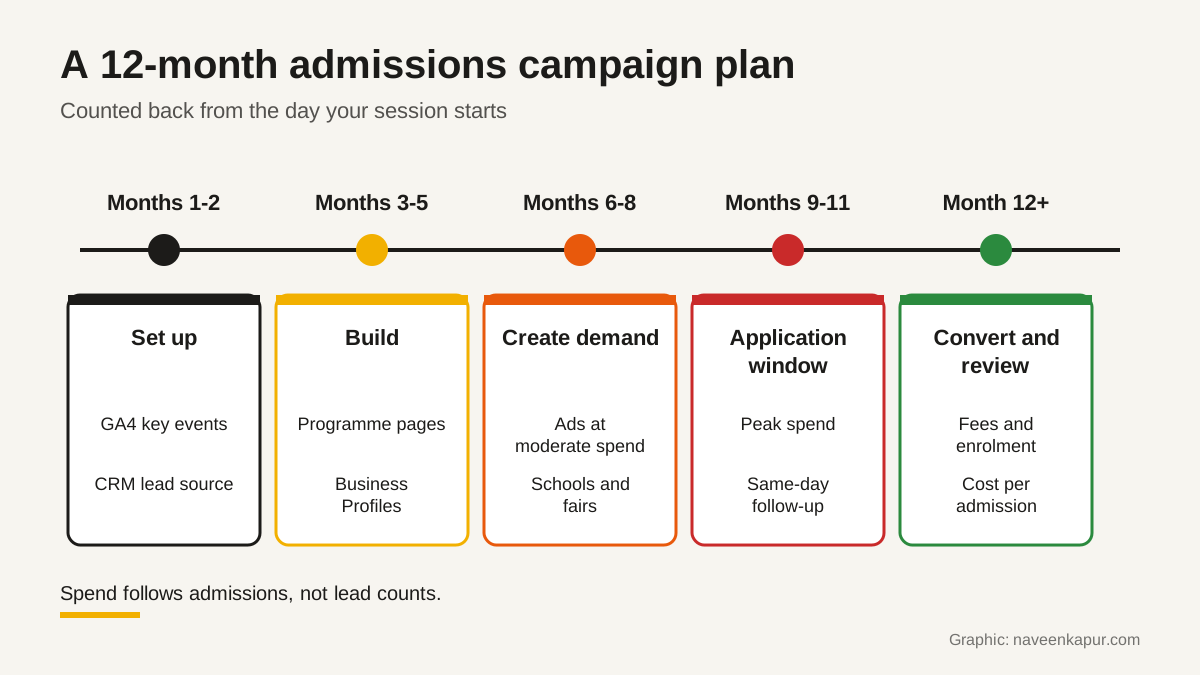
Months 1 to 2: tracking and the CRM
Nothing else in the plan can be judged without this step. If you cannot see which channel produced the students who paid fees, you will repeat last year's spend.
- GA4 key events: mark the enquiry form submission, the WhatsApp click, the phone click and the application start as key events. Google's help says a standard GA4 property can have up to 30 key events, so be selective.
- Lead source in the CRM: every lead should keep its first source (Google Ads campaign, Meta form, portal, school visit, walk-in) all the way to admission. Our guide to CRM for colleges covers what an admissions CRM must hold.
- Portal leads: if you buy leads from education portals, import them into the same CRM with the portal named as the source.
- Ad platforms see admissions: send admission or fee-paid events back to Google Ads so bidding learns from real students. Offline conversion tracking explains the steps.
Months 3 to 5: pages, profiles and content
Students and parents compare courses on phones, often late at night, and they want specific answers: eligibility, fees, duration, placements, hostel, scholarship rules and the last date to apply. Build or fix one page per programme that answers these plainly, with a short enquiry form and a WhatsApp option.
Set up or clean the Google Business Profile for each campus. Google's guidelines allow public-facing departments that operate as distinct entities, such as a separate school or department with its own entrance, to have their own profiles, with a different name from the main institute and their own categories. Do not create profiles for internal sections that students cannot visit.
This is also the time for content that answers real questions: course comparisons, career paths, fee and scholarship explainers, and student stories with their written consent. Content written now has months to be found before the application window.
Months 6 to 8: build demand
Start paid campaigns at moderate budgets: search ads on programme and career terms, video and social ads that show campus life and faculty, and remarketing to people who visited programme pages. Alongside, run school outreach, career talks and education fairs, and give each event its own source code in the CRM so its leads can be counted later.
Google Ads lead form assets can capture enquiries without a landing page. Google's help says they work in Search and Performance Max campaigns, need a good policy compliance history, and that leads can only be downloaded as CSV for the last 30 days, while Google Ads stores them for 60 days. Connect the form to your CRM or download leads often so none are lost.
Months 9 to 11: the application window
This is when students decide, and when most budget should go. But extra spend only helps if the team can respond. Before you raise budgets, check:
- Speed of first contact: new enquiries get a call or WhatsApp reply the same day, with lead routing set so no lead sits unassigned.
- WhatsApp consent: Meta requires businesses to clearly state that a person is opting in to receive messages and to name the business they are opting in to. Collect this on the form, not afterwards.
- Campus visits: the visit is where many admissions are won. Book, remind and record every visit in the CRM; campus visit tracking explains why this stage is lost so often.
- Counsellor scripts: answers on fees, scholarships and eligibility match what the website says.
| Channel | Main job in the window | Measure it by |
|---|---|---|
| Google search ads | Catch students already searching for the programme | Cost per application and per admission |
| Meta and video ads | Reach parents and students who are still comparing | Enquiry-to-visit rate, not just cost per lead |
| Education portals | Volume of comparison-stage leads | Admissions per portal, after duplicates are removed |
| Google Business Profile | Directions, calls and campus visits | Calls and direction requests per month |
| WhatsApp and calls | Fast follow-up and visit booking | Share of leads contacted the same day |
| Fairs and school visits | Trust and face-to-face counselling | Admissions per event, by source code |

Month 12 and after: fees, enrolment and review
An application is not an admission, and an admission is not a student until the fee is paid and classes begin. Keep reminders running for document submission and fee payment, and treat refunds and withdrawals as a stage in the CRM, not a spreadsheet. The fee receipt is the real finish line.
Then review the year by channel. Work out cost per admission for each source, and look at the stage where each channel loses people: enquiry to contact, contact to visit, visit to application, application to fee paid. Next year's budget should follow admissions, not lead counts.
Rules that protect the institute
- Honest ad claims: Google Ads' misrepresentation policy does not allow claims that entice users with an improbable result. Avoid '100% placement' or salary promises you cannot show, and make sure any scholarship or fee offer in an ad is available on the landing page.
- Consent and data: India's Digital Personal Data Protection Act, 2023 requires a clear notice and consent for personal data, with an easy way to withdraw. Check with your lawyer which duties under the DPDP Rules apply to you now.
- No messages without opt-in: buying phone number lists and messaging them on WhatsApp breaks Meta's opt-in rules and risks the number being blocked.
Questions to ask an agency or consultant
- 1How will you track each lead's source through to fee payment, and who sets that up?
- 2Which months will you spend the most in, and why, for our programmes?
- 3How will you report cost per admission, not only cost per lead?
- 4How will leads reach our counsellors, and how fast?
- 5How do you collect WhatsApp opt-in, and what will the first message say?
- 6Which ad claims will you avoid, and who signs off the creative?
- 7Will we own the ad accounts, Analytics, Business Profiles and all lead data?
If you want a plan like this built for your institute, with the tracking and CRM set up first, the service box below explains how we work. The colleges and universities service page has more detail on admissions systems.