Ten minutes before a lecture, the projector in Room 204 will not switch on. The faculty member tells the attendant, the attendant tells the admin office, and someone writes it in a register. Two days later, nobody is sure whether the electrician came, whether the lamp was replaced, or whether the projector is still under warranty.
Many colleges still run infrastructure this way: a complaint register, a stock register and an Excel sheet of AMCs that one person updates. Maintenance management software gets around 320 searches a month in India (OpenSEO, October 2026), and the need inside colleges is real. Colleges have invested in admissions CRMs and fee systems, but the equipment that teaching depends on is often tracked on paper.
This is a planning guide, not a product pitch. It explains what a college should track, how a complaint should flow, and what to ask before you buy, configure or build a system.
What maintenance management software does (and what CMMS means)
CMMS stands for computerised maintenance management system. The name sounds industrial, but the idea is simple. One system answers four questions for every piece of equipment: what do we own and where is it, what is broken right now, what is due for servicing, and what spares do we have.
- Asset register: every asset with an ID, location and history.
- Tickets (work orders): every complaint or job, from raised to closed.
- Preventive schedules: planned servicing that creates jobs on its own.
- Materials and stock: spares and consumables, with reorder levels.
- Vendors and AMCs: who services what, until when, and at what cost.
This sits beside your student systems, not inside them. Admissions and student records have their own logic (see student information system vs CRM). Maintenance data is about rooms, equipment and vendors, though it can share the same staff logins and departments.
Start with the asset register
Everything else hangs off the asset record. If the register is wrong, tickets, schedules and reports will be wrong too. Keep the fields few and fixed:
| Field | Example | Why it matters |
|---|---|---|
| Asset tag or QR | LAB-CS2-PC-014 | One unique ID, printed on a sticker on the asset |
| Category | Desktop PC, projector, AC, generator | Drives the service schedule and checklist |
| Location | Block B, 2nd floor, Lab 2 | Tells the technician where to go |
| Department or custodian | Computer Science, lab in-charge | Who confirms faults and fixes |
| Purchase date and cost | As per invoice | Age and value for repair or replace decisions |
| Supplier and invoice number | As per invoice | Needed for warranty claims |
| Warranty end date | Date | Avoid paying for repairs the supplier owes you |
| AMC vendor and AMC end date | Vendor name, date | Renewal alerts and visit tracking |
| Status | Working, under repair, condemned | Shows what is actually usable today |
What counts as an asset in a college
- Computer labs: PCs, monitors, UPS units, printers, network switches.
- Classrooms and halls: projectors, smart boards, sound systems, CCTV.
- Science and engineering labs: instruments and machines, each with its own service or calibration needs from the maker's manual.
- Building services: ACs, generators, water coolers, RO plants, pumps, lifts, fire extinguishers.
- Transport: buses and vans, with service, insurance and fitness dates.
- Furniture and fixtures: usually tracked in bulk by room rather than one by one.
Preventive vs corrective maintenance
Preventive maintenance is planned work done before something fails: servicing ACs before summer, running and checking the generator on a fixed day, cleaning lab instruments as the manual says. Corrective maintenance (also called breakdown maintenance) is work done after a fault is reported. Every college needs both. The aim is to move more work into the first column.
| Preventive | Corrective (breakdown) | |
|---|---|---|
| Trigger | A date, a usage count or a checklist | A complaint or a failure |
| Planned? | Yes, scheduled in advance | No, happens when it happens |
| College example | AC servicing in March, before exams and summer | Lab PC will not boot during a practical |
| Cost pattern | Small, regular, predictable | Irregular, often urgent and higher |
| What to record | Done or skipped, by whom, checklist result | Fault, time to fix, parts used, cost |
Say a college has 120 ACs (a hypothetical number). A preventive schedule can split them into batches by block, create the jobs a few weeks ahead, and give the AMC vendor a list. The schedule then shows which units were serviced and which were skipped. Vendor tools work the same way: Salesforce Field Service, for example, lets you create maintenance plans for assets that set a frequency and generate work orders for future visits.
If you want a formal framework, ISO 55000:2024 sets out the vocabulary and principles of asset management, managing assets over their whole life cycle. A college does not need certification to borrow the core idea: know what you own, what condition it is in, and what it costs to keep.
From complaint to closed: the ticket flow
The ticket flow is where most colleges lose control. Write the steps down and make the system follow them:
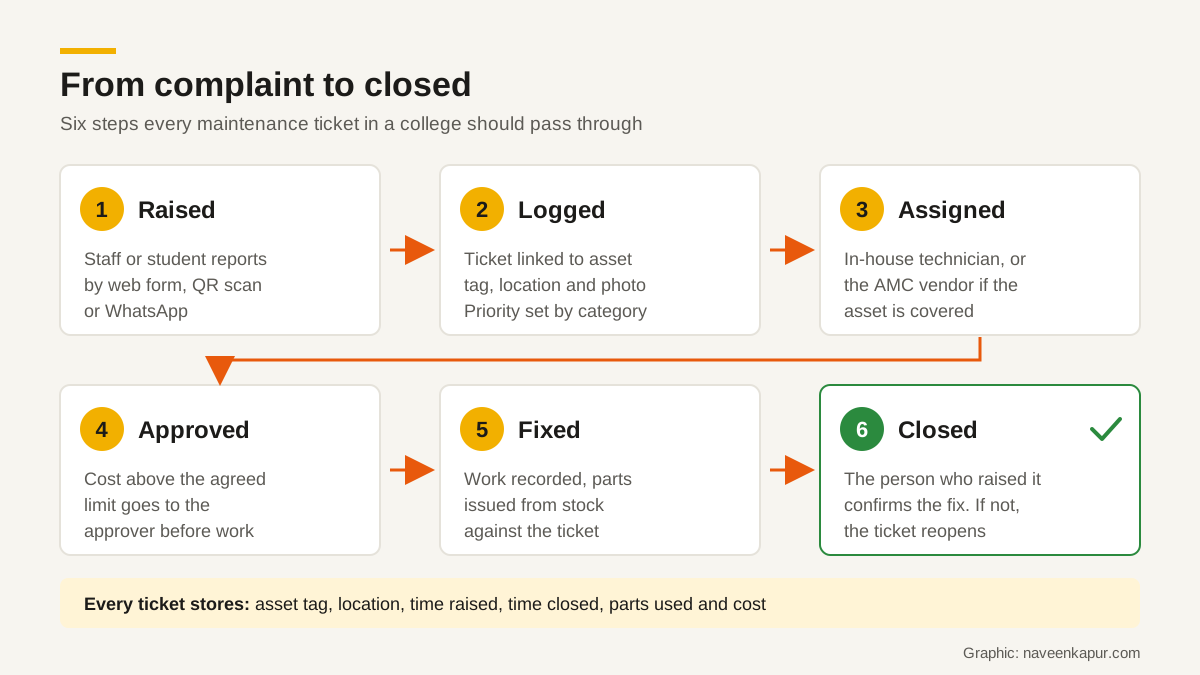
- 1Raised. Staff or students report the fault through a web form, a QR scan or a WhatsApp number connected to the system. Ask for the asset tag, a short description and a photo.
- 2Logged. The system gives a ticket number, links it to the asset and sets a priority by category (a dead generator is not the same as a squeaky chair).
- 3Assigned. The maintenance in-charge, or a rule, sends it to an in-house technician or to the AMC vendor if the asset is covered.
- 4Approved. If the repair needs parts or money above an agreed limit, it goes to the approver before work starts.
- 5Fixed. The technician records what was done and which parts were issued from stock.
- 6Closed. The person who raised it confirms. If they say it is not fixed, the ticket reopens.
WhatsApp is the easiest channel for students and non-teaching staff, but treat it as an entry point, not the record. The message should create a ticket, and replies should go back from the ticket. See WhatsApp automation for how opt-in and templates work.
Materials and consumables stock
A repair that waits three days for a ₹200 part is a stock problem, not a technician problem. Track the items you use often: tube lights and LED panels, toner, cables and connectors, AC filters, lab consumables, cleaning materials and common spares.
- Set a reorder level for each item. For example (hypothetical): when LED panels in store fall below 20, raise a purchase request.
- Issue stock against a ticket or a preventive job, so you know where every item went.
- Record receipts from suppliers with invoice numbers, so the stock balance stays true.
- Do a physical count every term and fix differences with a reason, not silently.

Vendors, warranties and AMCs
Colleges pay AMC fees every year, and many never check whether the visits happened. The system should hold every warranty and AMC with its start date, end date, assets covered, visit frequency and contact person.
- Send reminders well before a warranty or AMC ends, for example 60 and 30 days ahead, so renewal is a decision and not a surprise.
- Log every vendor visit against the AMC, with the assets checked.
- Before renewing, compare the AMC fee with the breakdowns and repair costs on those assets in the past year.
- When an asset under warranty fails, the ticket should say so on screen, so nobody pays a local repairer by mistake.
Who approves what
Decide roles before you choose software. A good system can follow any reasonable rule, but someone has to write the rule. A typical split looks like this:
| Role | What they do in the system |
|---|---|
| Staff and students | Raise complaints and confirm fixes |
| HOD or lab in-charge | Confirms faults on department assets, sees department tickets |
| Maintenance in-charge or estate officer | Assigns jobs, manages schedules and vendors |
| Store keeper | Issues and receives stock, maintains reorder levels |
| Principal, registrar or finance | Approves costs above the agreed limit, condemns assets |
Keep permissions tight: a student should see only their own complaints, and a department should see its own assets. The same thinking applies as in any CRM; see CRM user roles and permissions.
Reports that help management and accreditation
- Open tickets by age and by department.
- Assets with repeat breakdowns, which are candidates for replacement.
- Preventive jobs done vs planned, by month.
- Warranty and AMC coverage, and renewals due.
- Maintenance spend by department and by asset category.
NAAC lists Infrastructure & Learning Resources as one of its seven assessment criteria. Clean records of assets, maintenance and spend make it easier to prepare evidence for that part of the self-study. Check the current NAAC manual for exactly what your institution type must submit, because requirements are set by NAAC and can change.
Buy, configure or build
There are three broad routes. Ready-made CMMS and facility products are quick to start. Low-code platforms offer templates you can change: Zoho Creator, for example, has a facility maintenance template with scheduled maintenance, work orders, inventory with automatic purchase orders at set thresholds, and a mobile app with barcode scanning. Field-service suites such as Salesforce Field Service are built for technicians in the field and may be more than a single campus needs. A custom build fits your exact approval rules but needs a developer and upkeep (see hiring a CRM developer).
Whichever route you take, ask these questions first:
- 1Can a student or staff member raise a complaint on a phone in under a minute, without a login if needed?
- 2Does it support QR or barcode tags on assets?
- 3Can it import our existing Excel registers, and export everything back if we leave?
- 4Can approval limits and roles match our hierarchy?
- 5Does it create preventive jobs on its own and remind us of AMC end dates?
- 6Will the maintenance staff actually use it on their phones?
Start small: one block or one department, the asset register and the complaint flow. Add preventive schedules and stock once the basics are used every day. If you want help planning the fields, roles and complaint flow for your campus, see the CRM development service.