Your Google Ads account reports a form fill. Your CRM shows, six weeks later, that the same student paid the fee or the same customer signed the order. Unless you join the two, Google keeps bidding for form fills, including the junk ones, and you keep judging campaigns on leads instead of results.
Offline conversion tracking is the plumbing that joins them. The search volume for the term is small (about 30 searches a month in India, OpenSEO, October 2026), but the work matters for any business with a sales team or a counsellor between the form and the money. This guide walks through the full loop, step by step. Our cost per admission and GA4 setup checklist posts mention offline import briefly; this is the detailed how-to.
The loop in one paragraph
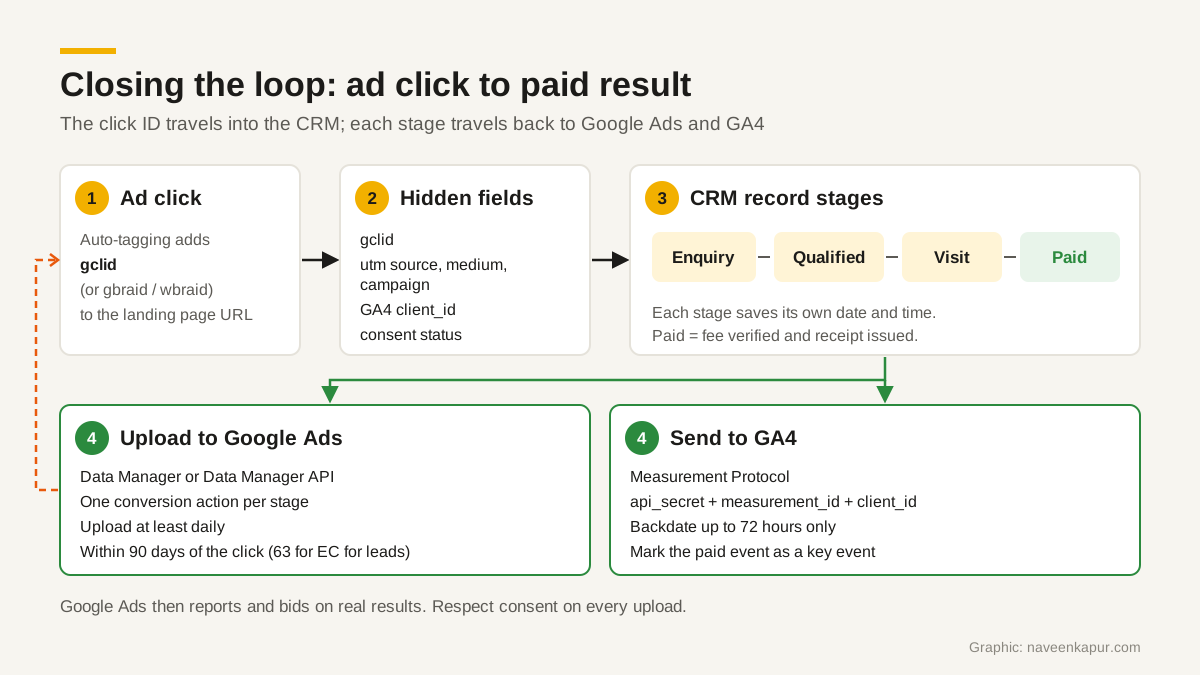
Someone clicks your ad. The landing page stores the click ID and campaign values. The form sends them, in hidden fields, into the CRM with the lead. Counsellors or sales staff move the lead through stages. Each time a lead reaches a stage that matters, the CRM (or a small script) sends that stage back to Google Ads and to GA4, with the original click ID and the time it happened. Google can then report, and bid, on qualified leads and paid admissions, not just form fills.
Step 1: capture the IDs in hidden form fields
Google’s own setup guide for GCLID imports lists auto-tagging as a prerequisite. With auto-tagging on, Google Ads adds a gclid parameter to the landing page URL. Google’s guide asks you to add a hidden field to every lead form, and a script on every page (not only landing pages) that reads the gclid from the URL and stores it in a cookie or local storage, so it survives if the visitor browses three pages before filling the form. Google’s sample script keeps it for 90 days. The GCLID is case sensitive, so never change its case.
Capture these values into hidden fields, and map each one to its own CRM field:
| Hidden field | Where it comes from | Why you need it |
|---|---|---|
| gclid | URL parameter added by auto-tagging | Main match key for Google Ads uploads |
| gbraid / wbraid | URL parameters on some iOS traffic | Click IDs Google uses where a GCLID may not be available |
| utm_source, utm_medium, utm_campaign | Your tagged URLs | Readable source for CRM reports and non-Google channels |
| GA4 client ID | gtag('get', 'G-XXXXXXX', 'client_id', callback) | Joins a later Measurement Protocol event to the same GA4 user |
| Consent status | Your consent banner | Tells you what you may send back later |
| Form time | Set by the server | The lead’s own timestamp, used for stage times |
The gtag.js get command can return client_id (GA4 only) and also gclid. Read the client ID only after the Google tag has loaded, and leave the field empty if it is not available, rather than inventing a value.
Step 2: CRM stages that mean something
Uploads are only as good as your stages. Keep them few and strict. For an institute, four are enough: enquiry, qualified (right course, right eligibility, reachable), visit (campus visit or counselling session attended) and paid (fee verified and receipt issued). A business selling services might use enquiry, qualified, proposal and won.
- Write a one-line rule for each stage, so two counsellors mark the same lead the same way.
- Record the date and time each stage was reached, in its own field. You need it for the upload.
- Never move a lead backwards to change its date. Log a new activity instead.
- Keep the click ID fields read-only for staff, so nobody overwrites them on a duplicate merge.
In CampusFlow CRM, the education CRM Naveen Kapur designed for a training institute, the payment-to-receipt rule decides the paid stage: an admission becomes a student only when payment is verified and the receipt issued. Whatever CRM you use, the paid stage should follow the same idea. Our post on campus visit tracking covers the visit stage in detail.
Step 3: send stages back to Google Ads
In Google Ads, create a separate conversion action for each stage you want to send, for example Qualified lead, Campus visit and Paid admission. Google says to wait 4 to 6 hours after creating a new conversion action before uploading to it. Then pick a route:
- 1Google Ads Data Manager (in the Google Ads interface). It connects sources such as Google Sheets, cloud storage, SFTP, Salesforce, HubSpot and several databases, and runs on a schedule.
- 2Data Manager API, for a developer connecting a custom CRM. Google says that from 15 June 2026, offline conversion import and enhanced conversions for leads uploads are migrated to the Data Manager API and blocked in the Google Ads API. Any older script built on the Google Ads API upload method needs moving.
- 3File uploads, which Google now lists as legacy. Fine for a test, poor for a busy admission season.
Google recommends enhanced conversions for leads over plain GCLID import. It adds hashed user-provided data, such as the email from the form, to the upload, which helps Google match leads even when the click ID is missing. Google still advises sending GCLIDs whenever you have them.
What each upload row needs
- One click ID: gclid, gbraid or wbraid. The Google Ads API requires exactly one of the three per conversion. In the Data Manager API they sit under ad_identifiers.
- Conversion time: the time the stage was reached, with a time zone. The legacy format is yyyy-mm-dd HH:mm:ss+05:30 for India; the Data Manager API uses event_timestamp in RFC 3339 format.
- Value and currency, if you use value-based bidding, for example the fee for a paid admission.
- Transaction ID (order_id in the old API, transaction_id in Data Manager). Optional but strongly recommended, and needed later if you adjust the conversion.
- Consent: ad_user_data and ad_personalization, set from what the person agreed to.
The time limits that catch people
Google’s import guidelines say offline conversions uploaded more than 90 days after the associated last click will not be imported. For enhanced conversions for leads, the limit is 63 days. The conversion also cannot be earlier than the click; a “precedes click” error usually means a time zone mistake. Google asks you to upload at least daily, says imported conversions take about 3 hours to show, and lets you adjust a conversion up to 55 days after it was first recorded.
This matters for colleges. If a student clicks in January and pays in May, the paid admission may fall outside the window. That is why you also send earlier stages, such as qualified and visit, which usually happen within weeks. Google can learn from those even when the final payment comes too late to upload.
Step 4: send stages to GA4 with the Measurement Protocol
The GA4 Measurement Protocol lets your server send events straight to GA4. For a web stream, the request goes to google-analytics.com/mp/collect with your measurement_id and an api_secret in the URL, and the client_id in the JSON body. Create the api_secret in GA4 under Admin, Data streams, your stream, Measurement Protocol. The client_id should match the one the Google tag set on your site, which is why you captured it in Step 1.
- Send up to 25 events per request, with a body under 130 kB.
- timestamp_micros can backdate an event by up to 72 hours. Older timestamps are set to 72 hours ago, or rejected under the stricter validation setting. So send each stage on the day it happens.
- Google recommends events meant to join gtag.js data arrive within 48 hours of the original timestamp.
- Test on the validation server (/debug/mp/collect) first. The live endpoint does not return HTTP errors even for malformed events, and validation events do not show in reports.
- Mark the paid stage event as a key event in GA4, so it appears in your reports.
Google describes the Measurement Protocol as a mature product with no plans for deprecation, meant to add to your tagging, not replace it. For new server-to-server work, Google recommends the Data Manager API, so a developer building today should look at that first. GA4 is for reporting; Google Ads bidding should still get its stages through the Google Ads route in Step 3.

Meta ads: the same idea, shorter window
If you run Meta lead ads, Meta’s Conversions API for CRM works the same way: send each CRM stage as an event with the Meta lead_id, event_source set to crm and action_source set to system_generated. Meta asks for uploads at least daily and allows backfill of only 7 days between the event time and the upload, so this has to be automatic.
Consent comes first
Consent Mode has four signals: ad_storage, analytics_storage, ad_user_data and ad_personalization. Store what the person agreed to on the CRM record at form time, and pass the matching consent values with each upload. If someone did not agree to their data being used for advertising, do not send their email for enhanced conversions. Our Consent Mode v2 guide explains the setup on the website side. Never put names, phone numbers or emails into GA4 event parameters.
Checks before you trust the numbers
- 1Test one real click: click your own ad, fill the form, and check the GCLID landed in the CRM field.
- 2Count leads with a click ID each week. A sudden drop usually means a form or page change broke the hidden field.
- 3Compare paid admissions in the CRM with the Paid admission conversion in Google Ads monthly. Some gap is normal; a large one needs a look.
- 4Check upload diagnostics for rejected rows, and fix the cause, not just the row.
Once the loop works, judge campaigns on cost per qualified lead and cost per paid admission or sale. If you want help building it end to end, see the analytics and tracking service.