Most admissions reports start and end with cost per lead. The agency says leads cost Rs 150 this month, down from Rs 200, and everyone is happy. Then the session closes with fewer admissions than last year, and nobody can say which channel let them down.
Cost per lead is useful, but it measures the cheapest step in the funnel. A lead is a name and a phone number. An admission is a student who has paid. This guide explains the five cost numbers worth tracking, why a channel with cheap leads can cost more per admission, and how to connect your ad spend to real outcomes in your CRM.
Five cost numbers, from lead to paid admission
Each number uses the same cost on top and a different outcome below. Use the same month and the same channel for both parts of each formula.
| Metric | Formula | What it tells you |
|---|---|---|
| Cost per lead (CPL) | Total cost ÷ number of leads | How cheaply a channel produces enquiries. Says nothing about quality. |
| Cost per qualified lead | Total cost ÷ leads that meet your criteria | Removes wrong numbers, wrong programme, wrong city and duplicates. |
| Cost per visit | Total cost ÷ leads with a campus visit done | How much it costs to get a family to the campus. |
| Cost per application | Total cost ÷ applications submitted | How much it costs to get a completed application. |
| Cost per paid admission | Total cost ÷ admissions with fee paid and receipt issued | The real cost of a student. Also called cost per enrolment or cost per acquisition. |
Count a paid admission only when the payment is recorded and the receipt is issued, not when a counsellor marks a lead “admitted”. Cost per visit only works if your CRM records visits as a separate “visit done” field, set when the family is checked in at the campus.
Why cheap leads can be expensive admissions
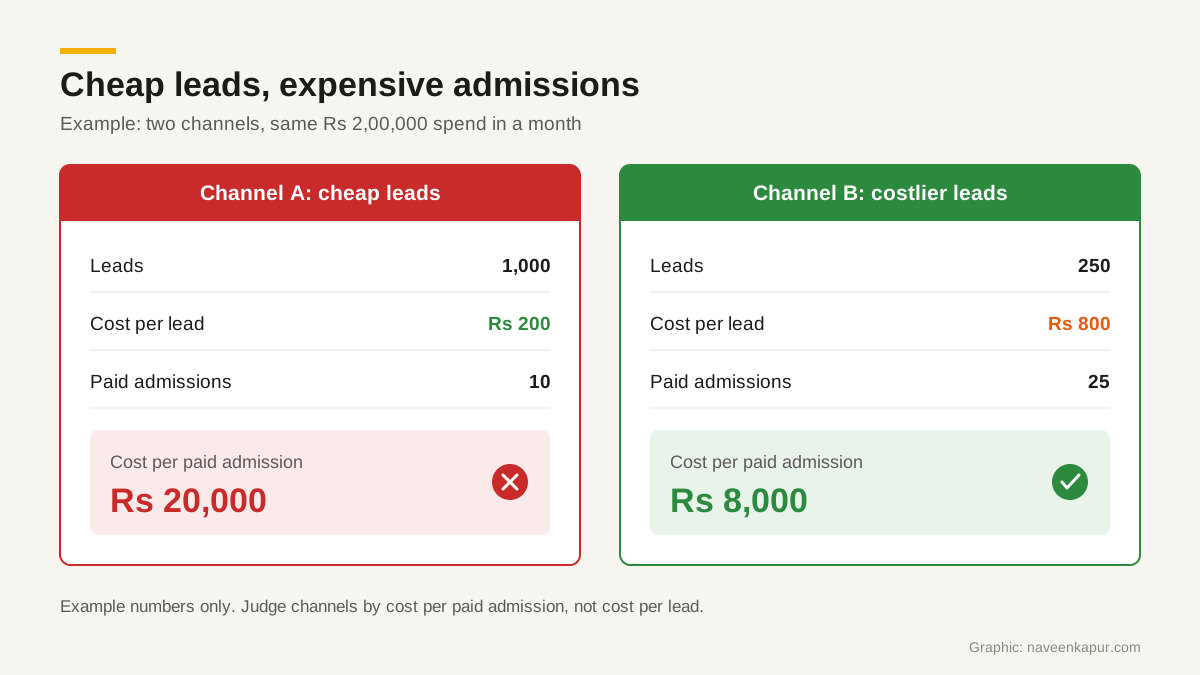
Here is a worked example with made-up round numbers, for illustration only. Say an institute spends Rs 2,00,000 in a month on each of two channels.
| Step | Channel A (example) | Channel B (example) |
|---|---|---|
| Total cost | Rs 2,00,000 | Rs 2,00,000 |
| Leads | 1,000 | 250 |
| Cost per lead | Rs 200 | Rs 800 |
| Qualified leads | 300 | 150 |
| Cost per qualified lead | about Rs 667 | about Rs 1,333 |
| Campus visits done | 60 | 60 |
| Cost per visit | about Rs 3,333 | about Rs 3,333 |
| Paid admissions | 10 | 25 |
| Cost per paid admission | Rs 20,000 | Rs 8,000 |
On a cost per lead report, Channel A looks four times better. On a cost per paid admission report, Channel B is two and a half times better. Both channels produced the same number of visits, but the families from Channel B were much more likely to pay. If you had cut Channel B because its leads were “expensive”, you would have lost most of your admissions.
This is why the comparison must go all the way to the paid admission. Stopping at qualified leads or visits is better than stopping at leads, but the last step can still change the answer.
Include all the costs
A cost per admission is only as honest as the cost on top. For each channel, add up:
- Media spend: what you paid Google, Meta or any other ad platform.
- Portal fees: subscriptions or per-lead charges from education portals and lead vendors.
- Agency fees: the management fee for running the campaigns, split across the channels the agency runs.
- Events: stall fees, travel, printing and staff costs for education fairs and school visits.
- Creative and tools: landing pages, videos, WhatsApp or SMS messaging charges linked to the channel.
- Counsellor time (optional): some institutes add an estimate of counsellor hours, because a channel full of unqualified leads uses up calling time. If you include it, include it for every channel.
Leaving out the agency fee or portal subscription makes some channels look cheaper than they are. Decide once which costs count and keep the list the same every month.
Attribution: pick one rule and keep it
Many students touch more than one channel. A student might find you through a Google ad, then enquire again through a portal, then walk in after a WhatsApp reminder. Which channel gets the admission?
- First source
- The admission is credited to the channel that brought the first enquiry. Good for judging which channels find new students.
- Last source
- The admission is credited to the last channel before the application or payment. Good for judging what closes the decision, but it can over-credit reminders, walk-ins and brand searches.
Neither is perfect. What matters is that you choose one rule for your monthly report, write it down, and make sure the CRM never overwrites the field it depends on. For first-source reporting, the original source on the lead must be locked once set, and duplicate leads must be merged into the original record rather than creating a new “source”. Our guide to a CRM for colleges covers how to set up source fields properly.

Connecting ad spend to CRM outcomes
Your ad platforms know the cost. Your CRM knows the outcome. The work is joining the two.
GA4 key events
In Google Analytics 4, a key event is, in Google’s words, “an event that measures an action that’s particularly important to the success of your business”. A form submission or a WhatsApp click is a sensible key event on an admissions website, and Google says you can create a Google Ads conversion from a GA4 key event. But GA4 sees the website, not what happens after. It cannot see a campus visit or a fee payment. Our GA4 setup checklist covers which events to mark.
Google Ads offline conversion import
Google Ads defines cost per conversion as how much, on average, each conversion cost: total cost divided by the number in the Conversions column. If your only conversion is a form fill, that figure is just your cost per lead. To make Google Ads report and optimise for admissions, import them as offline conversions.
- 1Turn on auto-tagging in Google Ads. Google gives every ad click a unique Google Click ID (GCLID).
- 2Capture the GCLID in a hidden field on each enquiry form and store it on the lead record in your CRM. Google notes that the GCLID is case sensitive.
- 3Create an offline conversion action in Google Ads, for example “Paid admission”, and connect a data source.
- 4Send outcomes back: when a lead pays, the GCLID and the conversion time go back to Google Ads. Google’s setup page lists Data Manager sources such as Google Sheets, SFTP, BigQuery, Salesforce and HubSpot, and the click-to-conversion window is 14 or 90 days depending on the source.
Google now recommends enhanced conversions for leads, which adds hashed details such as an email address or phone number from the lead form to the import. If a developer sends uploads through the Google Ads API, note Google’s notice: from 15 June 2026, offline conversion and enhanced conversions for leads uploads move to the Data Manager API and are blocked in the Google Ads API.
Value-based bidding only on paid admissions
If you use value-based bidding such as Target ROAS, the conversion values you report are what Google learns from. Send values only for paid admissions, never for raw leads, or the system will learn to buy cheap form fills. Be realistic about volume: Google recommends at least 15 conversions in the past 30 days for Target ROAS on Search, and suggests trying Target CPA first where possible. Many institutes will not have 15 paid admissions from Google Ads in a month. Until you do, keep tracking paid admissions as the number you judge campaigns by. Our guide to Performance Max campaigns explains why conversion data matters even more there.
A monthly dashboard for the admissions head
One page, one row per channel, the same columns every month:
| Column | Source of data |
|---|---|
| Total cost (all costs) | Ad platforms, portal invoices, agency invoice, event costs |
| Leads and cost per lead | CRM, by the agreed attribution rule |
| Qualified leads and cost per qualified lead | CRM qualification field |
| Visits done and cost per visit | CRM visit done field |
| Applications and cost per application | CRM or application system |
| Paid admissions and cost per paid admission | Fee records with receipt issued |
| Lead-to-admission rate | Paid admissions ÷ leads × 100 |
| Change from last month and same month last year | Your previous reports |
Admission cycles are seasonal, so compare with the same month last year as well as last month. If a channel is new, give it at least one full cycle before judging it on cost per paid admission.
Where to start
Start by getting paid admissions and lead source into the same record, then build the report by hand for one month. Once the numbers make sense, automate it. If you want help connecting campaigns, CRM and fee records for a college or institute, the colleges and universities service page explains how that work is done.