Ask any admissions counsellor which enquiries convert best and most will say the same thing: the ones who came to the campus visit. A parent who takes half a day off to see the classrooms, meet a faculty member and ask about fees is far more serious than someone who filled a form on a phone at midnight.
Yet in many colleges and training institutes, this is the stage the CRM knows least about. The enquiry is in the CRM, the payment is in the accounts system, and the visit in between lives in a paper register at reception. This guide explains why that happens and how to design the visit stage properly, from booking to check-in to reports.
Why the campus visit gets lost
Walk-in tracking breaks down in a few predictable ways. None of them is a software problem at first; they are process gaps that software then copies.
- Walk-ins go into a register. Reception writes the name and phone number in a notebook. Nobody types it into the CRM, or someone does it days later with half the details.
- Counsellors do not log the meeting. The counsellor spends 40 minutes with a family, then moves to the next one. The CRM still shows the lead as “contacted”.
- Visitors fill a paper form. The form has useful details (programme, city, budget, who referred them), but it ends up in a file, not on the lead record.
- Duplicates appear. When someone does enter the walk-in, they create a new lead instead of finding the existing one. Now the student has two records, the original source is lost, and the visit is credited to “walk-in” rather than the ad or the referral that brought them.
The last point matters most for marketing. If a student first enquired from a Google ad, then walked in two weeks later, and the walk-in became a new lead, your reports will say the ad produced nothing and walk-ins produced an admission. Budget decisions made on that report will be wrong.
Designing the visit stage in your CRM
The visit should be a set of fields on the lead (or a linked visit record if one student can visit more than once), not just a stage name. Here is a simple design that works in most CRMs.
| Field | Type | Why it matters |
|---|---|---|
| Visit booked | Yes or no, with booked date and slot | Shows intent. Lets you send reminders and measure no-shows. |
| Visit done | Yes or no, with actual date and time | The real signal. Set only when the person is checked in at the campus. |
| Met by | User (counsellor or staff) | Credits the right counsellor and shows workload. |
| Programme discussed | Picklist | The programme often changes after a visit. Record the new one. |
| Visitors | Picklist: student, parent, both, other | A visit with a parent usually means a decision is close. |
| Outcome | Picklist: ready to apply, thinking, fee concern, not suitable, other | Turns a conversation into something you can report on. |
| Next step and date | Task with a due date | Makes sure someone follows up within a fixed time. |
Keep visit booked and visit done as separate fields. Many CRMs use one stage called “Visit” and counsellors move the lead there when the visit is booked. Then you cannot tell how many people actually came. Two fields also let you see the gap between them, which is your no-show rate.
If you are setting up the rest of the admission pipeline as well, our guide to a CRM for colleges covers the stages from enquiry to enrolled. This article only goes deep on the visit.
Campus visit booking: WhatsApp and website
A booked visit is more likely to happen than a vague “come any day”. So give people an easy way to pick a time.
- 1Fixed slots. Decide when counsellors are free for visits, for example weekday afternoons and Saturday mornings, and how many families each slot can take.
- 2Booking on the website. A short form on the admissions page with programme, name, phone number and a choice of slot. Google Calendar’s appointment schedules can create a booking page showing your available times, and you can link it or embed it on your website. Email reminders are listed as a paid-subscription feature, so check your plan.
- 3Booking on WhatsApp. When a lead replies to your message, offer two or three slots and confirm the one they choose. Only send WhatsApp messages to people who have opted in; Meta’s rules say the opt-in must clearly state the business name and that the person is agreeing to receive messages from it.
- 4Write it to the lead. Whichever route they use, the booking must update the same lead record: visit booked = yes, slot, and the counsellor assigned.
- 5Reminders. One message the day before and one on the morning of the visit, with the address, a map link and the name of the person they will meet.
Our guide to WhatsApp automation for admissions explains how to set up templates and reminders like these without spamming people.
Reception check-in that matches the existing lead
The check-in step is where most systems fail, so design it carefully. The goal is simple: when a person arrives, their existing record is found and marked as visited, and a new record is created only if they are truly new.
- A tablet at reception with a short form: phone number first, then name, programme and who they came with. The receptionist or the visitor fills it in.
- Or a QR code on the reception desk that opens the same form on the visitor’s own phone.
- Match on phone number. When the form is submitted, the CRM searches for an existing lead with that number. If it finds one, it marks visit done on that record and keeps the original source. If not, it creates a new lead with source “walk-in”.
- Notify the counsellor. The assigned counsellor gets an alert that the family is at reception. If no counsellor is assigned, the lead goes to whoever is on duty.
- Keep the form short. Five or six fields at most. Details can be added by the counsellor after the meeting.
Phone numbers need cleaning before matching works. Store them in one format (for example, ten digits without +91, spaces or a leading zero) and apply the same rule on every form. Otherwise “98100 00000” and “+919810000000” look like two different people.
In CampusFlow CRM, the education CRM Naveen Kapur designed for a training institute, this kind of flow is built with its webforms and automation builder: one form for reception, and a rule that finds the existing lead before anything new is created.
Open days and campus tours
Open days, counselling days and campus tours bring many visitors at once, which is when registers come back. Treat each event as a campaign in the CRM with its own registration form. People who register get a confirmation and reminders. On the day, check-in uses the same phone number match, so you know who registered and came, who came without registering, and who registered but did not come.
After the event, every visitor should get a follow-up task within a fixed time, for example 48 hours. The people who registered but did not come are worth a separate message offering a one-to-one visit slot.
Google Business Profile: directions and calls before a visit
Many visitors find your campus through Google Maps. Your Business Profile’s performance report shows how many people asked for directions to your business and how many tapped the call button, and Google says performance data is available only for verified profiles. These numbers cannot tell you who visited, but a rise in direction requests before an open day is a useful check that people are finding you. Keep your address, hours and phone number correct. Our Google Business Profile guide covers the setup.
Visit reports: the formulas
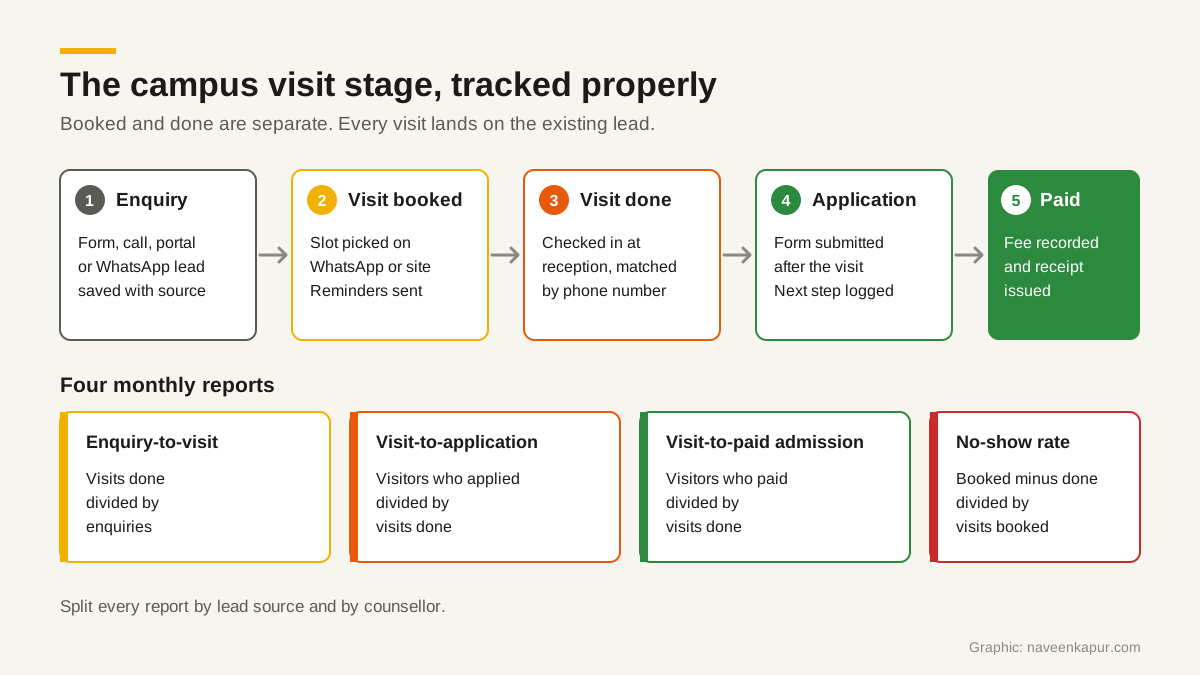
Once booked and done are recorded properly, four numbers tell an admissions head most of what they need about the visit stage. Use the same date range and the same group of leads for each formula.
- Enquiry-to-visit rate
- Leads with visit done ÷ total enquiries in the period × 100.
- Visit-to-application rate
- Visitors who submitted an application ÷ leads with visit done × 100.
- Visit-to-paid-admission rate
- Visitors whose admission fee is paid and receipt issued ÷ leads with visit done × 100.
- No-show rate
- (Visits booked − visits done) ÷ visits booked × 100.
Here is a worked example with made-up round numbers, for illustration only. Say an institute had 1,000 enquiries in a month. 200 booked a visit, 150 actually came, 60 of those visitors applied and 40 paid the admission fee.
- Enquiry-to-visit rate: 150 ÷ 1,000 = 15%.
- Visit-to-application rate: 60 ÷ 150 = 40%.
- Visit-to-paid-admission rate: 40 ÷ 150 = about 27%.
- No-show rate: (200 − 150) ÷ 200 = 25%.
These example figures are not benchmarks. Your own numbers depend on your programmes, fees, location and season. The value is in tracking them every month and comparing like with like.
Split by source and counsellor
The same four numbers become much more useful when you split them. By source, you can see whether leads from Google ads, education portals, referrals or your website actually come to campus. A source with many enquiries but few visits may need better qualification. By counsellor, you can see who books visits that happen, and who turns visits into admissions. A high no-show rate for one counsellor often means reminders are not going out, or slots are being booked without real agreement.
Count a paid admission only when the payment is recorded and the receipt is issued, not when a counsellor marks the lead as “admitted”. That keeps the last number in the funnel honest.
Getting started
- 1Add the visit fields to your CRM and agree what each picklist value means.
- 2Replace the reception register with a tablet or QR code form that matches by phone number.
- 3Give people a way to book a slot, and send reminders.
- 4Run the four reports monthly, by source and counsellor.
If your CRM cannot match walk-ins to existing leads, or you need the booking and check-in flows built properly, the CRM development service explains how this work is scoped.