
Most local business owners in India know they need a Google Business Profile. Fewer know what should happen to it after it is set up. Many profiles are created once, then left alone for years: old hours, a closed branch still showing, reviews with no reply. Others are handed to an agency that sends a nice monthly PDF but never explains what was actually done.
This guide is for owners who are hiring, or already paying, someone for Google Business Profile management. It sets out the monthly and quarterly work, the access to give, and the rules a provider must not break. The history of the product, from Google My Business to Google Business Profile, is in our Google Business Profile guide. If you are choosing a local SEO provider for wider work such as your website and location pages, read how to hire SEO services in Delhi first. Here we stay with the routine, month by month.
Before anything else: who owns the profile
Google's help lets a profile have several owners but only one primary owner. Owners have full control, including adding or removing users and deleting the profile. Managers have mostly the same access; Google's help says the only exception is that they cannot add or remove users or remove the profile. That is exactly the right level for an outside provider.
| What they can do | Primary owner (you) | Manager (provider) |
|---|---|---|
| Edit business info, photos, updates | Yes | Yes |
| Reply to reviews and read performance | Yes | Yes |
| Add or remove owners and managers | Yes | No |
| Change other users' roles | Yes | No |
| Remove or delete the profile | Yes | No |
The monthly routine
Real Google Business Profile optimization is not a one-time setup. It is a short list of jobs done every month, so the profile stays accurate and active. A good provider of Google Business Profile services should do all of the following and show you the evidence.
1. Check the basic information and any Google updates
Name, address or service area, phone, website, categories and hours should match reality. Google can also change your profile itself: its help explains that Google gathers information from sources such as user reports and licensed content, and may update your profile. For suggested edits that need your review, Google says you have 4 days to respond, and if you do not, it may publish the change when other public information, such as your website, supports it. In the profile editor, information Google has changed is shown in blue. Your provider should check this every month and accept correct changes or fix wrong ones.
Google may also call, text or WhatsApp the verified phone number to confirm details, and Google's help says your answers may be used to update the profile. Make sure whoever answers that number knows this.
2. Hours and special hours
Regular hours should be your real customer-facing hours. For Diwali, Holi, Eid, Christmas, a local holiday or a renovation closure, use special hours, which Google's help provides for holidays and other temporary periods. A provider should set them in advance from a holiday calendar you agree at the start of the year.
3. Services, products and menu
Depending on your category, you may be able to list services, products or a menu. Google's help says the menu editor is only for food and drink businesses. Each month, check that new services are added, discontinued ones are removed and prices or details are still correct.
4. Photos and videos
Add a few new, real photos each month: the shopfront, the team at work, finished jobs, new stock. Avoid stock images and heavy filters. Ask your provider to also look through photos added by customers.
5. Updates (posts)
Google's help on posts lists three types: updates, offers and events. Updates can carry text, a photo or video and an action button; offers and events need dates. Google says posts older than 6 months are archived unless a date range is set (checked October 2026). A couple of useful updates a month, such as a new service, a seasonal timing or an event, is better than daily filler. Google may reject a post with a phone number in the text if it cannot verify the number belongs to you.
6. Reply to every review
Google's review tips ask for replies that are short and simple, professional and polite, and conversational rather than promotional. It advises against using a reply to offer deals, says never to share a reviewer's private information, and suggests asking the reviewer to contact you by phone or email when a problem is complex. For negative reviews, it recommends acknowledging real mistakes and apologising where it is genuine. Your provider should draft replies in your voice and agree with you how quickly complaints get answered.
7. Ask for reviews the right way
Google gives every profile its own review link and QR code: from your profile on a computer browser, go to Read reviews, then Get more reviews. Share it on receipts, in thank-you messages or on a printed QR code at the counter. Google's help says reviews QR codes can only be generated on a computer browser for now (checked October 2026).
Two rules matter here. First, no incentives: Google says offering discounts or free goods in exchange for reviews is strictly prohibited. Second, no gating: Google's content policy does not allow businesses to discourage negative reviews or selectively ask only happy customers. Ask everyone, or ask no one.
8. Messages and calls
Google's help says a profile can add a WhatsApp or text messaging option, in select regions only. If your profile shows this, someone must reply quickly every day, and that job may sit with your team rather than the provider. The call button uses the phone number on your profile, so check every month that the number is correct and answered.
9. The performance report
Google's performance page defines the main numbers. Your monthly report should show each one for this month and last month, with a short note on what changed and why.
| Metric | What Google counts |
|---|---|
| Calls | Times a customer clicked the call button on your profile |
| Website clicks | Times people clicked the website link on your profile |
| Directions | People who asked for directions to your business |
| Profile views | People who viewed your profile on Search and Maps; a user is counted once per day |
| Searches | The search terms people used to find your business, updated monthly |
| Messages, bookings | Conversations through messages, and completed bookings, where these apply |
Website clicks only tell you someone arrived. To see what they did next, such as filling in a form or calling from the site, your analytics must be set up properly; our GA4 setup checklist covers that.
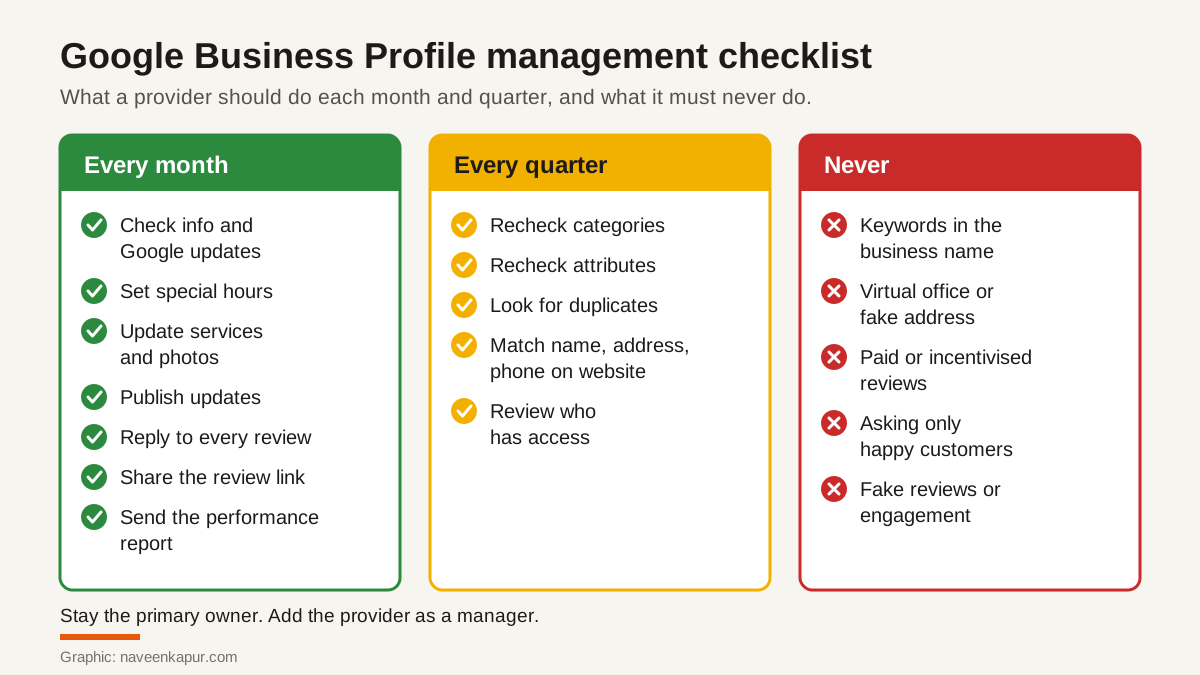
Every quarter: the deeper checks
- Categories: Google allows one primary category and up to 9 more, and its guidelines ask you to use as few as possible to describe your core business, never categories used only as keywords (checked October 2026).
- Attributes: check that factual attributes, such as outdoor seating, are still true.
- Duplicates: search Maps for your business name, phone and address. Google's guidelines say there should be only one profile per business and not more than one per location.
- Website match: your name, address and phone on the website should match the profile exactly. This matters because Google may accept a suggested edit if public information such as your website supports it.
- Description: Google allows up to 750 characters, with no URLs or HTML. Read it again and update it if your services have changed.
- Access: list every owner and manager and remove former staff and old agencies.

What is not allowed, and what happens
Some providers still sell shortcuts. These break Google's published rules, and the risk falls on your business, not on the agency.
| Allowed | Not allowed |
|---|---|
| Your real-world name, as on your signboard | Adding service, product or location words to the name |
| A real address with clear signage, or a hidden address for service-area businesses | Virtual offices, P.O. boxes, or co-working desks without signage |
| Asking every customer for a review through Google's link | Discounts, gifts or payment for reviews, or asking only happy customers |
| Replying to all reviews, good and bad | Reviews by staff, family or paid accounts, or attacking competitors with reviews |
| One profile per business location | Extra profiles for the same location |
Google's guidelines warn that unnecessary information in a business name can lead to suspension of the profile, and that Google can suspend access for other violations. For fake engagement, Google's help lists restrictions such as blocking new reviews for a set period, unpublishing existing reviews for a set period, or showing a warning that fake reviews were removed. An honest GMB management services provider will refuse these tactics, even if you ask for them.
For the wider picture of how your profile fits with your website and local pages, see our guide to SEO for small business.
Questions to ask a provider
- 1Will you work as a manager, with the primary owner role staying with us?
- 2What exactly will you do each month, and how will you show it?
- 3Who drafts review replies, how fast, and do we approve them?
- 4How will you collect reviews, and can you confirm you never use incentives or ask only selected customers?
- 5What will the monthly report include, and will you explain the changes in plain words?
- 6What happens to our profile and access when the contract ends?
If you want help with the monthly management of your profile, our digital marketing service covers local search, and the service box below explains how we work.