
Many Indian businesses buy Zoho CRM licences first and think about setup later. A partner is hired, a few demos happen, fields get created on the fly, and three months on the sales team is back on spreadsheets. The software was fine. The project had no scope.
This guide is for owners and managers of SMEs, colleges and institutes who are about to start a Zoho CRM implementation with a partner or an independent Zoho consultant. It sets out the work phase by phase, gives planning timelines, shows which features depend on the edition, and lists what you should receive at the end. If you are still deciding whether you need outside help at all, start with when a business needs a CRM consultant.
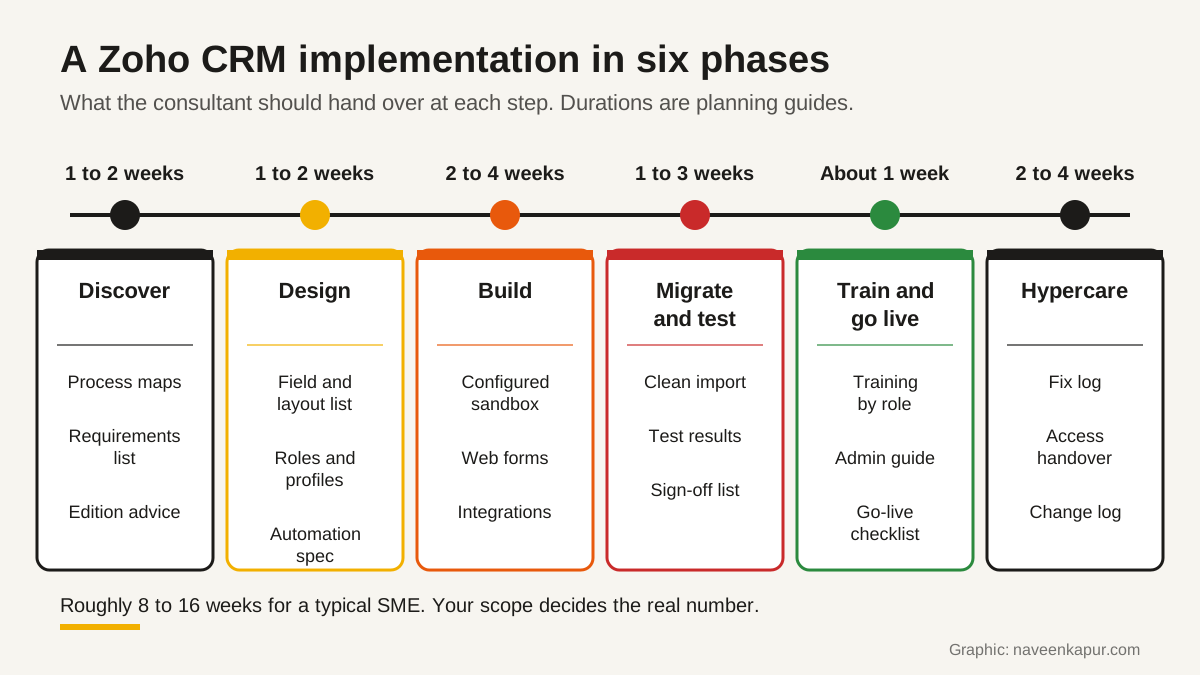
The six phases at a glance
Every partner names the phases differently, but a sound Zoho implementation covers the same ground. The durations below are planning guides for a small or mid-size team with one sales process and a few integrations. They are not facts or promises: more teams, more lead sources or messy old data will stretch them.
| Phase | Main work | Planning guide |
|---|---|---|
| 1. Discover | Process mapping, lead sources, reports you need, edition choice | 1 to 2 weeks |
| 2. Design | Modules, fields, layouts, roles, profiles, automation plan | 1 to 2 weeks |
| 3. Build | Web forms, workflow and assignment rules, Blueprint, integrations | 2 to 4 weeks |
| 4. Migrate and test | Clean and import old data, test every rule with real cases | 1 to 3 weeks |
| 5. Train and go live | Training by role, go-live checklist, switch off old sheets | About 1 week |
| 6. Hypercare | Fast fixes, small changes, adoption checks | 2 to 4 weeks |
Phase 1: Discovery and process mapping
Discovery is where the consultant learns how your business actually sells. They should talk to the people who answer enquiries, not only the owner, and write down how a lead moves from first contact to payment: where it comes from, who calls first, what happens after a demo, site visit or campus visit, and when it counts as won or lost.
The output is a set of simple process maps, a list of lead sources, the reports managers want each week, and a written requirements list. Only then should the consultant recommend an edition.
Pick the edition after discovery, not before
Zoho's comparison page, viewed from India, lists five editions: Free, Standard, Professional, Enterprise and Ultimate (the list can differ by country). Many features that an implementation depends on are edition-specific. These are the ones that most often change the plan:
| Feature | What the comparison page shows |
|---|---|
| Workflow rules | Listed in all five editions |
| Profiles and roles | Listed in all five editions |
| Assignment rules | Professional, Enterprise and Ultimate |
| Blueprint (active Blueprints) | Professional 3, Enterprise 50, Ultimate 100 |
| Validation rules | Professional 5, Enterprise 10, Ultimate 25 per layout |
| Approval process, page layouts | Enterprise and Ultimate |
| Custom modules | Enterprise 100 (2 per user licence), Ultimate 500 (5 per user licence) |
| Sandbox | Enterprise and Ultimate |
| Territory management | Enterprise 150 territories, Ultimate 250 |
So if discovery shows you need a guided sales process with mandatory steps, Blueprint means Professional at least. If you need a separate module for, say, admissions applications or service contracts, or a sandbox to test safely, the page points to Enterprise or above. Prices and the Zoho versus Salesforce question are covered in Zoho CRM vs Salesforce, so we do not repeat them here.
Phase 2: Design
Design turns the process maps into a written blueprint for the build (not to be confused with Zoho's Blueprint feature). Good Zoho CRM customization starts on paper. The design should cover:
- Modules and fields: each record type, every field with its type, which are mandatory and the picklist values. Keep only fields someone will actually use or report on.
- Layouts: what each team sees on a record, in the order they need it.
- Roles and profiles: in Zoho CRM, profiles decide which modules and features a person can use, and roles decide whose records they can see, following your reporting structure. Write down what each job can view, edit, export and delete.
- Automation plan: every rule written as 'when X happens, do Y', before anyone builds it.
Phase 3: Build
Lead capture
Zoho CRM web forms can create records in Leads, Contacts, Cases and custom modules. Zoho's help describes captcha and reCAPTCHA on paid editions, spam detection on all forms, hidden fields to record which page a form sat on, and an acknowledgement email to the person who enquired. Every source, including ad lead forms and phone calls, should arrive with the source recorded.
Automation
Three tools do most of the work. Workflow rules send alerts, create tasks or update fields automatically when a record meets the conditions you set. Assignment rules give each new lead an owner; the routing choices are explained in lead routing rules. Blueprint walks a record through set stages and can make certain steps compulsory before it moves on, which suits processes such as admissions or quotation approval.
Integrations
- Zoho Books: Zoho's help says CRM accounts and contacts can sync as Books customers and CRM products with Books items, with quotes, invoices and sales orders handled through the Zoho Finance module in CRM.
- Zoho Flow: Zoho describes it as an integration platform that connects more than 1,000 cloud and on-premise apps, with no-code tools.
- Telephony: Zoho's comparison page lists telephony integrations, including Zoho PhoneBridge. Ask your Indian telephony provider for a live demo of its connector with Zoho CRM.
- Email and WhatsApp: connect each user's mailbox, and use Zoho CRM's own WhatsApp integration, which supports message templates and workflow-based notifications.
Phase 4: Data migration and testing
Zoho CRM has its own import and migration tools, but the tool matters less than the data. Cleaning comes first: our guide to CRM data migration from Excel covers duplicates, phone formats, owners and the 50-row test import.
Testing is where most shortcuts happen. Zoho describes its sandbox as an isolated environment where you test workflow rules and Blueprints against records, then deploy the changes to the live account once tested. On editions without a sandbox, agree in writing how changes will be tested before they touch live data. Either way, write ten to twenty real cases (a website lead from Delhi, a duplicate phone number, a lost deal) and have your own staff run them.
Phase 5: Training and go-live
Train by role, not in one big session. Salespeople need to log calls, move deals and see tasks. Managers need reports and dashboards. One person inside your business should be trained as the admin, so small changes do not wait for the consultant. Set a go-live date, freeze the old spreadsheets on that day and keep a read-only copy.
Phase 6: Hypercare
For the first few weeks after go-live, the consultant should respond quickly to problems and track every fix in a log. Watch adoption: are leads being updated, are tasks closed, are reports trusted? Expect to adjust fields and rules once real use shows what does not fit. After hypercare, move to a monthly support arrangement or hand over fully to your admin.
What a Zoho consultant should hand over
| Deliverable | What it contains |
|---|---|
| Process maps | How leads and deals move, stage by stage |
| Field and layout list | Every module, field, type, picklist value and who can edit it |
| Automation register | Every workflow, assignment rule, Blueprint and custom function, with its purpose |
| Integration notes | Each connected app, sync direction and whose login it uses |
| Admin guide | How to add users, change picklists, edit rules and run imports |
| Test results | The cases run and who signed them off |
| Access handover | Super admin with your company, partner access removed or reduced, all passwords and API connections in your name |
How to check a partner on Zoho's directory
Zoho runs an official partner directory where you can filter by country, state, products, active Zoho certifications and industry, and see partner tiers. Zoho's own FAQ there says that if a partner is not listed, they may not have met the qualifying criteria. Not being listed does not make an independent consultant bad, but anyone who claims to be an official partner should be easy to find there.
The same FAQ notes that a partner cannot access your data unless you give them access, and that once you officially work with a partner, they can manage your payments and subscriptions in their partner tool. Ask who will hold billing for your licences and how you can take it back.
Red flags
- A quote and a timeline before anyone has seen your process.
- An edition recommended without a reason linked to your requirements.
- No written field list or automation plan before the build starts.
- Changes made straight in the live account with no testing.
- The partner keeps the super admin role or billing with no plan to hand them over.
- Training is one recorded video and support ends on go-live day.
Questions to ask before you sign
- 1Which edition do we need, and which of our requirements decides that?
- 2Can you show us your listing on Zoho's partner directory and your active Zoho CRM certifications?
- 3What will we receive at the end of each phase?
- 4How will you test rules and imports before they reach live data?
- 5Who will be super admin and who will hold billing for our licences?
- 6What is included in hypercare, for how long, and what does support cost after that?
- 7Which work is out of scope and would be quoted separately?
If you want help scoping or carrying out a Zoho CRM implementation, the service box below explains how we work. For builds that go beyond configuration, see the CRM development service.