
A new website is exciting. New design, faster pages, better forms. Then, a few weeks after launch, enquiries from Google drop and nobody knows why. In most cases the cause is simple: the old pages that Google ranked now show a 404, or all of them redirect to the home page.
Website redesign SEO (searched about 50 times a month in India, OpenSEO, October 2026) is mostly about one file: the redirect map. This guide shows how to build it, which redirect codes Google treats as permanent, and what to check before, during and after launch. Every Google rule below comes from Google's own documentation, linked in the references.
When a redesign needs a redirect map
If every URL stays exactly the same, you do not need redirects. You still need to check titles, content and indexing rules, but Google sees the same addresses. The moment any URL changes, you need a map. Common causes in a redesign:
- Moving to a new CMS or framework, for example from a PHP site or WordPress to Next.js, where page addresses change. See Next.js for business websites.
- Renaming sections, such as /courses/ becoming /programmes/.
- Removing .php or .html endings, or dates from blog URLs.
- Merging several thin pages into one stronger page.
- Changing the domain name itself, which needs extra steps covered below.
Step 1: List every old URL, not just the menu pages
Your new design team will usually know the 20 pages in the menu. Google may know hundreds more: old blog posts, course pages from past years, PDF prospectuses and image files. Google's site move guide suggests starting with your important URLs and lists where to find them. Combine these sources into one sheet:
- 1Your sitemaps. Google notes your important URLs are likely already submitted in Search Console this way.
- 2Your CMS. Most systems can export a list of every page and post.
- 3A crawl of the live site with any crawler tool, before anything changes.
- 4GA4 landing pages. In GA4, go to Reports, then Engagement, then Landing page. Pick a long date range so seasonal pages, such as admission pages, are included.
- 5Search Console Performance report, grouped by Pages. These are the URLs that actually get impressions and clicks on Google. Export them.
- 6Search Console Links report. Under External links, Top linked pages shows which of your pages other sites link to. You can export it as a CSV file or Google Sheet.
- 7Server logs, for URLs visited recently that do not appear anywhere else.
Do not forget embedded content. Google's guide says to include URLs of videos, images, JavaScript and CSS files in your move plans, because they need to be moved the same way as other content. For a college, brochure PDFs and fee structure PDFs often have their own backlinks and rankings.
Step 2: Build a one-to-one redirect map
Now remove duplicates and add a second column: the new URL for each old one. Google's instruction is plain: once you have the list of old URLs, decide where each one should redirect to. A simple sheet works well:
| Column | What goes in it |
|---|---|
| Old URL | Full path from your combined list |
| New URL | The closest matching new page, as a final URL |
| Action | 301, 308, or 404/410 if the content is gone |
| Priority | High for pages with clicks or backlinks, so they get checked first |
| Checked | Date the redirect was tested after launch |
Three rules decide the New URL column:
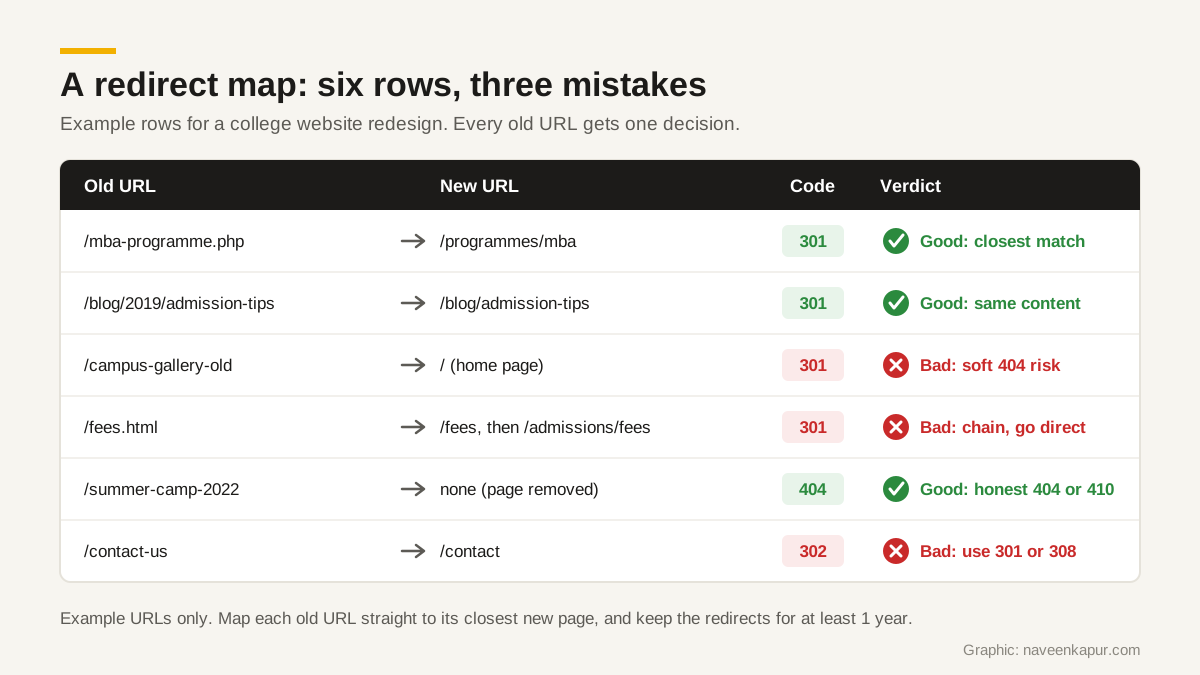
- Closest match, never the home page by default. Google says not to redirect many old URLs to one irrelevant destination, such as the home page of the new site, because this can confuse users and might be treated as a soft 404 error.
- Merged content can share one target. If three old pages were consolidated into one new page, Google says you can redirect all of them to that consolidated page.
- Truly removed pages get a 404 or 410. If you are not moving some content, Google says those URLs should correctly return an HTTP 404 or 410. An honest 404 is better than a misleading redirect.
Step 3: Choose the right redirect: 301 vs 302 vs 308
Google's redirects documentation splits redirects into two groups. With a permanent redirect, the indexing pipeline uses the redirect as a signal that the target should be canonical. With a temporary redirect, it does not, so the old URL can stay in search results.
| Type | Codes and methods | Use in a redesign |
|---|---|---|
| Permanent | HTTP 301, HTTP 308, instant meta refresh (0 seconds) | Yes, for every old URL that has a new home |
| Temporary | HTTP 302, 303, 307, delayed meta refresh | No, unless the change will be reverted |
| JavaScript redirect | location change in the browser | Only if server-side and meta refresh are not possible |
Google recommends a permanent server-side redirect whenever possible when a URL changes in search results, and says a server-side redirect has the highest chance of being interpreted correctly. JavaScript redirects are a last option: Google warns that if rendering fails, it might never see the redirect. The site move guide also says 301 and other permanent redirects do not cause a loss in PageRank, so there is no reason to fear a correct 301 redirect.
Step 4: Avoid chains and update everything that points to old URLs
A chain happens when page A redirects to B, and B redirects to C, often because an older redesign left redirects behind. Google says Googlebot can follow up to 10 hops, but advises redirecting to the final destination directly. If that is not possible, keep it low, ideally no more than 3 and fewer than 5. So when you build the new map, also update your old redirect rules to point straight to the new final URLs.
Before launch, update these on the new site using your map:
- Internal links. Menus, footers, buttons and links inside blog posts should point to new URLs directly, not rely on redirects.
- Canonical tags. Google says each new URL should have a self-referencing rel="canonical" link.
- hreflang. If you have language or country versions, update the annotations to the new URLs.
- XML sitemap. Prepare a sitemap containing only the new URLs.
- Titles, headings and main content. Keep what ranked. A redesign is not the moment to delete the text that brought enquiries. Our SEO audit checklist helps you record the current state first.

Step 5: Launch day checks
Most staging sites are hidden from Google with noindex rules or a robots.txt block. That is correct during development, and a disaster if it goes live. Google lists this as a common mistake: do not forget to remove any noindex or robots.txt blocks that were only needed for the migration.
- 1Turn on the redirects from your map.
- 2Remove staging noindex rules and robots.txt blocks on the live site.
- 3Confirm canonical tags use the new URLs, not the staging domain.
- 4Test redirects: Google suggests the URL Inspection tool for single URLs and command line tools or scripts for many. Run every high priority row.
- 5Submit the new sitemap in Search Console.
- 6Check that forms, thank you pages and GA4 tracking still work, so you can measure enquiries.
Changing the domain too? Use the Change of Address tool
Search Console's Change of Address tool is only for moving from one domain or subdomain to another, for example example.com to example.in. Google's help page says not to use it for an http to https move, for moving pages within the same site, or for switching between www and non-www. You must be an owner of both properties in Search Console, use it after you have moved and redirected the site, and have a 301 from the old home page to the new one. Google says these actions continue for 180 days after you start the migration.
Step 6: Monitor for weeks, not hours
Google's site move guide says to expect temporary fluctuation in rankings while it recrawls and reindexes, and that a small to medium-sized website can take a few weeks for most pages to move, with larger sites taking longer. Do not panic in week one, but do check every few days:
- Page indexing report in Search Console: watch Not found (404), Soft 404 and Redirect error. A new 404 on an old URL with clicks usually means a missing row in your map.
- Performance report: clicks and impressions for the new URLs should rise as the old ones fall.
- GA4 landing pages and key events: enquiries are the real test, not just traffic.
- Backlinks: ask sites that send you real visits to update their links to the new URLs, as Google's guide suggests.
- Speed: a new design can be heavier than the old one. See website speed optimisation and, if the server changed, web hosting in India.
How long to keep the redirects
Google's site move guide says: keep the redirects for as long as possible, generally at least 1 year. That time lets Google transfer signals to the new URLs, including links from other sites. In practice, there is little cost in keeping them longer, so many teams simply never remove them. Keep your redirect map file safe too; the next redesign will need it to avoid chains.
If you are planning a new website and want the redirect map built into the project from day one, see the web design and development service.