
Many Indian SMEs decide on Salesforce, then search for a Salesforce consultant and get quotes that are hard to compare. One partner quotes a fixed project, another a monthly retainer, a freelancer an hourly rate. None of them shows the licence bill, the add-ons or the admin time you will carry after go-live.
This guide is for owners and managers who have already chosen Salesforce, or are close to it. If you are still deciding between platforms, read Zoho CRM vs Salesforce first. If you are not sure you need outside help at all, when a business needs a CRM consultant covers the signs. Here we cover what is specific to Salesforce: who to hire, how to check them and the full cost to run it.
Consultant or in-house admin?
These are different jobs. A consultant designs and builds: they turn your sales process into a working Salesforce setup. An admin runs it: adds users, fixes reports, changes a field, answers 'why can't I see this record?'. Most SMEs need a consultant for a few months and an admin for years.
| Situation | Usually needs | Why |
|---|---|---|
| First Salesforce setup, or moving from sheets or another CRM | Consultant | Process mapping, data model, automation and migration all happen at once |
| Adding a new team, branch or product line with its own process | Consultant | New objects, permissions and Flows touch the whole system |
| Connecting an ERP, telephony, WhatsApp or website forms | Consultant, sometimes a developer | Integrations need API work and testing |
| New users, small field changes, new reports | In-house admin | Weekly work that a trained admin handles in hours |
| Team stops using the system after go-live | Admin first, consultant if it is a design problem | Often training and small fixes, not a rebuild |
If you have no one inside the company who can be the admin, ask partners whether they offer a support retainer after go-live, and what it covers.
What a Salesforce consultant does
Good Salesforce consulting services follow roughly the same stages, whatever the size of the project:
- Discovery: workshops with sales, service and finance to write down how a lead becomes a customer today, which reports managers need and which rules are fixed. This becomes the written scope.
- Configuration: objects, fields, page layouts, record types, sales stages, user profiles and permission sets set up to match the scope.
- Automation with Flow: Salesforce describes Flow Builder as a way to build simple or complex automations, forms and guided experiences with no code. Assignment, reminders, approvals and updates usually belong here before anyone writes Apex code.
- Data migration: cleaning and importing your old leads, accounts and deals. The steps are in CRM data migration from Excel.
- Integrations: website forms, ad lead forms, telephony, WhatsApp, accounting or ERP. Custom code or heavy integration work may need a developer; see hiring a CRM developer.
- Training and handover: role-based training, a short user guide, and documentation of every Flow and integration so your admin can maintain them.
How to check a Salesforce consultant
- Certifications on Trailhead: Salesforce's Trailhead credential verification page lets anyone search for a Salesforce Certified Professional by name (first name followed by last name). Ask for the full names of the people who will work on your project and check each one. Updates can take up to one business day to appear.
- The right certifications: for admin work, look for the Salesforce Certified Platform Administrator. For a sales project, the Salesforce Certified Agentforce Sales Consultant is aimed at people who design and implement Sales Cloud solutions, and lists Platform Administrator as its prerequisite. Certifications also carry maintenance requirements, which holders can check on the same verification page.
- Partner listing: Salesforce points customers to the AppExchange Partner Finder to search for implementation experts. Read the firm's listing and compare the expertise it claims with your industry and the Salesforce products you will use.
- Partner tier: Salesforce's FY27 consulting partner programme brochure names Summit and Select tiers, and competency levels called Accredited and Expert, measured on certifications, completed projects and customer satisfaction. A freelancer with no partner status can still be very good; just check the individual's certifications and references instead.
- References you can call: ask for two SMEs with a similar sales process, and ask them what went wrong and how it was fixed.
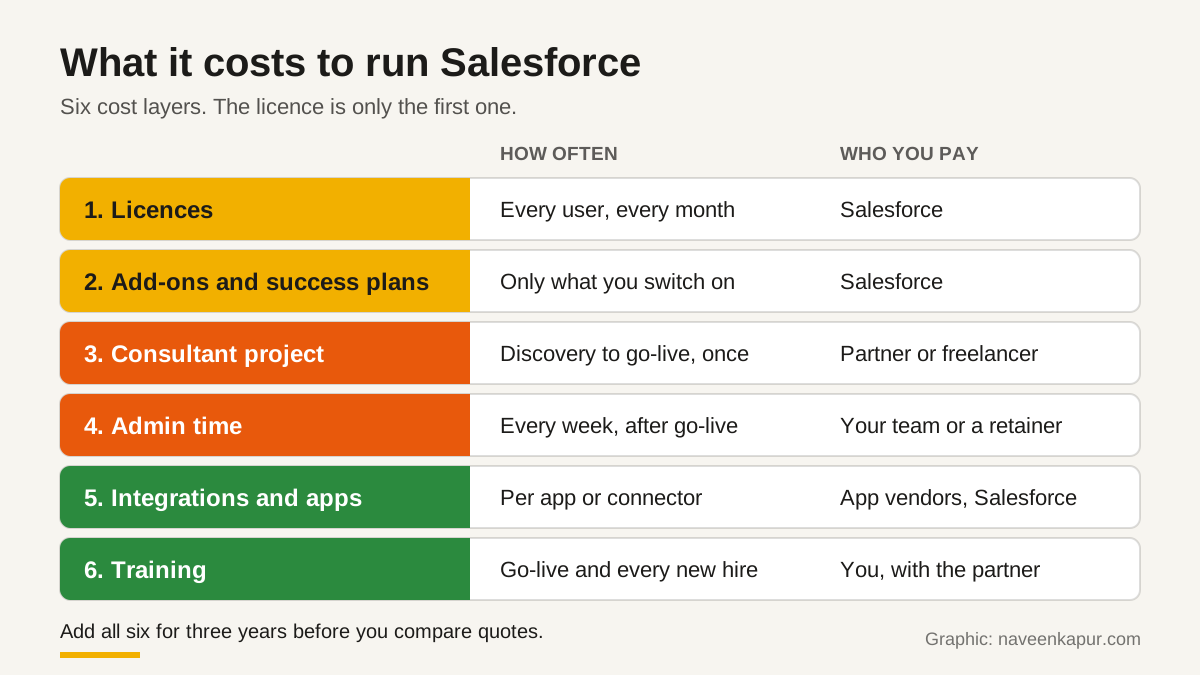
What Salesforce costs to run
1. Licences
| Sales Cloud plan | Price shown (USD per user per month) | Billing shown |
|---|---|---|
| Free Suite | $0 | Not stated |
| Starter Suite | $25 | Billed monthly or annually |
| Pro Suite | $100 | Billed annually |
| Core | $195 | Billed annually |
| Advanced | $395 | Billed annually |
| Max | $550 | Billed annually |
For Salesforce pricing in India, ask your account executive or partner for a written quote in the currency you will be invoiced in, with taxes shown. Multiply the per-user price by every user who needs a login, including managers who only read reports.
2. Add-ons and success plans
The same page lists paid add-ons with their own prices, for example Agentforce for Sales from $125 USD per user per month, and says AI can be added to Core and above. The Standard Success Plan is included in all licences, and the Premier Success Plan costs 30% of net licence fees. Plans and names on this page change often, so if your design depends on any add-on, get its price in writing before you sign.
3. Sandboxes
A sandbox is a copy of your Salesforce org where changes are built and tested before they reach your live data. Salesforce Help describes the types: a Developer sandbox copies only metadata, not records; a Partial Copy holds sample data; a Full sandbox copies all data. Developer and Developer Pro sandboxes can be refreshed every day, a Partial Copy every 5 days and a Full sandbox every 29 days. How many of each you get depends on your edition, and the pricing page marks some sandbox types as included only on higher plans.
If your consultant wants to test a data migration on a full copy of real data, ask whether your plan includes a Full sandbox or whether you must buy one.
4. Storage
Salesforce Help's Data and File Storage Allocations page sets data and file storage per org and per user licence, and the amounts differ by edition. Large email logs, attachments and duplicate records use storage fast, so ask your consultant to estimate your storage from your record counts and check it against the allocation for your edition before go-live.
5. Consultant fees, admin time, apps and training
These depend on your scope, so no honest article can give you a rupee figure. Ask each partner to price the same written scope, and split the quote into discovery, build, migration, integrations, testing and training. Count admin time in hours per week, whether it is a staff member's time or a retainer. AppExchange apps and connectors for telephony, WhatsApp, e-signature or accounting are usually priced separately by their own vendors, per user or per org.
Total cost of ownership table
| Cost component | Who you pay | How to estimate it |
|---|---|---|
| Licences | Salesforce | Users with a login x per-user monthly price x 36 months |
| Add-ons and success plans | Salesforce | Only the items your design needs; ask for written prices |
| Extra sandboxes or storage | Salesforce | Compare your edition's allocation with your testing plan and record counts |
| Consultant project | Partner or freelancer | Fixed quote against a written scope, split by stage |
| Admin time | Your staff or a retainer | Hours per week x cost per hour x 36 months |
| Integrations and apps | App vendors, connector providers | Each app's pricing per user or per org, plus setup |
| Training | You, with the partner | Go-live sessions plus time for every new hire |

Red flags
- No discovery stage. A partner who quotes a full build after one call is guessing.
- Names you cannot verify. If the people on your project do not appear on Trailhead's verification page, ask why.
- Licences in the partner's name. The Salesforce org, the admin login and the contract should be in your company's name.
- Code first, Flow later. Custom Apex for things Flow can do makes every future change slower and costlier.
- No documentation or handover. If only the consultant understands the setup, you are locked in.
- A plan chosen before the scope. The plan should follow from what you need, such as sandboxes, automation and storage.
Questions to ask a Salesforce implementation partner
- 1Who exactly will work on our project, and can we verify their certifications on Trailhead?
- 2Which edition do we need, and which feature in it do we actually use?
- 3Which add-ons, apps or extra sandboxes does your design assume, and what will they cost each year?
- 4Will automation be built in Flow, and where do you plan custom code?
- 5How will you test the data migration, and in which sandbox?
- 6What does your quote include, stage by stage, and what counts as a change request?
- 7Who will be our admin after go-live, and what does your support retainer cover?
- 8Do you earn anything from the licences or apps you recommend?
If you want help scoping a Salesforce project, checking quotes or planning the admin role after go-live, the service box below explains how we work. Our CRM development service page has more detail.