Most college websites look fine on the laptop in the director's office. The trouble starts on a parent's phone at nine at night: the fee structure is a scanned PDF, the programme page has no eligibility, and the enquiry form asks for fourteen fields. That family enquires somewhere else.
This buyer's guide is for owners, directors and admissions heads of colleges, universities and institutes who are planning education website design or a redesign. It covers the pages a college website design must include, how to build the admission enquiry form, speed, accessibility, SEO, tracking and what to ask your web designer. Most of it applies equally to university website design and school website design.
Start with what UGC expects on an HEI website
UGC's Guidelines on Public Self-Disclosure by Higher Education Institutions say every HEI "shall maintain a functional website" for self-disclosure to stakeholders. The disclosure must be open without any log-in or registration, and the site must have a search facility. The guidelines then list the information HEIs may provide, under heads such as About HEI, Administration, Academics, Admissions and Fee, Research, Student Life, Alumni, Information Corner, Picture Gallery and Contact us.
That list doubles as an admissions checklist. Under Admissions and Fee it names the prospectus including the fee structure for programmes, the admission process and guidelines, and the fee refund policy. Under Student Life it includes hostel details, the placement cell and its activities, the anti-ragging cell and facilities for the differently-abled. Parents look for exactly these things, so build them as proper web pages, not scanned notices.
| Page | What it should contain | Why it matters for enquiries |
|---|---|---|
| Programme page (one per programme) | Duration, eligibility, fees and intake as the prospectus states them, what is taught, an enquiry form | The page students land on from search and ads |
| Admissions | Steps, key dates, documents, fee refund policy, admissions office contact | Answers the questions that delay a decision |
| Fee structure | Programme-wise fees that match the prospectus | Mismatched fees create doubt and extra calls |
| Campus and hostel | Real photos, hostel details, transport, location map | Families decide on safety and distance |
| Faculty | Department-wise faculty with photographs | Shows who will actually teach |
| Placements | Placement cell activities and only figures you can document | Inflated claims cost trust |
| Disclosures | Approvals, accreditation, committees, grievance and anti-ragging cells, RTI details | Listed by UGC and checked by careful parents |
| Contact | Phone, official email, address, location map, office timings | The last step before a call or visit |
Programme pages do the selling
A student who searches for a course, or clicks an ad for it, should land on a page about that programme, not on the home page. Give each programme its own URL with duration, eligibility, fees, intake and selection process exactly as the prospectus states them, a short outline of what is taught, the department's faculty, and a short enquiry form on the same page. When the prospectus changes, update the page the same day, and show when it was last updated.
Placements need extra care. Publish only what you can back with records: the placement cell, recruiters who actually came to campus, and figures for a named batch if you have them. A vague "100% placement" banner is exactly the kind of claim parents have learned to distrust.
Build the enquiry form for phones
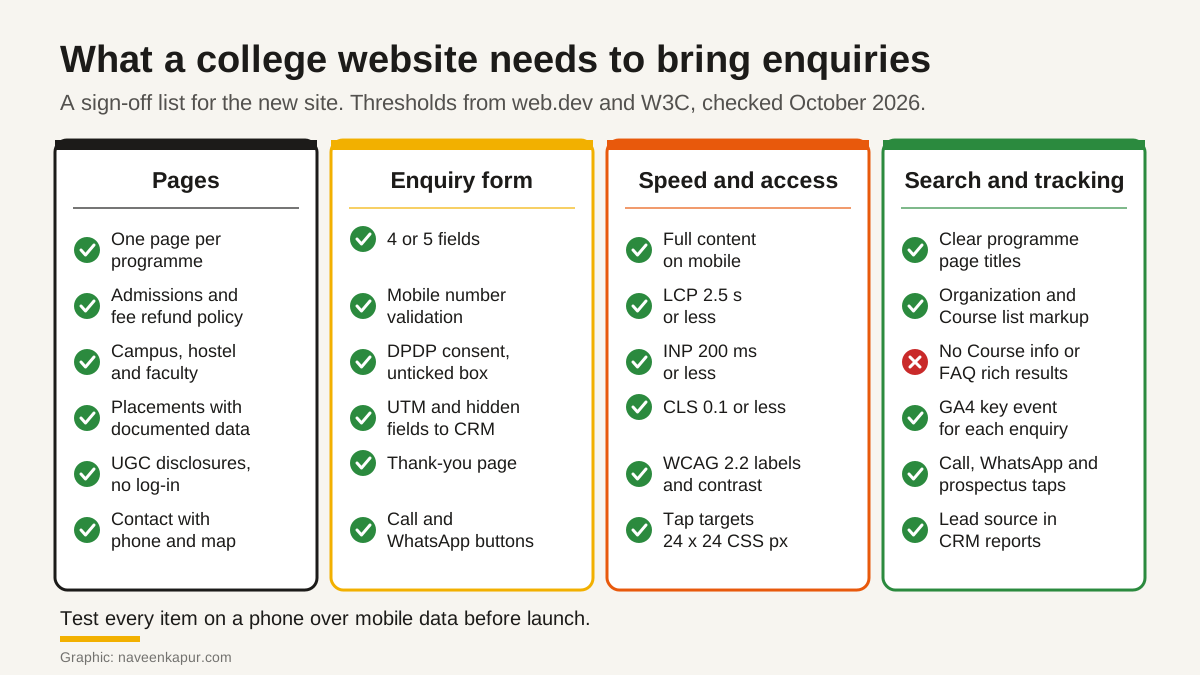
- Few fields: name, mobile number, programme of interest and city. Everything else can wait for the counsellor's call. Ask only for what the first call needs.
- Phone validation: use the telephone input type so phones show a number keypad, and check the number inline while the person types, with a clear message that says what to fix.
- Visible labels: every field needs a label that stays visible, not just placeholder text. WCAG 2.2 success criterion 3.3.2 requires labels or instructions when content needs user input.
- Hidden source fields: tag every campaign link with UTM parameters, and capture the UTM values, the page URL and the programme in hidden fields. Pass them into the CRM with the lead, so each admission can be traced back to its source.
- A real thank-you page: confirm what happens next (for example, "a counsellor will call you"), offer the prospectus and a campus visit booking. It also gives you a clean page to measure.
- WhatsApp and click-to-call: on mobile, add a tap-to-call button and a WhatsApp button for the admissions number for people who prefer not to fill a form. Track those taps too.
Once leads arrive with clean source data, a CRM does the follow-up work: assignment, reminders and reports. Our guide to CRM for colleges explains how that side should work.
Consent wording under the DPDP Act
The Digital Personal Data Protection Act, 2023 says consent must be "free, specific, informed, unconditional and unambiguous with a clear affirmative action", and limited to the personal data needed for the stated purpose. Every consent request must be accompanied or preceded by a notice that tells the person what data is collected and why, how to exercise their rights and withdraw consent, and how to complain to the Data Protection Board. The Act also says withdrawing consent should be as easy as giving it.
On a college form, a clear affirmative action in practice means a checkbox the person ticks, never one that is ticked already. Keep the wording plain, for example: "I agree that [Institute] may use my name, mobile number and email to contact me by call, SMS, email and WhatsApp about admission to the programme I selected. I can withdraw this consent at any time by [method]." Link it to your privacy notice and do not bundle unrelated purposes.
Two more points. The Act treats anyone who has not completed eighteen years as a child, and requires verifiable consent of a parent or lawful guardian before processing a child's personal data, in the manner the Rules prescribe. Many school and junior college applicants are under eighteen, so ask your lawyer how your form should handle this. Also, the Government notified the DPDP Rules, 2025 on 13 November 2025 with an 18-month phased compliance timeline (checked October 2026). This article is not legal advice; have your privacy notice and consent text reviewed.
Mobile first and speed
Google uses the mobile version of a site's content for indexing and ranking. Its mobile-first indexing guidance asks for the same content, the same structured data and equivalent titles and meta descriptions on mobile and desktop. So do not drop programme details on mobile to make the page shorter; group them in accordions or tabs instead.
| Core Web Vital | What it measures | Good threshold |
|---|---|---|
| Largest Contentful Paint (LCP) | Loading | 2.5 seconds or less |
| Interaction to Next Paint (INP) | Responsiveness | 200 milliseconds or less |
| Cumulative Layout Shift (CLS) | Visual stability | 0.1 or less |
On college sites, the usual suspects are large hero sliders, uncompressed campus videos, several chat widgets and stacks of tracking scripts. Ask your designer to show field data for these three metrics before and after launch. Our guide to Core Web Vitals explains each metric and the common fixes.

Accessibility: build to WCAG 2.2
W3C's page shows WCAG 2.2 as a W3C Recommendation dated 12 December 2024. The success criteria that matter most on a college site are:
- Text alternatives (1.1.1, Level A): campus photos, charts and icons need text alternatives that serve the same purpose.
- Contrast (1.4.3, Level AA): text needs a contrast ratio of at least 4.5:1, and large text at least 3:1. Light grey text on a photo usually fails.
- Target size (2.5.8, Level AA, new in 2.2): buttons and links should be at least 24 by 24 CSS pixels, with some exceptions for spacing and inline links.
- Form errors and labels (3.3.1 and 3.3.2, Level A): errors are identified and described in text, and fields have labels or instructions.
- Input purpose (1.3.5, Level AA): the purpose of fields such as name, email and phone can be identified by the browser, which also helps autofill.
UGC's list includes facilities for the differently-abled, such as a barrier-free environment. A barrier-free website is the online side of the same promise.
SEO basics that still apply
One page per programme is the foundation. Give each a clear title such as "BBA: Duration, Eligibility, Fees and Admission", a unique description, and links from the department and admissions pages. If you are replacing an old site, plan redirects before launch; website redesign without losing SEO covers the steps.
Structured data is where many proposals are out of date. Check what Google supports today before you pay for markup:
| Markup | Status in Google Search (checked October 2026) |
|---|---|
| Organization | Listed in Google's search gallery. Helps Google identify your institution and its logo. |
| Course list | Listed in the search gallery, for pages that list several courses. |
| Breadcrumb | Listed. Google says breadcrumbs appear only on desktop results, not mobile. |
| Event | Listed. Can suit open days and admission events published on your site. |
| Course info | Phased out. Google removed it from Search Console reporting and the Rich Results Test from 9 September 2025. |
| FAQ | Google says the FAQ rich result is no longer shown in Search, from 7 May 2026. |
Tracking: mark the right key events in GA4
In GA4, the actions that matter are marked as key events. Google's help says a standard property can have up to 30 key events (checked October 2026), and you can create Google Ads conversions from them for bidding. For a college site, mark these:
- A successful enquiry, sent as Google's recommended generate_lead event when the thank-you page loads or the form submits.
- Taps on the call and WhatsApp buttons.
- Prospectus downloads.
- Campus visit bookings.
Then compare GA4 with the CRM every month: enquiries by source in GA4 should roughly match leads by source in the CRM. Our GA4 setup checklist covers the configuration.
Questions to ask a web designer
- 1Will every programme have its own page, and who will update fees and eligibility each year?
- 2How will the UGC disclosure items be organised, and will they open without log-in and be searchable?
- 3Which fields will the enquiry form have, and how will the consent text and privacy notice be handled?
- 4How do UTM values and the page URL reach our CRM? Can you show a test lead?
- 5What LCP, INP and CLS will you measure at launch, and on which pages?
- 6Which WCAG 2.2 level will you test against, and with what tools?
- 7Which structured data will you add, and is each type still supported by Google today?
- 8Which GA4 key events will you set up, and will we own the GA4 property, domain and hosting logins?
Red flags
- A template with one generic "Courses" page instead of one page per programme.
- Fees and the prospectus only as PDF downloads.
- An enquiry form with ten or more fields, or a consent box that is ticked already.
- Form leads arriving only by email, with no source recorded.
- Placement figures or rankings on the home page that no one can document.
- A proposal that still sells Course info or FAQ rich results.
- Domain, hosting or analytics registered in the agency's name.
If you want help planning a college website that turns visits into enquiries, see our web design and development service and our work with colleges and universities. The service box below explains how we work.