Indian schools are buying software faster than ever. Search data shows it: “school management system” is searched about 12,100 times a month in India and “school management software” about 3,600 times (OpenSEO, October 2026). There are hundreds of products, from simple fee apps to full school ERPs.
Most demos look the same: a dashboard, an attendance screen and a parent app. The real test comes in the busiest months, when fees, exams, report cards and next year's admissions all happen together. This guide gives eight checks to make before you buy, so the software works in March, not only in the demo.
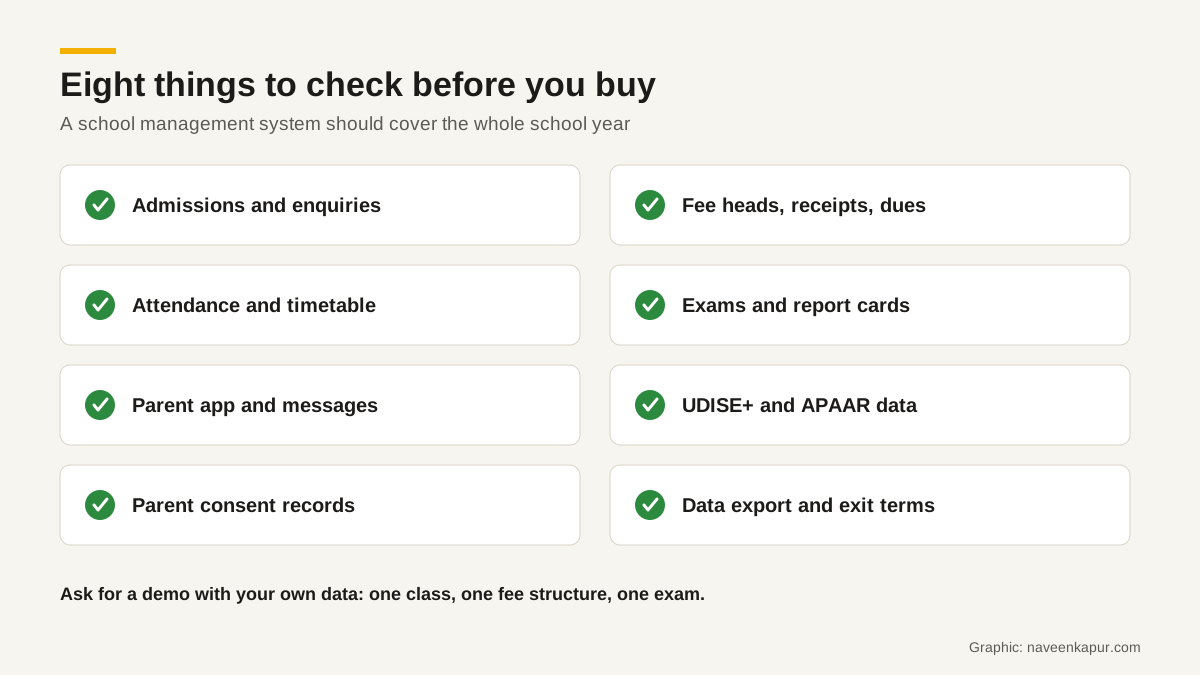
1. Admissions and enquiries
Admission season decides next year's revenue. The system should capture enquiries from your website, calls, walk-ins and social media, record where each came from, assign them to the admissions desk, and track them through stages: enquiry, school visit, registration form, test or interaction, offer, fee paid. Many school ERPs treat admissions as a form only. If yours does, you may need a separate CRM for schools in front of it. Our guide to CRM for colleges explains the stages; schools work the same way. Many school enquiries begin on Google Maps, so keep your Google Business Profile complete.
2. Fee heads, receipts and dues
Fees cause more complaints than any other module. Check that you can set up your real fee structure: different heads (tuition, transport, activity, annual charges), different amounts by class, sibling concessions, instalments, and receipts with your school's details.
CBSE's affiliation bye-laws say fees shall be charged under the heads prescribed by the Department of Education of the state or UT, and the school website should carry information on the fees charged. Several states have their own fee regulation laws; Delhi, for example, set up school-level fee regulation committees under a 2025 Act. Your software should make it easy to publish the fee schedule and keep it matched to what is billed. Late fines and reminders are covered in our fee management system guide.
3. Attendance and timetable
Attendance should take a teacher less than a minute per class on a phone, work on a weak connection, and notify parents of absence the same day if you choose. The timetable module should handle substitutions when a teacher is absent, which is where many products struggle.
4. Exams and report cards
Ask the vendor to produce your report card, in your board's format, with your grading scale, co-scholastic areas and remarks. Then ask how long it takes for 500 students. A report card that needs manual fixing in Word every term defeats the purpose.
5. Parent app and messages
Parents judge the school's software by the app they use, just as they judge the school's website on a phone; a slow site fails Google's Core Web Vitals and frustrates them before they ever enquire. Check that it shows fees due and receipts, attendance, homework, circulars and report cards, and that messages can be sent to a class, a section or one parent. If you plan to use WhatsApp for reminders, it should connect through the WhatsApp Business Platform, which requires opt-in and approved templates. See WhatsApp automation for the rules.

6. UDISE+ and APAAR data
Indian schools report to UDISE+ every year: a school profile, and for each student a general profile, an enrolment profile and other details, with a system-generated PEN (Permanent Education Number). Schools also register students for APAAR, the Ministry of Education's 12-digit academic ID, which its site says is added to DigiLocker after verification. For a minor, the school must obtain parental consent for APAAR registration.
Your school management system should store the fields you need for these returns in the same format, so the data team does not rebuild them in Excel each year. Ask the vendor to show a UDISE+-ready student export and where APAAR IDs and consent are recorded.
7. Parent consent and data protection
Almost every student in a school is a child under India's Digital Personal Data Protection Act, 2023, which defines a child as anyone under 18. Section 9 requires verifiable consent of the parent before processing a child's personal data, and bars tracking, behavioural monitoring and targeted advertising directed at children. The DPDP Rules, 2025 were notified on 14 November 2025 with an 18-month phased compliance timeline.
- Ask where consent is recorded, by whom and when.
- Ask who at the vendor can see your students' data, and where it is stored.
- Ask how a parent's request to correct data is handled.
- Check the contract for what the vendor may and may not do with the data, including analytics and advertising.
8. Data export and exit
Schools change software more often than they expect. Before you sign, get a written clause on how you will receive all your data (students, parents, fees and receipts, attendance, marks) in a usable format such as CSV or Excel, how quickly, and at what cost. Ask whether past report cards and receipts can be exported as PDFs.
Questions on cost and support
- 1What is the total cost for three years, per student or per school, including SMS, WhatsApp, payment gateway and app charges?
- 2What is included in setup: data migration, fee structure, report card format, training?
- 3Who answers support calls during exam and fee weeks, and in which language?
- 4How are updates handled when the board changes a report card format?
- 5Can we speak to two schools of our size that use it?
Plan the switch for the right month
Do not switch software in March or during admissions. The quietest time for most Indian schools is the summer break, after results and before the new session. Move fee data and student lists first, run both systems side by side for one fee cycle, and train office staff before teachers and parents. Give parents a short guide to the new app, in the languages they use.
School ERP or school CRM?
A school ERP or management system runs the school year for enrolled students. A CRM manages enquiries and admissions before a child joins. Many small schools manage both in one product. Larger school groups with active admissions marketing often use a CRM for enquiries and the ERP for everything after admission, joined by one student ID. The same split is explained for colleges in student information system vs CRM.
Choose the product your office staff, teachers and parents will actually use every day, test it with your own data, and protect your exit. For help planning admissions and fee systems for an institution, see the colleges and universities service page.