Ask an admissions team how many students joined this year and you often get two answers. Admissions says one number. Accounts says a smaller one. Both are right by their own rules, and that is the problem. Good student lifecycle management needs one clear moment when a person stops being an applicant and becomes a student.
In CampusFlow CRM, the education CRM I designed for a training institute, that moment is fixed by a rule called payment-to-receipt. An admission becomes a student only when the payment is recorded and verified and the receipt is issued. Before that, the person is an applicant with an offer, however keen they sound on the phone. This guide explains why that rule matters and how to set it up in any admission CRM.
Why “admitted” is not a student
An offer or admission letter is a promise from the college. The applicant has not yet promised anything back. Many applicants hold two or three offers at once and pick one later. Some say “I will pay tomorrow” and never do. Some pay a small booking amount and withdraw before classes start.
A verified payment with a receipt number is different. Money has moved, the accounts team can see it, and there is a document both sides can point to. That is the right trigger for everything that follows: the student ID, the class allotment, the fee schedule and the welcome message.
What goes wrong when “admitted” counts as a student
Inflated admission numbers
If counsellors can mark a lead “admitted” on a verbal yes, the dashboard fills up fast. Management plans batches, faculty and hostel rooms on a number that will shrink. Say 200 applicants are marked admitted but only 140 pay (an example with round numbers, not real data). The plan was 30% too high from day one.
Marketing optimises to fake conversions
Google Ads and Meta learn from the conversions you send them. If you send “admitted” as the conversion, the campaigns learn to find more people who say yes and then disappear. Your cost per conversion looks good while your cost per paying student quietly rises. This is one of the most common digital marketing mistakes in education.
Unfair counsellor incentives
If incentives are paid on “admitted”, people mark more leads admitted. That is not dishonesty, it is the rule doing what it rewards. Tie incentives to paid and receipted admissions, net of refunds, and the behaviour follows.
Refunds and withdrawals
Students do withdraw, and colleges must handle refunds properly. UGC’s fee refund policy for 2024-25 asks higher education institutions to refund fees in full when an admission is cancelled by a set date, with only a small processing deduction allowed until a later date. UGC’s notice of 27 October 2025 says the same policy stays in force for later sessions until a new one is issued, and it also says original certificates must not be retained. Check the notice for the exact dates and rules that apply to your institution. In the CRM, a refund should reverse the student status with a reason, not delete the record.
Accounts and admissions mismatch
When the student status depends on a receipt, the admissions count and the accounts count are the same list by design. Month-end reconciliation becomes a check, not an argument.
The student life cycle, stage by stage
Here is a simple stage model that works for most colleges, universities and institutes. The names can change; the triggers should not.
| Stage | Who owns it | What moves it to the next stage |
|---|---|---|
| Enquiry | Admissions or counselling team | Applicant fills the application form or counsellor completes it with consent |
| Applicant | Counsellor | Documents checked and eligibility confirmed |
| Offer / admitted | Admissions office | Offer issued; applicant pays the fee |
| Fee paid | Accounts | Payment verified on the server or matched with the bank statement |
| Receipt issued = student | Accounts | Receipt number generated; student ID created |
| Enrolled with registrar | Registrar or academic office | Documents verified, roll number and batch or section allotted |
| Alumni | Alumni or placement cell | Course completed and final dues cleared |
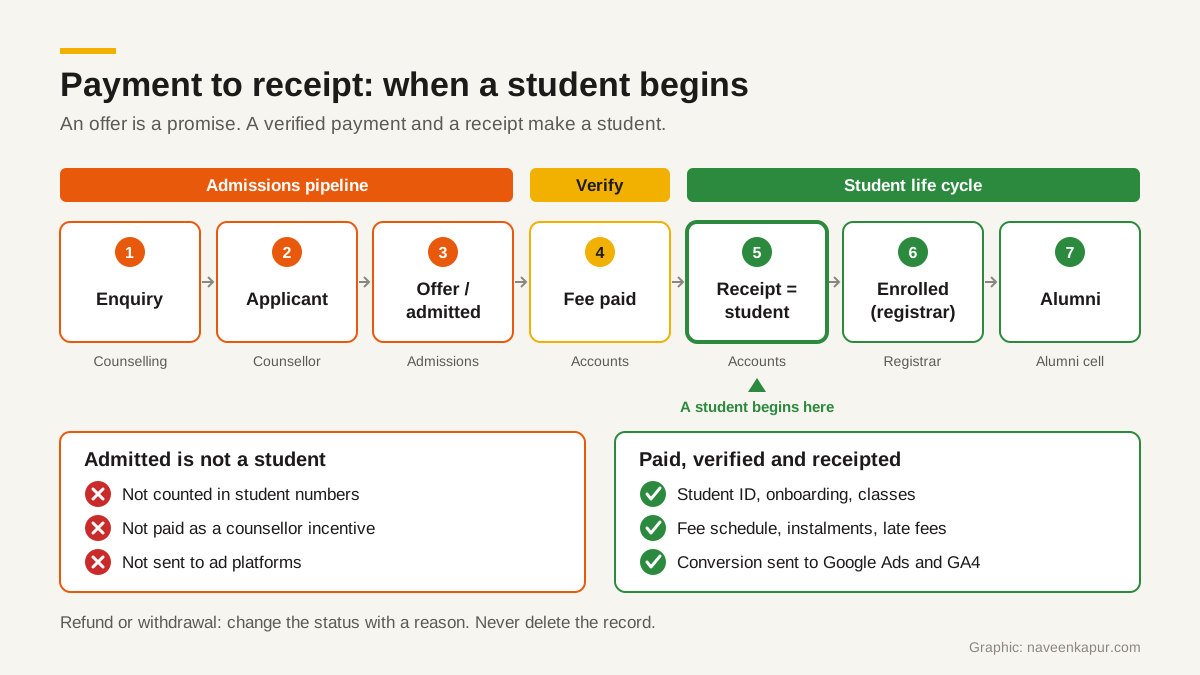
After the receipt, the record belongs to the student life cycle: onboarding, classes, attendance, instalments and late fees, and finally alumni. Our guide to the fee management system covers instalments and late fines, and admission management system covers the hand-offs between the four offices.
How to set up payment-to-receipt in any CRM
You do not need a custom build for this. Salesforce, Zoho, LeadSquared or a CRM you already have can do most of it with fields, validation rules and workflows. What matters is that the rule is enforced by the system, not by a training session.
1. Lock the status to payment fields
Add fields for amount paid, payment reference, payment verified (yes or no) and receipt number. Then add a validation rule: the stage cannot be set to “student” unless payment verified is yes and the receipt number is filled. Counsellors should not be able to edit these fields at all. Only accounts, or the payment integration, can.
2. Verify payments on the server
A “payment successful” page in the browser is not proof. The browser can be closed, the page can be refreshed, and screenshots can be edited. Your system should confirm the payment with the gateway on the server, using its signature check or webhook, before it marks anything as paid. For bank transfers and cheques, accounts should mark the payment verified only after matching it with the bank statement. Our guide to payment gateway integration explains server-side verification step by step.
3. Make the receipt number required
Generate the receipt number from the system in a fixed sequence, never typed by hand. One payment, one receipt. If a payment is refunded, keep the receipt and add a refund record linked to it, so the trail stays complete.
4. Separate the two numbers in reports
Every admissions report should show “admitted” and “paid and receipted” side by side, by course, counsellor, source and week. The gap between them is useful information: it shows which courses, sources and counsellors produce offers that do not turn into students.

5. Send only paid admissions to ad platforms
Google Ads lets you import offline conversions: you save the Google Click ID (GCLID) with the lead and later send it back with the conversion when the lead converts offline. Google now also offers enhanced conversions for leads, which matches hashed details such as the email address captured on your form. Google’s help pages say that from 15 June 2026 these uploads move to the Data Manager API and are blocked in the Google Ads API, so check that your CRM or connector uses the current method.
Whichever method you use, the conversion you send should be the receipt, not the offer. In Google Analytics 4, mark the events that matter as key events, and keep the form submission as an early signal rather than the main goal. Our GA4 setup checklist covers key events and lead sources.
Terms to agree with your team
- Admitted
- An offer has been made. Not a student. Not a conversion for ad platforms.
- Paid
- A payment exists and has been verified on the server or matched with the bank statement.
- Student
- Paid, verified and receipted. The record moves to the student life cycle.
- Withdrawn
- A student who cancelled. The status changes with a reason and a refund record; the record is never deleted.
- Admission to enrolment
- The steps from offer to registrar enrolment. In this model, the receipt sits in the middle and decides who continues.
Will this slow down admissions?
No. Counsellors can still mark applicants admitted and chase them. The rule only stops that status from being counted as a student, paid as an incentive or sent to an ad platform. Most teams find the follow-up gets sharper, because the gap between offer and payment is now visible.
If you want help setting this up in your current CRM, or a CRM built around this rule, the colleges and universities service page explains how I work with institutions.