
Developers love Next.js, and many agencies now pitch it for every website. Business owners hear that it is “great for SEO” and wonder whether their WordPress site is holding them back. The honest answer is: Next.js can be very good for SEO, but only when it is built the right way, and for some businesses it is the wrong choice altogether.
This guide explains what Next.js SEO really means, which built-in features matter, the mistakes that quietly stop pages from ranking, and a simple table to decide whether a Next.js website suits your business. For full disclosure, this blog itself runs on Next.js.
What Next.js is
Next.js is an open-source React framework maintained by Vercel. React builds the user interface out of components. Next.js adds routing, rendering, data fetching, caching and build tooling around them. When I checked nextjs.org on 17 October 2026, the latest stable release was 16.4.2. Version numbers move quickly, so always read the docs for the version your project actually uses.
Next.js has two routers: the newer App Router (files under an app folder) and the older Pages Router. Everything in this guide refers to the App Router, which is what new projects use.
Server, static and client rendering, and why Google cares
A web page can be built in three places. The difference decides what a search engine sees on its first visit.
- Static rendering (prerendering)
- The HTML is built once, at build time or on first request, and then served to everyone. Ideal for service pages, blog posts and landing pages that do not change per visitor.
- Server rendering
- The HTML is built on the server for each request. Used when the page depends on fresh data, such as live seat availability or stock.
- Client rendering
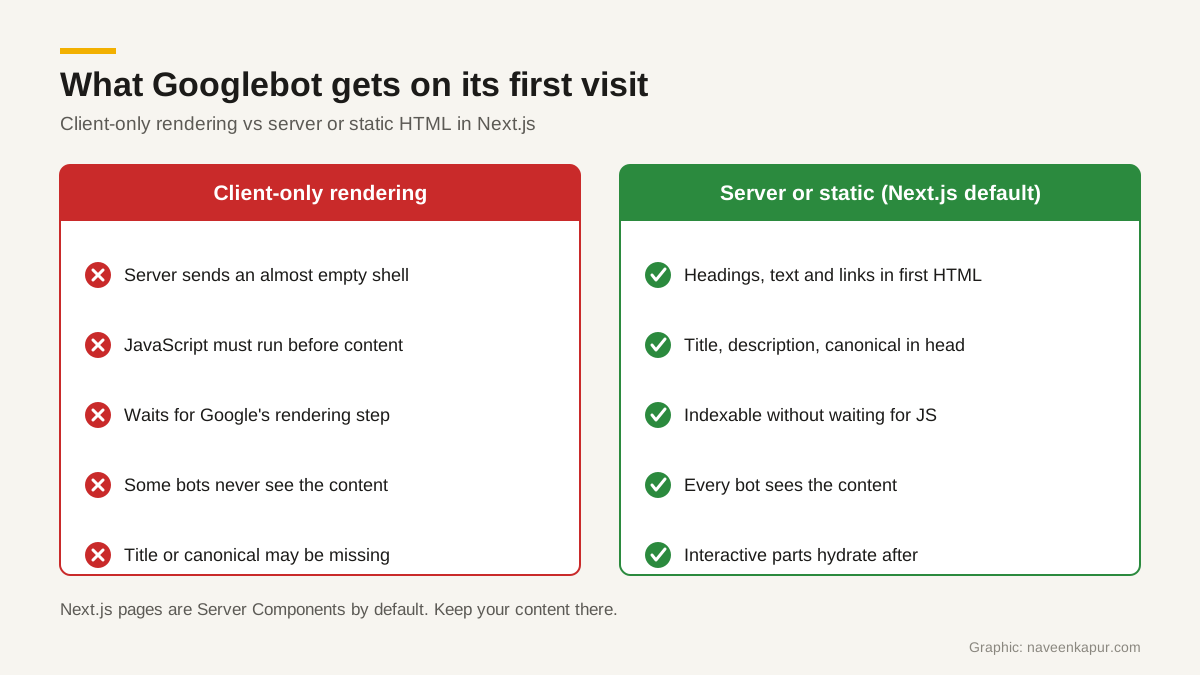
- The server sends a nearly empty page and JavaScript in the browser fetches data and builds the content. Fine for dashboards behind a login, risky for pages you want to rank.
Google’s own page on JavaScript SEO basics says Google processes JavaScript sites in three phases: crawling, rendering and indexing. Rendering happens later, when Google’s resources allow, in a headless Chromium browser, and Google then uses the rendered HTML for indexing. Google can index client-rendered pages, but there is an extra step and a delay, and Google also notes that not all bots can run JavaScript, which is why it still recommends server-side rendering or prerendering.
This is where Next.js helps. In the App Router, layouts and pages are Server Components by default. Even interactive Client Components are prerendered to HTML on the first load and then “hydrated” with JavaScript. So if you build normally, your headings, text and links are already in the HTML when Googlebot arrives. Nothing has to wait for the render queue.
The Next.js features that matter for SEO
The Metadata API
Instead of hand-writing head tags, you export a metadata object from a layout or page for static values, or a generateMetadata function when the title depends on data, such as a course page that reads the course name from your database. Next.js turns this into the title tag, meta description, Open Graph tags, robots meta tags and the canonical link.
Two details are worth knowing. First, metadata exports are only supported in Server Components, because Next.js resolves metadata on the server so it can include it in the initial HTML. Second, set metadataBase once in the root layout (your domain), and then each page can set alternates.canonical as a short relative path such as /courses/bba. Without metadataBase, a relative canonical causes a build error, which is a helpful safety net.
sitemap.ts and robots.ts
Put a sitemap.ts file in the root of the app folder and export a function that returns your URLs, each with optional lastModified, changeFrequency and priority. Next.js serves it at /sitemap.xml. Because it is code, new blog posts or course pages appear in the sitemap automatically. Large sites can split sitemaps with generateSitemaps.
A robots.ts file in the same place returns your rules (user agent, allow, disallow) and the sitemap address, and Next.js serves it as /robots.txt. You can still use a plain sitemap.xml or robots.txt file if you prefer.
next/image, next/font and Link prefetching
- next/image serves correctly sized images for each device in modern formats like WebP, lazy-loads images as they enter the viewport, and uses width and height to prevent layout shift.
- next/font self-hosts fonts, including Google Fonts, from your own domain, so the browser makes no request to Google for them, and the docs say this loads web fonts with no layout shift.
- Link prefetching: in production, as each Link enters the viewport, Next.js prefetches the route behind it, so clicking through to the next page feels instant.
Core Web Vitals
Google’s Core Web Vitals are LCP (loading, good at 2.5 seconds or less), INP (responsiveness, good at 200 milliseconds or less) and CLS (visual stability, good at 0.1 or less), measured at the 75th percentile of real visits. The features above help with LCP and CLS. INP depends mostly on how much JavaScript runs in the browser, so keep Client Components small. Our guide to Core Web Vitals explains each metric in detail.
Common Next.js SEO mistakes
A framework does not do SEO for you. These are the mistakes I see most often when auditing a Next.js website.
1. Rendering content only on the client
A developer marks a whole page with “use client” and fetches the text inside a useEffect hook. The page looks fine in a browser, but the first HTML is empty. The Next.js docs suggest the opposite: keep pages as Server Components and add “use client” only to the small interactive parts, such as a search box or a form.
2. Missing or wrong canonical tags
Next.js does not invent canonicals for you. Filter pages, tracking parameters and trailing-slash versions can all create duplicates. Set alternates.canonical on every indexable page. Google’s JavaScript SEO page says the best way to set the canonical is in HTML, and if JavaScript changes it, it should match the original HTML value and be the only rel=canonical on the page.
3. Soft 404s
A deleted course or product page that shows “not found” text but returns status 200 is a soft 404. In Next.js, call notFound() when the data does not exist. Called before the response starts streaming, it returns a real 404, and Next.js also adds a noindex robots tag. If it is called inside a Suspense boundary after streaming has started, the status stays 200 with noindex, so do the existence check early for pages where a true 404 matters.
4. Blocking JavaScript in robots.txt
Some teams disallow /_next/ or script folders in robots.txt to “save crawl budget”. Google says it won’t render JavaScript from blocked files or on blocked pages. Never block the files your pages need to render.
5. Links that are not real links
Google can only discover links that are a elements with an href attribute. A button with an onClick handler that changes the page is invisible to crawlers. Next.js’s Link component renders a proper anchor, so use it for navigation.

When Next.js is overkill
Next.js is a developer tool. Content usually lives in code files, Markdown or a separate headless CMS that someone has to connect and maintain. That is a strength when you have developers. It is a weakness when you do not.
Take a 5-page brochure site for a coaching centre or a clinic, where the marketing person needs to change the fee banner, add a holiday notice or publish an event photo almost every day. With WordPress or a good site builder, they log in and do it. With a plain Next.js build, every change may need a developer and a deployment. The site will be fast, but it will be out of date, and stale content is worse for the business than a slightly slower page.
| Your situation | Better fit | Why |
|---|---|---|
| 5 to 10 pages, staff edit daily, no developer | WordPress or a site builder | Non-technical editing matters more than framework speed. |
| Content site or blog with a developer on call | Next.js | Static pages, clean metadata and automatic sitemaps. |
| Many dynamic pages from a database (courses, products, listings) | Next.js | generateMetadata and generateSitemaps scale with your data. |
| Website plus portal, CRM forms or student login | Next.js | One codebase for public pages and app features. |
| Online store with standard needs | A hosted store platform or WooCommerce | Payments, stock and tax come ready-made. |
| Marketing team wants Next.js speed and easy editing | Next.js with a headless CMS | Editors get a dashboard, but budget for setup and upkeep. |
Whatever you choose, a well-built WordPress site on good hosting can pass Core Web Vitals too. If speed is your main worry, read our guides on website speed optimization and web hosting in India before you rebuild anything.
A short Next.js SEO checklist
- 1Keep content in Server Components; add “use client” only to interactive pieces.
- 2Set metadataBase in the root layout and a unique title, description and canonical on every page.
- 3Add sitemap.ts and robots.ts, then submit the sitemap in Search Console.
- 4Use notFound() for missing data, early enough to return a real 404.
- 5Use next/image with width and height, and next/font for fonts.
- 6Use Link for internal navigation, and never block /_next/ in robots.txt.
- 7Check field data for LCP, INP and CLS after launch, not just a lab score.
If you are planning a new business or college website and want help choosing between Next.js and a CMS, see my web design and development work. The best stack is the one your team can keep up to date.