Many business websites are built well and then left alone. For a while nothing seems wrong. Then a contact form stops sending emails, a plugin update breaks the menu, the security certificate expires on a Sunday, or Google shows a warning that the site may be hacked. None of these are rare, and most are prevented by routine work that nobody was paid to do.
This guide explains what website maintenance services should include, how often each task should happen, and what to ask a provider. It applies to WordPress and to most other sites, with WordPress examples because so many business sites run on it.
What maintenance is, and what it is not
Maintenance keeps the site you have safe, current and working. It is not a redesign, new pages or new features; those are projects with their own scope. A good plan says clearly where maintenance ends, how many hours of small changes are included each month, and what anything beyond that costs.
1. Backups you can actually restore
Every plan says "daily backups". Ask three follow-up questions. Where is the copy kept? A backup stored only on the same server disappears with the server. How long are copies kept? If a hack is found three weeks late, you need a copy from before it. When was a restore last tested? A backup that has never been restored is a hope, not a backup.
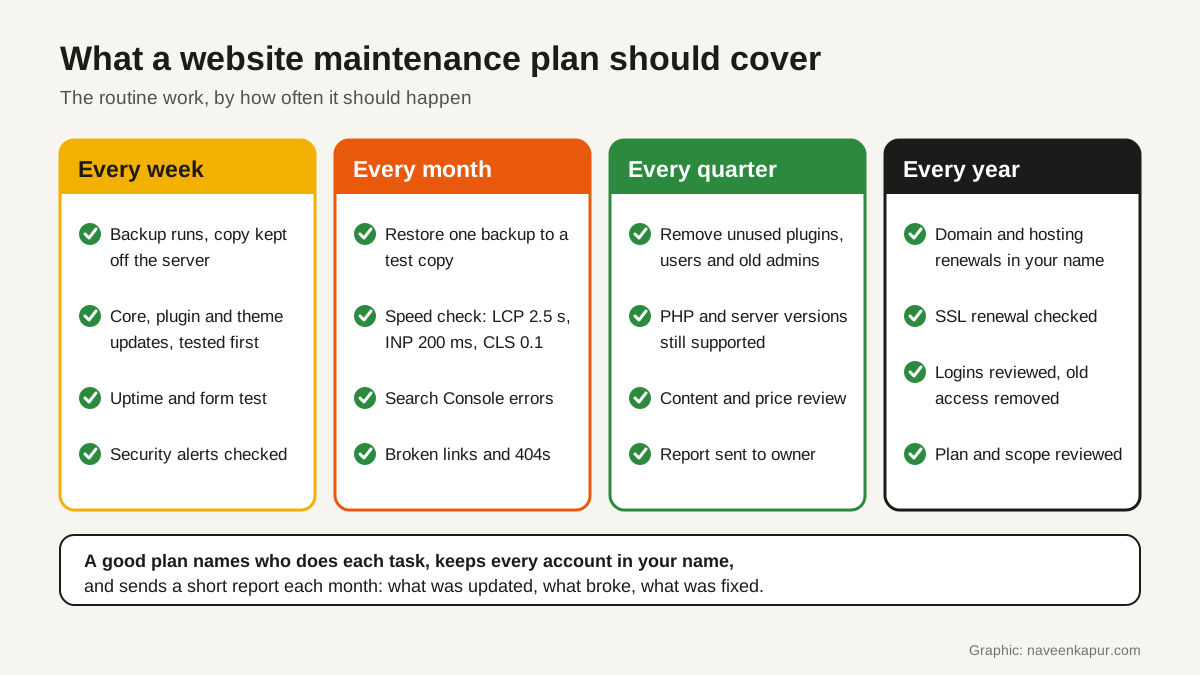
A sensible routine: an automatic daily backup of files and database, a copy stored with a different provider or account, at least 30 days of copies, and one test restore each month onto a staging copy of the site.
2. Updates, tested before they go live
A common way into a website is a known weakness in a plugin, theme or CMS version that was never updated. WordPress has supported automatic updates for plugins and themes since version 5.5, where administrators opt in plugin by plugin and theme by theme; by default WordPress runs auto-updates twice a day. Automatic updates are useful for small, trusted plugins. For plugins that run forms, payments or bookings, a provider should update a staging copy first, check the key pages and forms, then update the live site.
The server software matters too
Your site runs on a programming language and a database that also go out of support. WordPress's requirements page recommends PHP 8.3 or greater, MariaDB 10.11 or greater or MySQL 8.0 or greater, and HTTPS support. The PHP project's own support table (checked 27 Oct 2026) is below.
| PHP version | Active support until | Security fixes until |
|---|---|---|
| 8.2 | 31 Dec 2024 | 31 Dec 2026 |
| 8.3 | 31 Dec 2025 | 31 Dec 2027 |
| 8.4 | 31 Dec 2026 | 31 Dec 2028 |
| 8.5 | 31 Dec 2027 | 31 Dec 2029 |
If your hosting still runs PHP 8.2 or older, plan the move to a newer version now, test it on staging first, and confirm every plugin supports it. Our guide to web hosting in India explains what to look for in a host.
3. Security monitoring
Security work in a maintenance plan is mostly routine: strong unique passwords and two-step login for every admin, removing old staff and agency logins, a firewall or security plugin with alerts that someone reads, and a weekly look at those alerts. Add your site to Google Search Console and watch its Security issues report, which tells you if Google has found hacked content or harmful downloads on the site. After a fix, you request a review there.
Indian businesses should also know about CERT-In's directions of 28 April 2022 under section 70B of the IT Act. They require service providers, intermediaries, data centres, body corporates and government organisations to report listed cyber incidents to CERT-In within 6 hours of noticing them, and the list includes defacement of a website or intrusion with unauthorised changes such as malicious code or links. The same directions ask these organisations to keep logs of their ICT systems for a rolling 180 days within India. Ask your provider who would notice an incident, who would tell you, and how quickly. Check with your legal adviser how the directions apply to your business.
4. SSL certificates that renew themselves
The padlock in the browser depends on a TLS (SSL) certificate that must be renewed before it expires. In April 2025 the CA/Browser Forum, the body of certificate issuers and browser makers, approved a ballot that cuts the maximum life of public TLS certificates from 398 days to 47 days, in steps starting in March 2026 and ending in March 2029. Manual yearly renewal will not keep up. A maintenance plan should use automatic renewal and include a monitor that warns you before any certificate expires.
5. Speed, forms and emails
Sites slow down over time as plugins, scripts and large images pile up. A monthly check against Google's Core Web Vitals is a simple test. web.dev lists the "good" thresholds as Largest Contentful Paint within 2.5 seconds, Interaction to Next Paint of 200 milliseconds or less, and Cumulative Layout Shift of 0.1 or less, measured at the 75th percentile of page loads. If the site fails these, that is a speed project; see our guide to website speed optimisation services.
Forms are where a business site earns its money. Test every form each week: submit it, check the email arrives, and check the lead reaches your CRM. If form emails land in spam, the cause is often missing email authentication; our article on SPF, DKIM and DMARC explains the fix.

6. Ownership and access
This is the least technical part and often the most important. The domain, the hosting account, Google Search Console, Google Analytics and any paid plugin licences should be registered in your business's name, with the provider added as a user. If a relationship ends, you remove their access; you do not ask for your website back. Keep a simple document listing each account, who owns it, who has access and when it renews.
What a monthly plan should include
| Area | What the provider does | How often |
|---|---|---|
| Backups | Daily automatic backup, copy kept off the server, test restore | Daily; restore monthly |
| Updates | CMS, plugins and themes, tested on staging first | Weekly or as released |
| Security | Read alerts, remove unused logins and plugins, check Search Console security issues | Weekly; access review quarterly |
| Uptime and forms | Uptime monitor with alerts; submit every form and confirm the lead arrives | Continuous; forms weekly |
| SSL and domain | Automatic certificate renewal with expiry alerts; renewal dates tracked | Continuous; review yearly |
| Speed and SEO health | Core Web Vitals check, Search Console errors, broken links | Monthly |
| Small changes | Text, image and price updates within the agreed hours | As requested |
| Report | What was updated, what broke, what was fixed, what needs a decision | Monthly |
What website maintenance costs
Prices vary widely, so compare scope, not only the monthly figure. The cost depends on the number of plugins and integrations (forms, payments, bookings, CRM), how many small-change hours are included, how fast the provider promises to respond, whether staging and off-server backups are included, and whether hosting is bundled. A cheap plan that only clicks "update all" each month can cost more later than a plan that tests updates and restores backups.
Questions to ask a provider
- 1Where are backups stored, how long are they kept, and when did you last test a restore?
- 2Do you test updates on a staging copy before the live site?
- 3Who watches security alerts and uptime, and how fast will you tell us about a problem?
- 4Which PHP version is our site on, and when will it be upgraded?
- 5How many hours of small changes are included, and what is the rate after that?
- 6Will the domain, hosting and Google accounts stay in our name?
- 7What does the monthly report contain?
Red flags
- Backups kept only on the same server as the site.
- "We update everything automatically" with no testing or rollback plan.
- The domain or hosting registered in the provider's name.
- No written scope for what is and is not included.
- No report, or a report that lists only plugin names.
If you are planning a redesign rather than upkeep, read our guide to website redesign without losing Google traffic first. For help with a maintenance plan or a site that needs fixing, see our web design and development service. The service box below explains how we work.