A business can have a well-built Google Ads account and still waste much of its budget after the click. The ad promises "BBA admissions 2027, apply now" and sends people to the home page. The ad says "AC repair, same day" and the page talks about the company's history. People who were ready to enquire press back.
This buyer's guide covers landing page design for Google Ads when the goal is an enquiry: a form, a call or a WhatsApp message. It explains what Google measures, what Google's policies require, and what a high converting landing page does that a normal website page does not. It is written for business owners and marketing heads who brief designers and agencies.
What Google looks at after the click
Google Ads shows a Quality Score from 1 to 10 for each keyword in Search campaigns. Google's help names three parts: expected clickthrough rate, ad relevance and landing page experience, which it describes as how relevant and useful your landing page is to people who click your ad. Each part is rated Above average, Average or Below average, compared with other advertisers whose ads showed for the exact same search over the last 90 days.
Google also says Quality Score is not an input in the ad auction; it is a diagnostic tool. So do not chase the number for its own sake. A Below average rating for landing page experience is still a useful signal that the page does not match what people searched for, or is hard to use. Our guide to hiring a Google Ads expert explains how to read these diagnostics.
Google's advice for landing pages is short: choose a page that closely matches your ad and keywords, provide useful and original information about what you advertise, remember that many visitors are on mobile, check whether the speed of your mobile site is costing you customers, and make it quick and easy to take the action you want.
Google's destination rules
Beyond quality, the landing page must pass Google Ads' destination requirements policy, or ads can be disapproved. The policy covers, among others:
| Rule | What it means for your page |
|---|---|
| Destination not working | The page must load and work on common browsers and devices, without errors. |
| Destination mismatch | The ad must reflect where people land. Redirects from the final URL to a different domain are a listed example. |
| Destination not crawlable | Google AdsBot must be able to crawl the page. Blocking it in robots.txt or behind a login causes problems. |
| Destination not accessible | The page must be reachable in the locations you target. |
| Destination experience | Pages that are unnecessarily difficult or frustrating to navigate are not allowed. |
| Insufficient original content | A page that exists only to send users elsewhere does not qualify. |
| Phone numbers | Numbers in call and location assets must be verified, active and local to the targeted country. |
One offer, one page
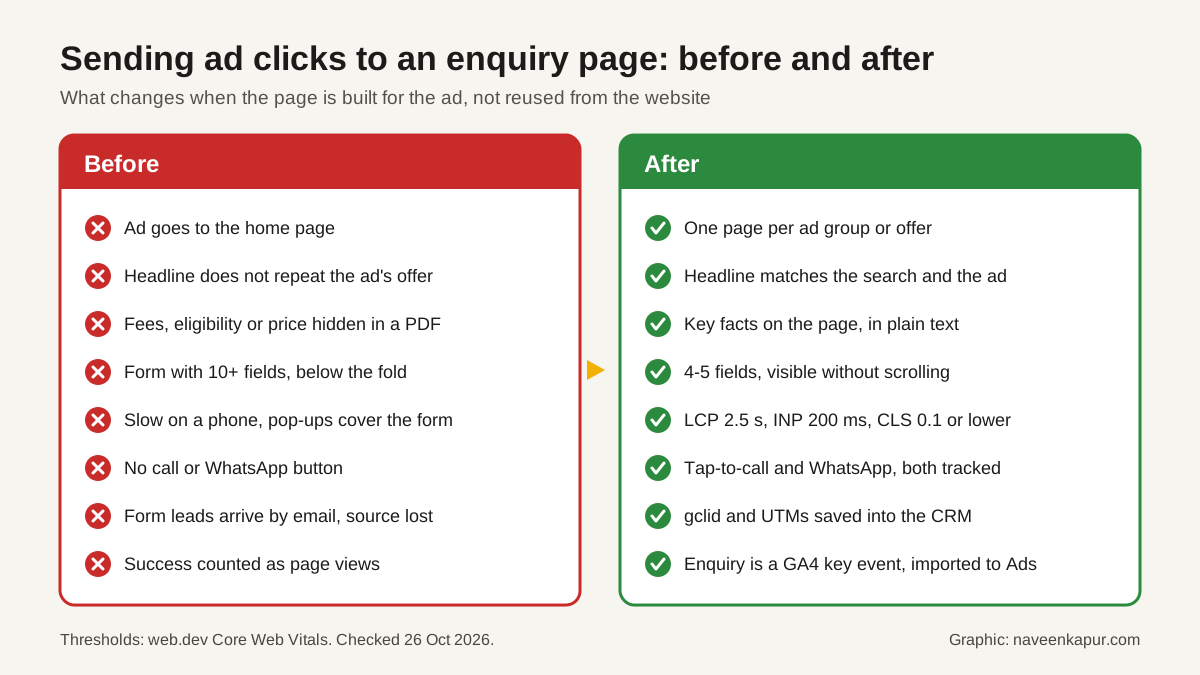
The single biggest improvement is usually structure, not colour. Group keywords by what the person wants (a course, a service in one city, a product type) and give each group its own page. The page headline should repeat the search in plain words: someone searching for "MBA admission in Delhi" should land on a page whose first line says MBA admission in Delhi, not "Welcome to our university".
Then answer the questions that stop people from enquiring, above the fold or close to it:
- The offer: what exactly the person gets, for whom, and where.
- The key facts in text: price or fee range, duration, eligibility, location, timings. Not hidden in a PDF.
- Proof you can document: approvals, years in business, real photos, genuine reviews. Google Ads' misrepresentation policy does not allow claims that entice people with an improbable result, so avoid "100% placement" style promises.
- What happens next: "A counsellor will call you within working hours" sets a clear expectation.
Designing the form
A lead generation landing page lives or dies on its form. Ask only what the first call needs: usually name, mobile number, the course, service or product of interest, and city. Every extra field is one more reason to stop. Use the telephone input type so phones show a number keypad, keep labels visible above each field, explain errors in plain words, and use a consent checkbox that the person ticks themselves. Our guide to college website design covers form rules and consent wording under India's DPDP Act in more detail.
Place the form high on the page on mobile, or use a fixed button that scrolls to it. Add a tap-to-call button and a WhatsApp button for people who would rather talk. Avoid pop-ups that cover the form on a phone.
Lead form assets: a page-less option
Google Ads also offers lead form assets, which collect details inside the ad without a landing page. They suit simple offers. Download the leads regularly or connect them to your CRM, because Google keeps them only for a limited time. For considered purchases such as courses or high-value services, a good landing page usually gives people more of the facts they need before they enquire.
Speed and mobile
Paid traffic arrives mostly on phones, often on mobile data. Use Google's Core Web Vitals as the target. web.dev sets the good thresholds at the 75th percentile of page loads as:
| Metric | Measures | Good |
|---|---|---|
| Largest Contentful Paint (LCP) | Loading | 2.5 seconds or less |
| Interaction to Next Paint (INP) | Responsiveness | 200 milliseconds or less |
| Cumulative Layout Shift (CLS) | Visual stability | 0.1 or less |
Typical slow-downs on ad pages are large hero sliders, background videos, several chat widgets and stacked tracking scripts. Test the page in PageSpeed Insights on mobile and on a real mid-range phone. Our guide to Core Web Vitals explains common fixes.

Tracking: the part that pays for the page
Landing page optimization is impossible if you cannot see which visits became customers. Set up three things:
- 1Auto-tagging on. Google's help says auto-tagging adds the GCLID (Google Click Identifier) to ad clicks and is on by default for new accounts. Test that your page keeps the parameter: some sites reject unknown URL parameters, and redirects can drop it before the final page.
- 2Click ID and UTMs into the CRM. Save the gclid and UTM values in hidden form fields so each lead carries its source. This is what makes offline conversion tracking possible later.
- 3Key events. Mark a successful enquiry as a GA4 key event (Google recommends the generate_lead event), plus taps on call and WhatsApp buttons. Google's help says a standard property can have up to 30 key events, and you can use them as Google Ads conversions.
In Google Ads, the Landing pages page lists the URLs from your Search, Display, Video and Shopping campaigns, with clicks, impressions and CTR, so you can see which pages get the traffic. Put enquiries and sales by page into a lead-source dashboard so the whole team sees the same numbers.
Questions to ask your designer or agency
- 1Will each ad group or offer have its own page, and who updates prices and dates?
- 2How many form fields, and what happens after someone submits?
- 3What LCP, INP and CLS do you expect on mobile, and how will you measure them?
- 4Can Google AdsBot crawl the page, and are there any redirects from the final URL?
- 5How do the gclid and UTM values reach our CRM? Can you show a test lead?
- 6Which GA4 key events will be set up, and are they imported into Google Ads?
- 7Will the page, domain and analytics be in our accounts?
Red flags
- All ads pointing to the home page.
- A page builder template so heavy it fails Core Web Vitals on mobile.
- Claims on the page that you cannot back with records.
- Leads arriving only by email, with no source or click ID.
- Conversions counted on page views instead of real enquiries.
If you want help building enquiry pages for your Google Ads campaigns and measuring them against real sales, see our digital marketing service. The service box below explains how we work.