Most businesses in India already get their enquiries on WhatsApp. The problem is what happens next: the same five questions arrive all day, replies depend on who is holding the phone, and good enquiries go cold overnight. A WhatsApp chatbot looks like the fix, and it can be. It can also be a source of angry customers, blocked numbers and a monthly bill nobody planned for.
This guide is for owners and managers who are about to buy or build one. It covers what a good bot does, the rules Meta sets, how the cost really adds up and the questions to ask before you sign. If you are still deciding whether to automate WhatsApp at all, start with our guide to WhatsApp automation.
First, which WhatsApp are we talking about?
There are two business products. The WhatsApp Business app is the free app on a phone. It has quick replies, greeting and away messages, which suit a small shop with one person answering. A real chatbot needs the WhatsApp Business Platform (often called the WhatsApp Business API). You reach it through Meta's Cloud API directly or through a provider that sells a ready-made inbox and bot builder on top of it. The platform is where the rules and the per-message pricing below apply.
What a good WhatsApp chatbot does
| Give the bot | Keep with a person |
|---|---|
| Answers to repeated questions: timings, location, fees or prices, documents needed | Negotiation, discounts and anything that needs judgement |
| Collecting name, need, city and preferred time before the first call | Complaints and refund requests |
| Booking or confirming a visit, demo or appointment | Questions the bot is not sure about |
| Status updates the customer asked for, such as an order or application stage | Sensitive personal matters |
| Sending a brochure or form after the person asks for it | Final confirmation of payments when the gateway has not confirmed them |
Notice what is missing from the left column: chasing people who never asked to hear from you. A bot that pushes offers to every number in your contact list is the fastest way to get blocked and reported.
Opt-in: the rule that decides everything
Meta's Business Messaging Policy says you may message people only after you have received their opt-in permission. Its developer guide on opt-in sets two clear requirements: you must state clearly that the person is opting in to receive messages over WhatsApp, and you must state the name of your business. You must also follow applicable law. Opt-in can be collected on a website form, in a WhatsApp chat, by SMS, through a phone IVR flow or on a signed form.
In India, the Digital Personal Data Protection Act, 2023 adds its own test. Section 6 says consent must be free, specific, informed, unconditional and unambiguous, with a clear affirmative action. In practice that means an unticked checkbox the person ticks themselves, with plain words such as "I agree to receive updates about my enquiry from [Business name] on WhatsApp".
Meta's guide also recommends getting opt-in for each kind of message you plan to send, giving clear instructions on how to opt out, and honouring those requests. It notes that blocks and reports from people feed into your quality rating, and sustained low quality can lead to limits on your number.
Hand-over to a person is not optional
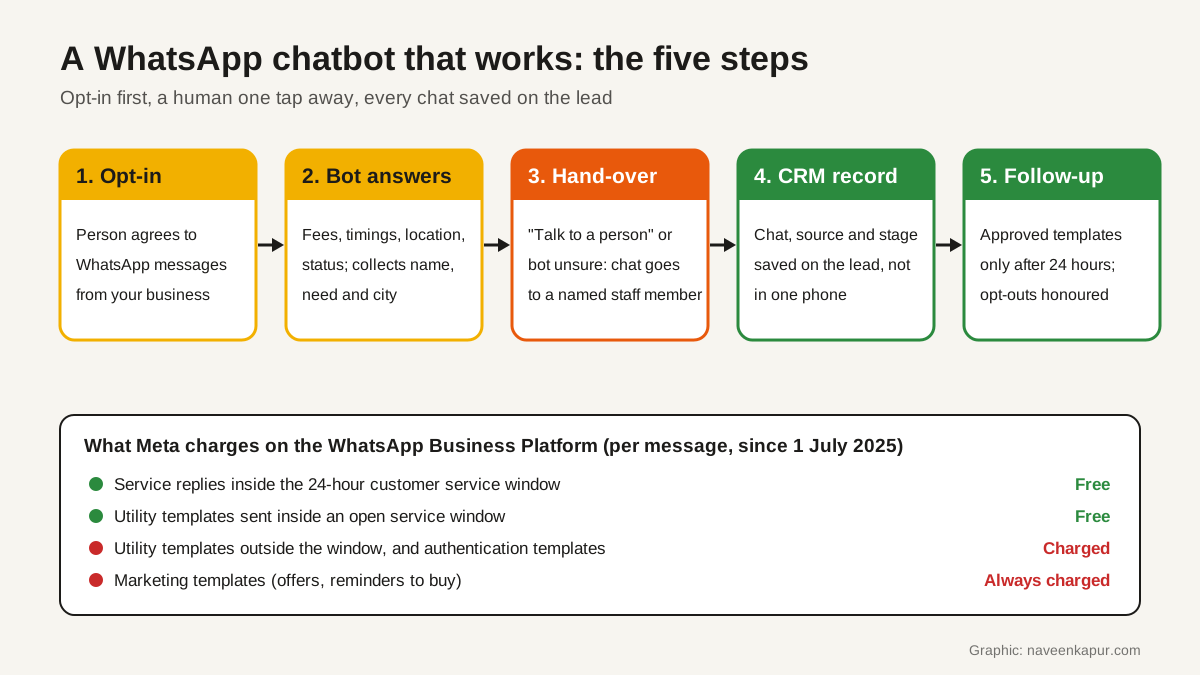
Meta's policy says you may use automation when responding during the 24-hour window, and that you must also have prompt, clear and direct escalation paths available. It lists examples such as in-chat transfer to a human agent, a phone number, email, web support or a store visit. The most useful of these is the in-chat transfer, because the customer does not have to repeat themselves.
Design the hand-over before you design the bot:
- A visible way out. Every menu should include "Talk to a person". Typing words like "agent" or "call me" should work too.
- A rule for doubt. If the bot does not recognise the question twice, it should stop guessing and hand over.
- A named owner. The chat should go to a specific person or team queue, with an alert, during stated working hours.
- An honest out-of-hours reply. Tell the person when someone will reply, and keep that promise.
- Context carried over. The person who takes over should see the whole chat and the details already collected.
What a WhatsApp chatbot really costs
Vendors often quote one monthly number. The real cost has four parts.
1. Meta's message charges
Meta's pricing page says it moved from conversation-based pricing to per-message pricing on 1 July 2025. The main points (checked 27 Oct 2026):
- When a person messages you, a 24-hour customer service window opens. Non-template replies inside it, such as text and images, are free.
- Outside that window you can send only approved templates. Marketing templates are always charged. Utility templates are charged when sent outside an open window and free inside one. Authentication templates are charged.
- If a person messages you from a Click to WhatsApp ad or a Facebook Page call-to-action button and you reply within 24 hours, a 72-hour free entry point window opens in which all message types are free.
- Utility and authentication messages get lower rates at higher monthly volumes. Rates differ by country, so check Meta's current rate card for India before you budget.
The practical lesson: a bot that answers people who wrote first costs very little in Meta charges. Costs grow with marketing templates sent to people who have not written to you recently. Search demand reflects this: "whatsapp business api pricing" gets about 3,600 searches a month in India (OpenSEO, 27 Oct 2026), more than most chatbot terms.
2. The provider or platform fee
Most businesses use a provider for the shared inbox, bot builder, template management and reports. Fees are usually per month, sometimes per agent seat, and some add a markup on Meta's message charges. Ask for the fee and the markup separately.
3. The build
Someone has to write the flows, the answers and the templates, connect the bot to your CRM, and test the hand-over. This is a one-time cost plus small changes later. Answers about fees, dates or policies need an owner who keeps them current.
4. AI usage, if the bot uses AI
A rule-based bot follows menus and keywords. An AI chatbot for WhatsApp understands free text and can answer from your documents, but each reply uses model tokens, which are billed. Long chat histories and large documents make each reply cost more. Our article on the hidden cost of AI agents explains how to keep that bill small. Whichever type you choose, limit the AI to answers from your own approved content and make it hand over when it is not sure.

Messaging limits and quality
Meta's messaging limits page says a newly created business portfolio can message up to 250 unique people outside a customer service window in a moving 24-hour period. The limit is shared by all phone numbers in the portfolio. After Meta approves an increase, the limit rises to 2,000, and it can then scale further when your messages keep a high quality rating. Replies to people who wrote to you first are not limited in this way.
This is one more reason to build the bot around inbound chats and opted-in follow-ups, not mass broadcasts.
The chat must live in your CRM
A bot that collects details into its own dashboard creates a second list of leads that nobody reconciles. Ask for the chat, the details collected, the lead source and the hand-over time to be written to the lead's record in your CRM. Our guide to WhatsApp CRM explains why the conversation belongs on the record. Also measure honestly: a message that was sent is not a message that was delivered or read, as our article on sent vs delivered shows.
Questions to ask a chatbot vendor
- 1Is this the WhatsApp Business Platform through Meta's Cloud API or your own setup on top of it? Whose Meta business portfolio and phone number will it use?
- 2How do you collect and store opt-in, and how does a person opt out?
- 3How does a person reach a human, and what happens outside working hours?
- 4Do you add a markup on Meta's message charges? What is the monthly fee and what does it include?
- 5Will every chat and collected detail be saved to our CRM record? Which fields?
- 6If the bot uses AI, what content can it answer from, and how is AI usage billed?
- 7Can we export our chats and contacts if we leave?
Red flags
- Offers to send bulk messages to purchased or scraped number lists.
- No in-chat way to reach a person.
- The phone number or business portfolio registered in the vendor's name, not yours.
- Prices quoted without separating Meta's charges from the vendor's fee.
- Leads kept only inside the vendor's dashboard.
- An AI bot that answers questions about fees or policies without an approved source.
If you want help planning a WhatsApp chatbot that hands over cleanly and writes every chat to your CRM, see our CRM development service. The service box below explains how we work.