Our guide to AI automation for business mentions that AI APIs bill per token. That one line hides most of the real cost of running an AI agent. Two agents with the same number of customers can have bills that differ by ten times or more, purely because of how they are built.
This guide explains where the tokens go, why “memory” is expensive, and the specific changes that cut AI agent cost without making the agent less useful. It ends with a worked example using real prices.
Input tokens and output tokens
A token is a small piece of text, often part of a word. If you are new to this, our explainer on what generative AI is covers tokens and context windows in plain English. For billing, two numbers matter:
- Input tokens
- Everything you send to the model on a call: your instructions (the system prompt), tool definitions, the conversation so far, any documents, and the new message.
- Output tokens
- Everything the model writes back. On Anthropic’s current main models, output costs five times the input price per token on each model.
- Cached input
- Input the provider has stored from an earlier call and can reuse. It is billed at a small fraction of the normal input price.
- Context window
- The most tokens one call can hold. Everything in the request counts towards it: system prompt, every message, tool results and tool definitions.
Output is pricier per token, but in a chat agent the input is usually far larger. That is where the money leaks.
Why chat “memory” multiplies cost
People assume an AI agent remembers the conversation. It does not. Anthropic’s documentation says plainly that its Messages API is stateless, which means you always send the full conversational history to the API.
So on turn 1 you send the instructions and one message. On turn 10 you send the instructions, nine earlier questions, nine earlier answers and the new question. Every earlier message is billed again as input on every later turn. The cost of a conversation grows much faster than its length.
The system prompt and tools are billed every call
Your system prompt (who the agent is, the rules, the fee list, the tone) is sent on every turn. So are the definitions of every tool the agent can use, such as “check seat availability” or “book a visit”. On top of that, when you enable tools the API adds its own hidden tool-use instructions. Anthropic’s pricing page lists these as a few hundred extra input tokens per call, for example 286 tokens on its current 5.5 models when tool choice is set to auto. A 3,000-token system prompt over a 20-turn chat is 60,000 input tokens before the customer has said much at all.
Ways to keep the bill small
1. Cache the fixed part of the prompt
Prompt caching lets the provider reuse the unchanging start of your prompt instead of processing it again. On the Claude API, the cache covers tools, then system, then messages, in that order, up to a point you mark. Anthropic’s pricing page says a cache read costs 0.1 times the base input price on most models (0.05 times on Claude Opus 5.5 and Claude Sonnet 5.5). Writing to the cache costs a little more than normal input: 1.25 times for the default 5-minute cache and 2 times for a 1-hour cache.
Two catches. The 5-minute cache expires if nobody uses it, though each use refreshes it at no extra cost, so a customer who replies on WhatsApp after twenty minutes may trigger a fresh write. And very short prompts are not cached at all: the minimum is 512 tokens on Anthropic’s current models and higher on some older ones. Put everything that never changes at the top of the prompt, and anything that changes per customer below it.
2. Summarise old history
Instead of resending all 20 turns, keep the last few turns word for word and replace older ones with a short summary: name, course of interest, questions already answered, next step agreed. Writing the summary costs a little, but it stops input from growing without limit. Better still, store key facts in proper CRM fields and send only those.
3. Retrieve, do not stuff
Pasting your whole prospectus, fee structure and FAQ into every call is the most common cause of a large bill. Split documents into small sections, search them for each question, and send only the two or three relevant sections. This is called retrieval. It is cheaper and often more accurate, because the model is not distracted by unrelated pages.
4. Route with a small model
Most messages are simple: timings, location, “ok thanks”. A small, cheap model can classify each message and answer the easy ones, and pass only complex or sensitive cases to a larger model. On Anthropic’s current prices, Claude Haiku 5.5 costs one-twentieth of Claude Sonnet 5.5 per input token, so routing well changes the bill a lot. Test the small model on your real questions first.
5. Cap output length
Every call takes a maximum output setting (max_tokens on the Claude API), which the documentation describes as the maximum number of tokens to generate before stopping. Set it to what a good reply needs. Also ask for short replies in the system prompt. A WhatsApp answer rarely needs more than a few sentences.
6. Batch the jobs that can wait
Nightly work, such as summarising the day’s enquiries, tagging leads or drafting follow-up messages for review, does not need an instant answer. Anthropic’s Batch API charges 50% of standard prices for both input and output, and says most batches complete within an hour (results are guaranteed within 24 hours or the request expires). The batch discount also stacks with caching. Do not use it for live chat.
A worked example with real prices
Here is one example, with made-up but realistic sizes, priced on Anthropic’s official pricing page as I checked it on 17 October 2026. Prices change often and differ by provider, so check the current page before you plan a budget. Prices are in US dollars per million tokens (MTok).
| Model | Input | Cache read | Output |
|---|---|---|---|
| Claude Haiku 5.5 (prompts up to 100,000 tokens) | $0.10 | $0.01 | $0.50 |
| Claude Sonnet 5.5 | $2 | $0.10 | $10 |
| Claude Opus 5.5 | $4 | $0.20 | $20 |
The example (numbers are illustrative only): an admissions agent on Claude Sonnet 5.5 with a 3,000-token system prompt and tool definitions. Each conversation runs 20 turns, each customer message is about 50 tokens and each reply about 150 tokens. Say there are 1,000 such conversations a month.
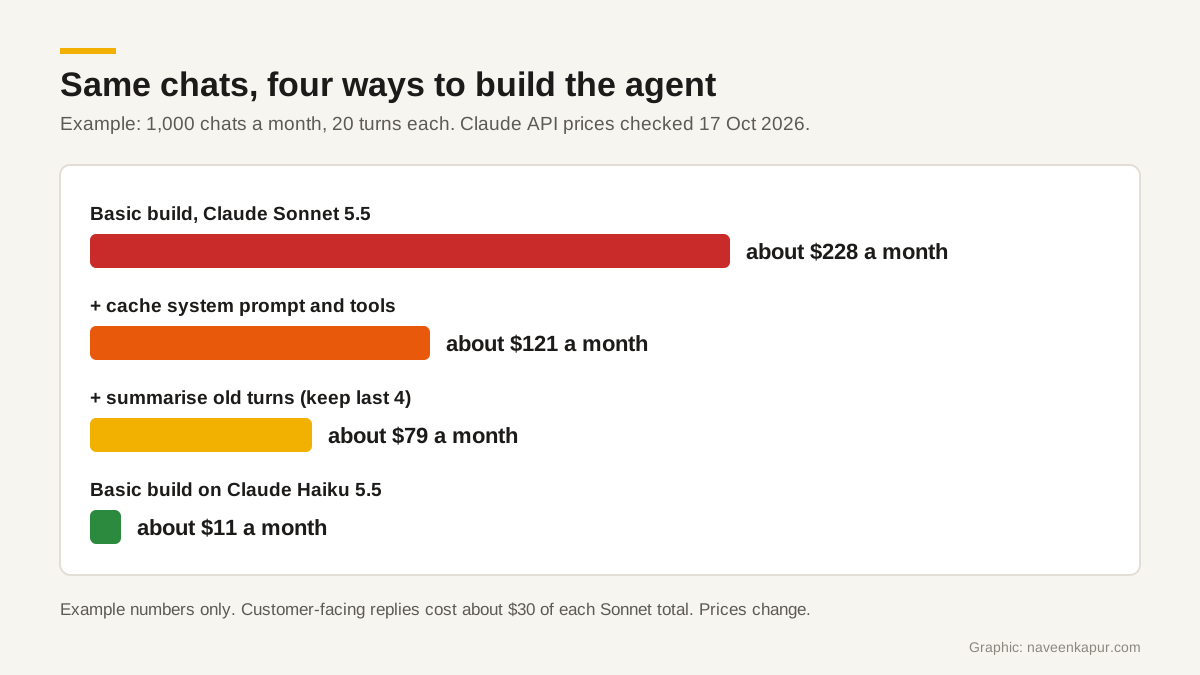
- 1Basic build. Input per chat is 60,000 tokens of system prompt (3,000 times 20), 1,000 tokens of new messages, and 38,000 tokens of resent history, so 99,000 in total. Output is 3,000 tokens. Cost: 99,000 at $2/MTok is $0.198, plus 3,000 at $10/MTok is $0.030. About $0.23 per chat, or $228 a month.
- 2Add prompt caching for the system prompt and tools. One cache write per chat (3,000 tokens at $2.50/MTok, $0.0075) and 19 cache reads (57,000 tokens at $0.10/MTok, $0.0057). The other 39,000 input tokens still cost $0.078, and output $0.030. About $0.12 per chat, or $121 a month.
- 3Also summarise history, keeping the last four turns plus a 200-token summary. Resent history drops from 38,000 to about 17,000 tokens, so uncached input falls to 18,000 tokens ($0.036). About $0.08 per chat, or $79 a month, plus a small cost to write the summaries.
- 4Compare the small model. The basic build on Claude Haiku 5.5, with no other changes, costs about $0.011 per chat, or about $11 a month. That is why routing simple chats to a small model matters.
The replies the customer sees cost $30 a month in every Sonnet version. The rest is the agent rereading itself. That is the hidden cost.
Budgets, logs and who pays
- Per-customer usage logs. Store tokens and cost per conversation and per customer. You can then spot a stuck loop or a customer sending hundreds of messages.
- Monthly spend limits and alerts. On the Claude Console, workspaces can have their own API keys, a monthly spend cap and alerts when spending reaches set thresholds. If you use another provider, look for the same controls. Set them before go-live, not after the first surprise bill.
- Per-chat limits in your own code. Cap turns per conversation and hand over to a person when the limit is reached.
- Who pays. If an agency or developer builds the agent, the client can create its own account and API key. The client then sees and pays the provider’s bill directly, owns the usage data, and the developer charges only for building and maintaining the system. Put this in the contract.
These costs matter most where agents talk all day. In CampusFlow CRM, the education CRM Naveen Kapur designed for a training institute, AI agents on WhatsApp are optional add-ons, and the design rule is that the CRM owns the records while the agents own the conversations. Staff can see and take over any conversation. The same idea helps any agent’s budget: facts kept in CRM fields can be sent in a few tokens, instead of making the agent reread a long chat history.
For what agents should and should not be allowed to do, read AI CRM: what AI agents should and should not do. If you want an agent built into your CRM with usage logs and spend limits from day one, see my CRM development work.