Most Indian colleges buy leads from education portals such as Shiksha and Collegedunia, alongside their own ads and website. A few months later, someone asks a simple question: which portal actually brought us students? Very often the CRM cannot answer, because the source was lost somewhere between the portal and the counsellor’s phone.
This guide is about keeping that source intact in a college portal leads CRM setup. It does not judge any portal. Each portal’s lead products, delivery methods and prices are their own, and they change, so ask the portal directly. What you control is what happens once a lead reaches you.
How portal leads reach you: ask first
Before you design anything, ask each portal account manager four questions and write the answers down:
- 1How are leads delivered: dashboard export, email, API or webhook?
- 2Which fields come with each lead, and is there a unique lead ID?
- 3How quickly does a lead reach us after the student submits?
- 4What consent does the student give, and does it name our institution?
The answers decide how you connect. An API or webhook can push leads straight into the CRM. An email can be parsed by an automation. A dashboard export means a scheduled upload, done the same way every time.
Why the lead source gets lost
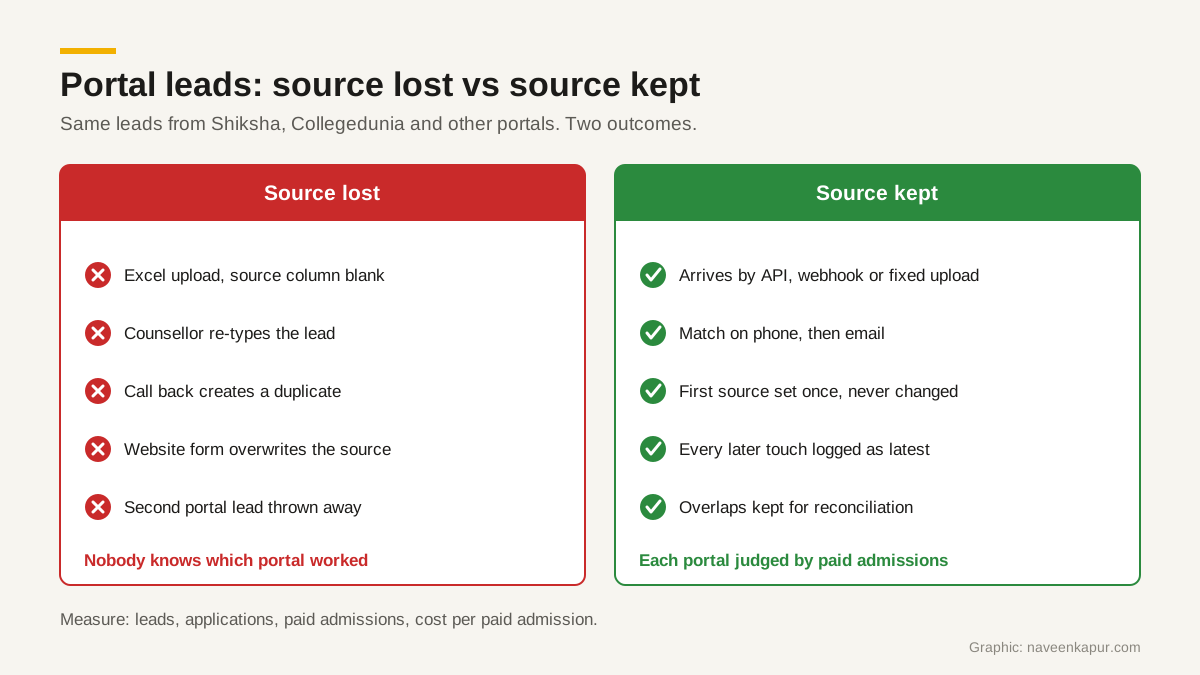
- Manual Excel uploads. Someone downloads a sheet, edits columns and uploads it. The source column is left blank or filled with “portal” for every row.
- Re-typed leads. A counsellor copies a lead from an email into the CRM and picks whatever source is first in the list.
- Duplicates created by counsellors. The student calls back, the counsellor cannot find the record and creates a new one with source “walk-in” or “phone call”.
- The later website form. The portal lead visits your website a week later and fills your form. A badly built form overwrites the source with “website” or “Google”, and the portal loses the credit.
- Same student on two portals. The student enquires on two portals. Whichever arrives second is either thrown away or counted as a second lead.
A source field design that holds up
Use a small set of fixed fields on every lead. Make them picklists, not free text, so “Shiksha”, “shiksha.com” and “Sikha” do not become three sources.
| Field | Example value | Rule |
|---|---|---|
| Source | Education portal | Broad channel: portal, paid search, paid social, organic, referral, walk-in |
| Sub-source (portal) | Shiksha, Collegedunia | Exact portal or platform name from a fixed list |
| Campaign | MBA 2027 intake | Portal campaign, package or UTM campaign name |
| First source | Collegedunia | Set once when the record is created. Never overwritten |
| Latest source | Website form | Updated on every new touch |
| Date received | Date and time | When the lead reached you, set by the system |
| Portal lead ID | As supplied | Stored if the portal supplies one, for reconciliation |
For your own website and ads, Google’s guidance on custom campaign URLs says you should always use utm_source, utm_medium and utm_campaign. Capture these into the same CRM fields through hidden form fields, so portals and ads are compared on the same columns. Our GA4 setup checklist covers lead sources on the analytics side.
Duplicate rules that keep the first touch
Duplicates are where most source data dies. Write the rule down and let the system apply it.
- 1Match on mobile number first, after removing spaces, the +91 prefix and a leading zero. Then match on email, in lower case.
- 2If a match exists, do not create a new lead. Add the new enquiry as an activity on the existing record.
- 3Keep first source as it is. Update latest source, and log the new touch with its date and portal.
- 4Keep the existing owner unless the lead has been inactive past your agreed limit, and say who decides that.
- 5Block manual creation of a lead whose phone already exists. Show the counsellor the existing record instead.
Also decide who may edit the source fields. In most teams, nobody should edit first source by hand after the record is created. If a correction is really needed, let one admin do it and log the reason. A source that anyone can change is a source nobody can trust at the end of the season.
De-duplicating across portals
When the same student comes from two portals, first source goes to whoever was first by date received. The second portal still gets a logged touch. Do not throw the second lead away; you need it for reconciliation, because the portal will count it in its own report.
Agree in advance how you treat these overlaps when you judge portals. One fair approach is to report both first-source admissions and “touched by this portal” admissions, so you can see where portals overlap.
Speed-to-lead rules
A student who enquires on a portal is often comparing several colleges at once. The first college to call with a useful answer has an advantage. Set rules the system can check:
- Assign every new portal lead to a counsellor automatically, by course or region.
- Set a first-call target during working hours, and track the actual time on every lead.
- Send an approved WhatsApp or email acknowledgement only if the consent covers it.
- Escalate untouched leads to the team lead after the target time.
In CampusFlow CRM, the education CRM Naveen Kapur designed for a training institute, webforms and the automation builder handle this kind of routing. Any good CRM can do the same; see CRM for colleges and, if you use LeadSquared, LeadSquared for colleges.
Measure portals by admissions, not leads
Lead count is the easiest number to get and the least useful. Two portals can send the same number of leads and produce very different admissions. Report each portal on this funnel, every month:
- 1Leads received (after de-duplication)
- 2Leads contacted
- 3Applications submitted
- 4Paid admissions (fee verified and receipt issued)
- 5Cost per paid admission = what you paid the portal ÷ paid admissions
For example (round numbers, only to show the maths): if you pay a portal Rs 3,00,000 in a season and it produces 20 paid admissions, the cost per admission is Rs 15,000. Compare that with your other channels on the same basis (see cost per admission, not cost per lead), and include the counsellor time each channel takes.
If you also run Google Ads, the same paid admissions can go back to Google as offline conversions, using the Google Click ID saved with each lead, so your own ads are judged on the same number as the portals.
Monthly reconciliation with each portal
Once a month, download the portal’s own lead report and compare it with your CRM by portal lead ID, phone or email. Look for three things: leads in the portal report missing from your CRM (a broken connection or a skipped upload), leads in your CRM tagged with that portal that the portal does not list (a tagging mistake), and duplicates the portal counted twice. Share the differences with the account manager. It keeps both sides honest and usually fixes delivery problems early.
Consent and the DPDP Act, 2023
Portal leads are personal data. India’s Digital Personal Data Protection Act, 2023 requires consent to be “free, specific, informed, unconditional and unambiguous”, given with a clear affirmative action, and preceded or accompanied by a notice. A person can withdraw consent at any time, and Section 8(3) asks you to keep data complete, accurate and consistent when it is used to make a decision about the person. This is general information, not legal advice; check with your lawyer.
In practice: ask each portal what the student agreed to and whether it names your institution, store the consent source and date on the record, honour opt-outs on every channel, and never send names, phone numbers or emails into Google Analytics, which Google’s policy prohibits. If you need help setting up the CRM side, see the colleges and universities service page.