Every automation tool has a big number on its dashboard. Usually it is “sent”. It goes into the monthly report, everyone feels good, and nobody asks what it proves. The honest answer is: very little. A message can be sent and never reach the phone. An email can be accepted and land in spam. An “open” can be a privacy feature loading images, not a person reading.
This guide explains what each WhatsApp status and email metric really proves, and how to build a WhatsApp delivery report and email report that you can show to management without stretching the truth.
WhatsApp message status: what the Cloud API reports
When you send through the WhatsApp Business Platform (Cloud API), Meta sends a status webhook to your server as the message moves along. Meta’s developer documentation defines the values like this:
- sent
- The message was successfully sent from Meta’s servers. In the app, this is one grey tick.
- delivered
- The message was successfully delivered to the WhatsApp user’s device. Two grey ticks.
- read
- The message was displayed in an open chat thread on the user’s device. Two blue ticks. Meta notes a message counts as read only if it has been delivered.
- failed
- The message could not be sent or delivered. The webhook carries an errors array with a code, a title and a link to the error code documentation.
- played
- The first time a voice message is played on the user’s device.
One detail matters for counting. Meta’s documentation says that when a message is delivered and read at the same moment, the delivered webhook is not sent. So if you count delivered by counting delivered webhooks, you will undercount. Treat every read message as delivered too.
Why read is a lower bound
WhatsApp lets users switch off read receipts under Settings, Privacy. WhatsApp’s help centre says this does not turn off read receipts in group chats, but it does for normal chats. So some people will read your message and it will stay at delivered in your report. That means your read rate is a floor, not the true figure. Never compare read rates across audiences as if they were exact.
Common failed reasons
A failed status is useful because it comes with a reason. Some of the codes in Meta’s error code list that matter most for automation:
| Code | What Meta says | What to do |
|---|---|---|
| 131026 | Message undeliverable. Reasons include: the number is not a WhatsApp number, the user has not accepted the new Terms of Service, or the user is on an old WhatsApp version. | Mark the number. Do not keep retrying every day. |
| 131049 | Not delivered “to maintain healthy ecosystem engagement”. | Meta’s advice: wait at least 24 hours before resending the template. Look at how many marketing messages each person gets. |
| 131050 | The recipient has chosen to stop receiving marketing messages from your business. | Stop marketing sends to that person and record it on the CRM record. |
| 131047 | More than 24 hours have passed since the recipient last replied. | Send an approved template instead of a free-form message. |
| 132001 | The template does not exist in that language or is not approved. | Fix the template name, language or approval before the next run. |
| 132015 / 132016 | Template paused for low quality, or permanently disabled after being paused too many times. | Rewrite the template and check who it is going to before sending again. |
If your CRM throws these codes away and only keeps “failed”, you lose the most useful part of the report. Store the code on each message row. For how WhatsApp sits inside the record, see our guide to WhatsApp CRM.
Email deliverability: accepted is not inbox
Email has the same gap, only less visible. When your email service says “delivered”, it usually means the receiving mail server accepted the message. What happens next is up to that server: inbox, promotions tab or spam folder. Your tool does not see that step. A hard bounce tells you the address does not work. A soft bounce is a temporary problem. A spam complaint means a person marked you as spam.
For Gmail, the best view you get is Google Postmaster Tools. Its dashboards show your user-reported spam rate, IP and domain reputation, the share of mail passing SPF, DKIM and DMARC, encryption, delivery errors and your compliance with Gmail’s sender requirements. Google notes the dashboards may not show all data on days when your volume is low.
Gmail’s sender guidelines say to keep the spam rate reported in Postmaster Tools below 0.10% and avoid ever reaching 0.30% or higher. Senders of more than 5,000 messages a day to Gmail accounts must meet the bulk sender rules, including SPF, DKIM and DMARC, and one-click unsubscribe for marketing mail. If authentication is not set up yet, start with our guide to SPF, DKIM and DMARC.
Email open rate accuracy: why opens mislead
Opens are tracked with a tiny image. When the image loads, the tool records an open. Apple’s Mail Privacy Protection breaks this. Apple says that without it, senders “may learn when and how many times you opened their email”. With it on, Mail downloads remote content in the background by default, “regardless of whether you engage with the email”, through relays that hide the user’s IP address.
So for many Apple Mail users, an open can be recorded when nobody read anything. The safe rule: opens can show a trend inside one list over time, but they are not proof that a person read your email. Do not reward a team, choose a winning subject line or claim a campaign worked on opens alone.
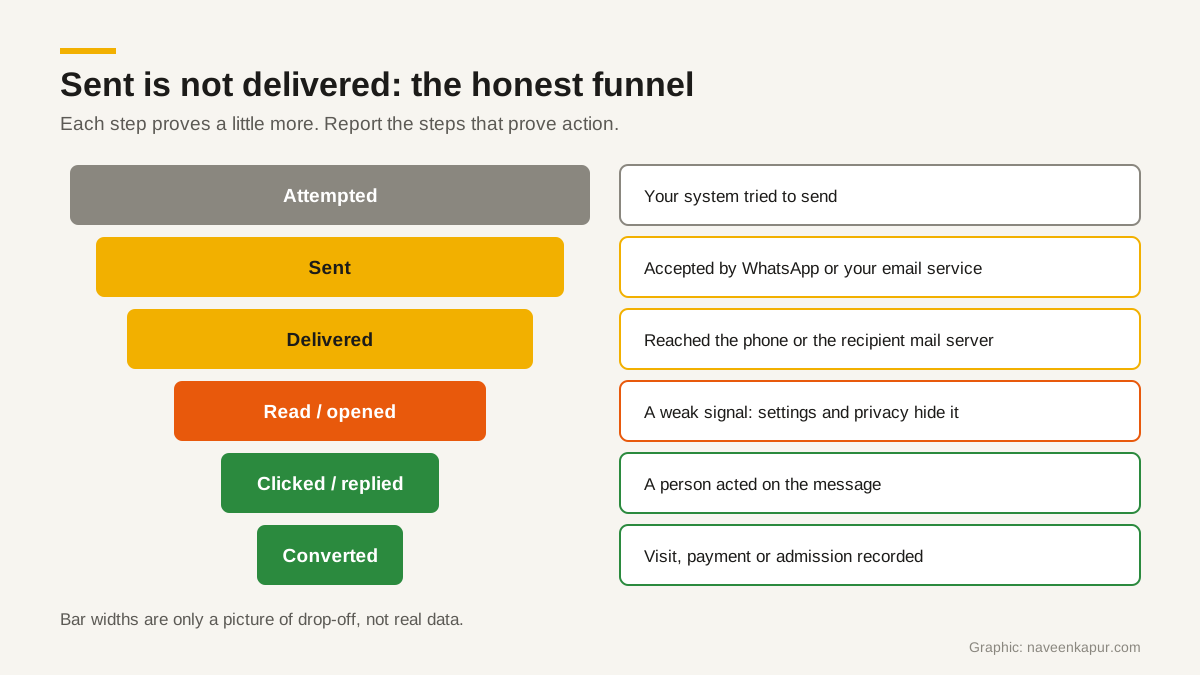
The honest funnel: what each step proves
| Step | WhatsApp source | Email source | What it proves | What it does not prove |
|---|---|---|---|---|
| Attempted | Your CRM queue | Your CRM queue | Your automation fired | That anything left your system |
| Sent | sent webhook | Accepted by your email service | A provider accepted the message | That it reached anyone |
| Delivered | delivered or read webhook | Accepted by the receiving server, no bounce | It reached the phone or mail server | Inbox placement (email) or attention |
| Read / opened | read webhook | Tracking image loaded | Possibly seen | That a person read it; reads are undercounted, opens overcounted |
| Clicked / replied | Button click, reply in chat | Link click, reply | A person acted | That they will buy or enrol |
| Converted | CRM record: visit, payment, admission | Same | The business result | Which single message caused it |

How to report automation honestly to management
Management does not need ten numbers. They need to know whether the messages reached people and whether people acted. A simple monthly report has three parts.
- 1Health: delivered rate and failed rate per channel, with the top failure codes. For email, bounces, spam rate from Postmaster Tools and any change in reputation.
- 2Response: replies and clicks, per template or per email, compared with last month.
- 3Results: conversions recorded in the CRM, such as visits booked, fees paid or admissions confirmed, linked back to the source.
Say, for example, a college sends a fee reminder template to 2,000 students. The report should not say “2,000 reminders sent”. It should say how many were delivered, how many failed and why, how many students replied or tapped the payment button, and how many payments were recorded in the following week. (These numbers are an example only.)
De-duplicate before you count
- Count unique people, not messages. One student who got three reminders is one person reached, not three.
- Store one row per message ID and keep the furthest status reached, so a repeated or late webhook cannot double-count a message or move it backwards.
- Count a message as delivered if its row shows delivered or read.
- Remove test sends and staff numbers from the report.
Report per template, not only per campaign
Each WhatsApp template and each email should have its own line: delivered, failed by code, replied or clicked, converted. A template with a high failure rate or low replies stands out at once. Rolled into one campaign total, it hides.
Suppress repeated failures
If a number fails with 131026 more than once, or an email address hard bounces, stop sending to it and flag the record for a person to check. Honour opt-outs (131050 on WhatsApp, unsubscribes on email) at once. Sending again and again to bad or unwilling contacts costs money and hurts your sender quality on both channels.
Build the report into the CRM
All of this is easier when message statuses are written back to the CRM record, not left inside the messaging tool. Then the counsellor sees that the last reminder failed, and the report can join a delivered message to a paid fee. If you are planning the automations themselves, start with our guide to WhatsApp automation for admissions and sales. If you want status webhooks, failure codes and conversion reports built into your CRM, see my work on CRM development.